


PluginAGPL-3.0-or-later
Welcome Mat
A friendly way to roll out the welcome mat for players.
854
Downloads
4
Followers
7 months ago
Updated
📦
8
Versions
📖About Welcome Mat
A friendly way to roll out the welcome mat for your players!
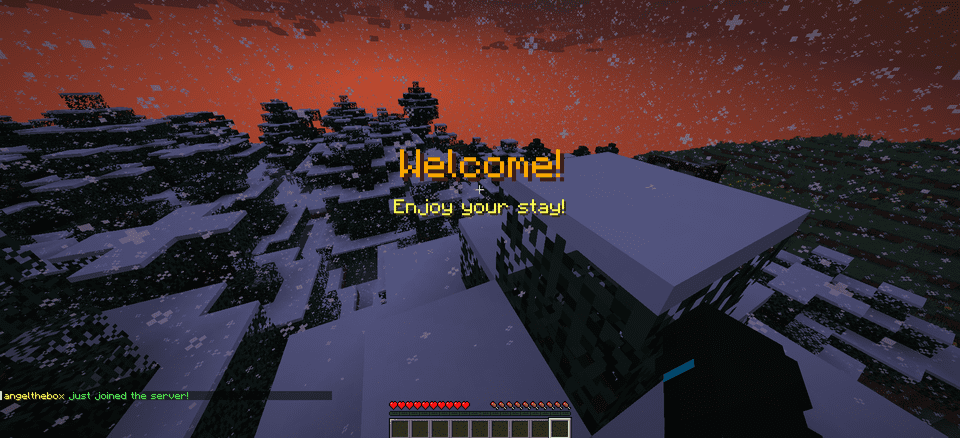
WelcomeMat is a lightweight, powerful plugin that enhances your server's welcome experience. It provides customizable join/leave messages, titles, animations, and sounds to make players feel at home on every login.
🎉 What's New!
Version 1.3.1 (Latest)
- 🍃 Folia-Ready Animations: Visual effects now use the latest Folia entity schedulers (1.21.8+) with automatic signature detection, clamped delays, and no unsafe Bukkit fallbacks.
- 🧠 Smarter Diagnostics: If future Folia builds introduce new scheduler signatures, they’re logged automatically so you can keep running the same jar everywhere.
- 🧾 Auto Version Metadata:
plugin.ymlnow inherits the Gradle version, guaranteeing accurate version strings inside the jar. - 🌌 Skyward & Copper Packs: Two new message packs inspired by the 1.21 “Chase the Skies” and “Copper Age” updates, selectable right from the GUI.
Version 1.2.x Highlights
- Message Packs System: Multiple themed collections (default, friendly, professional, funny, RPG) with GUI switching.
- Multi-Language Support: English and Spanish out of the box with easy CLI/GUI selection.
- Improved Configuration Display: Human-friendly display names and cleaner GUI organization.
🔄 Compatibility
- Fully tested on Bukkit/Spigot, Paper, Purpur, and Folia from Minecraft 1.13 through 1.21.10.
- Region-aware scheduler paths keep Folia’s watchdog happy while the same jar continues to run flawlessly on single-threaded servers.
Features
🎨 Customizable Messages
- Rich join/leave text with color codes and placeholders
- Player-specific greetings and per-pack collections
- Display-name helpers and multi-language support (EN/ES)
📜 Welcome Titles
- Configurable title/subtitle timing and colors
🔊 Interactive Sounds
- Join/leave sounds with per-player toggles, volume, and pitch
✨ Animation System
- Fire Spiral, Green Spike Firework, and more join effects
- Folia-safe schedulers and per-player animation preferences
⚙️ Extensive Configuration
- Feature toggles, admin logging, instant
/wm reload - GUI-driven settings for packs, languages, sounds, and more
- Feature toggles, admin logging, instant
📋 Commands
/welcomemator/wm- Base command/wm sound- Toggle join/leave sounds for yourself/wm reload- Reload the plugin configuration/wm help- Show help message/wm animation- Toggle join animations for yourself/wm language- Change the plugin language/wm pack- Change the message pack/wm config- Modify plugin configuration
🔑 Permissions
welcomemat.reload- Allow reloading the configuration (default: op)welcomemat.bypass- Bypass welcome messages (default: false)welcomemat.sound.toggle- Allow toggling sounds (default: true)welcomemat.animation.toggle- Allow toggling animations (default: true)welcomemat.admin.log- Receive admin log messages (default: op)welcomemat.language- Allow changing the plugin language (default: op)welcomemat.pack- Allow changing message packs (default: op)welcomemat.config- Allow modifying plugin configuration (default: op)
📦 Installation
- Download the latest version of WelcomeMat
- Place the
.jarfile in your server'spluginsfolder - Restart your server
- Configure the plugin in
plugins/WelcomeMat/config.yml
⚙️ Configuration
features:
  join-message: true
  leave-message: true
  join-title: true
  join-sound: true
  leave-sound: true
  other-players-sounds: true
  join-animation: true
  admin-logging: true

messages:
  join: "&e%player% &ajust joined the server!"
  leave: "&e%player% &chas left the server!"
  player-specific:
    example-player:
      join: "&6Welcome back, special player %player%!"
      leave: "&eGoodbye, special player %player%!"

titles:
  join:
    title: "&6Welcome!"
    subtitle: "&eEnjoy your stay!"

sounds:
  join:
    sound: ENTITY_PLAYER_LEVELUP
    volume: 1.0
    pitch: 1.0
  leave:
    sound: ENTITY_IRON_GOLEM_DEATH
    volume: 0.5
    pitch: 1.0

animations:
  green-spike:
    enabled: true
    duration: 40
    height: 2.0

# Message Packs
message-packs:
  # Currently selected pack (default, friendly, professional, funny, rpg)
  selected: "default"

  # Default pack (original messages)
  default:
    join:
      - "&e%player% &ajust joined the server!"
    leave:
      - "&e%player% &chas left the server!"

  # Friendly pack
  friendly:
    join:
      - "&d✨ &e%player% &ahas joined the party! &d✨"
      - "&aWelcome back, &e%player%&a! We missed you! &d❤"
    leave:
      - "&e%player% &7had to go... &cSee you soon! &d💕"
      - "&7Until next time, &e%player%&7! &d👋"
🌐 Language Support
WelcomeMat now supports multiple languages:
# Available languages: english, spanish
selected-language: "english"

languages:
  english:
    name: "English"
    messages:
      reload:
        success: "&aConfiguration reloaded successfully!"
      sound:
        enabled: "&aJoin/leave sounds enabled!"
        disabled: "&cJoin/leave sounds disabled!"
  spanish:
    name: "Español"
    messages:
      reload:
        success: "&a¡Configuración recargada con éxito!"
      sound:
        enabled: "&a¡Sonidos de entrada/salida activados!"
        disabled: "&c¡Sonidos de entrada/salida desactivados!"
🎵 Available Sounds
Modern (1.13+)
ENTITY_PLAYER_LEVELUPENTITY_IRON_GOLEM_DEATHBLOCK_NOTE_BLOCK_PLINGBLOCK_NOTE_BLOCK_CHIMEBLOCK_NOTE_BLOCK_BELL- And more...
Legacy (1.8-1.12) (Under development)
LEVEL_UPIRONGOLEM_DEATHNOTE_PLINGNOTE_PIANO- And more...
💡 Example Configurations
Professional Server with Message Packs
# Use the professional message pack
message-packs:
  selected: "professional"

# Set the language to English
selected-language: "english"

sounds:
  join:
    sound: BLOCK_NOTE_BLOCK_PLING
    volume: 0.8
    pitch: 1.5

animations:
  green-spike:
    enabled: true
    duration: 30
    height: 1.5
VIP Server with Custom Messages
messages:
  join: "&d✨ &e%player% &ahas joined the party! &d✨"
  leave: "&e%player% &7had to go... &cSee you soon!"
  player-specific:
    VIP_Player:
      join: "&6⚡ The legendary &e%player% &6has arrived! ⚡"
      leave: "&6The legend &e%player% &6must go... &7Until next time!"

sounds:
  join:
    sound: ENTITY_PLAYER_LEVELUP
    volume: 1.0
    pitch: 1.2

animations:
  green-spike:
    enabled: true
    duration: 50
    height: 2.5
📝 Support
If you encounter any issues or have suggestions:
- Create an issue on our GitHub repository
- Join our Discord server
Made with ❤️ by angeldev0