Logo
MINECRAFTBIBLE
Items
Items

All game items

Blocks
Blocks

Building blocks

Mobs
Mobs

Creatures & monsters

Biomes
Biomes

World biomes

Structures
Structures

Generated structures

Recipes
Recipes

Crafting guides

Advancements
Advancements

Achievements

Loot Tables
Loot Tables

Drop rates

Tags
Tags

Item groupings

All Versions
View all data →
Capes
Cape ArchiveNEW

Browse rare Minecon capes, OptiFine capes, and custom capes from players worldwide

Browse

Player Database
Player DatabasePopular

Search any player

Skin Browser
Skin Browser

Browse & download skins

Cape Gallery
Cape GalleryNEW

Minecon & OptiFine capes

Seed Vault
Seed Vault

Curated seeds

Learn

Guides
GuidesNew

Tutorials & tips

Blog
Blog

News & updates

Community

Community Hub
Community HubHub

Posts, discussions & more

All Versions
View community →
Seed Analyzer
Seed Analyzer

World seed analysis

Loot Explorer
Loot Explorer

Drop rates

Crafting Calculator
Crafting Calculator

Material planning

Enchant Calculator
Enchant Calculator

Probability math

Redstone Lab
Redstone Lab

Signal timing

Trading Profit
Trading Profit

Villager ROI

All Versions
View all tools →
Mods
Mods

Browse all mods

Plugins
Plugins

Server plugins

Resource Packs
Resource Packs

Textures & sounds

Shaders
Shaders

Visual enhancements

Datapacks
Datapacks

World logic

Scanner
Mod Intelligence

Scan & analyze any mod

All Versions
View all mods →
Loading...
IntroductionIntroductionVersion HistoryVersion HistoryGuidesGuidesBlog & NewsBlog & News
ItemsItemsBlocksBlocksMobsMobsRecipesRecipesBiomesBiomesStructuresStructuresAdvancementsAdvancementsLoot TablesLoot TablesTagsTags
ModsModsPluginsPluginsResource PacksResource PacksShadersShadersDatapacksDatapacks

MinecraftBible

The Ultimate Wiki

Logo
MINECRAFTBIBLE

The ultimate Minecraft reference. Every item, block, mob, and recipe documented with precision.

Community

  • Player Database
  • Skin Browser
  • Cape Gallery
  • Community Hub
  • Seed Vault

Database

  • Items
  • Blocks
  • Mobs
  • Recipes
  • Biomes
  • Structures

Tools

  • Seed Analyzer
  • Mod Intelligence
  • Crafting Calculator
  • Enchant Calculator

Mods & Packs

  • Mods
  • Plugins
  • Resource Packs
  • Shaders
  • Datapacks

© 2026 MinecraftBible. Not affiliated with Mojang or Microsoft.

PrivacyTermsContact
Vote Protect
PluginLicenseRef-All-Rights-Reserved

Vote Protect

Vote Protect - protect your server from griefing

28
Downloads
0
Followers
7 months ago
Updated
📦
1
Versions
game-mechanicssocialbukkitpaperpurpurspigot
Download Latestv1.3-releaseView on Modrinth

📖About Vote Protect

Vote Protect - is a Minecraft server plugin that allows players to initiate a democratic vote to transfer another player to adventure mode. Perfect for protecting your server from griefers, cheaters, or suspicious behavior without the need for server admins.

⚙️ Key Features:

✅ Voting via /vote
Any player can start a vote to transfer another player to adventure mode.

Replace this with a description

️ Voting for "Yes" or "No"
Players vote via the /y and /n commands for 60 seconds.
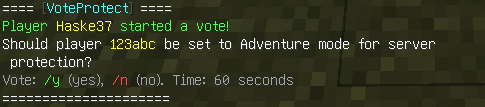
Replace this with a description

Automatic restriction of rights
If the majority votes (more than 50%) "Yes", the player is transferred to GameMode.ADVENTURE.
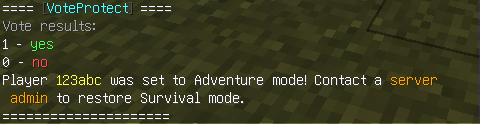
Replace this with a description

Cooldown 15 minutes
Players without OP rights have a cooldown between votes.

Replace this with a description

OP players are not limited
Players with OP rights can use commands without waiting.

Dual language support
Easily switchable languages via config.yml:
language: en
language: ru

️ Message configuration
All texts are stored in messages_en.yml and messages_ru.yml — you can edit them for yourself.

To prevent players from starting voting, simply add their nicknames to the voteprotect_whitelist.yml file. The system will automatically check the list and will not allow you to start voting against the specified players.

⚠️ To return the player to survival mode, the server operator must use the standard vanilla Minecraft command - /gamemode survival

✅ Compatibility:
Servers 1.21+ (including 1.21.8)
Spigot / Paper

NEW VERSION 1.3

Now you can set for yourself how long the voting will last. Just specify the required number of seconds in the config. The system will pick up the new value on its own.
How to set up:
Open config.yml.
Find the vote_duration parameter.
Set the desired time in seconds.
Restart the plugin.
Everything is ready! Now all voting will take place at the time you set.

👥 Team & Contributors

Haske37
Haske37Owner

⚙️ Compatibility

Environment
🖥️ Server-side
Loaders
bukkitpaperpurpurspigot
Minecraft Versions
1.211.21.11.21.21.21.31.21.41.21.51.21.61.21.7+1 more

🔗 Links

Modrinth Page