


vMessage
vMessage is the best Velocity plugin for synchronizing chat and player events across your entire proxy network. It is designed for server administrators who want seamless, reliable, and configurable message syncing without unnecessary complexity.
📖About vMessage
vMessage





🆕 Hey, I'm SzymON/OFF! If you found vMessage useful please don't hesitate to also try vHubs! It allows you to create multiple hub servers accesible with player commands (e.g.
/hub,/lobby,/survival).
vMessage is the best Velocity plugin for synchronizing chat and player events across your entire proxy network! It is designed for server administrators who want seamless, reliable, and configurable message syncing without unnecessary complexity.
Features
- Global Chat Sync: Instantly syncs chat messages across all servers connected to your Velocity proxy.
- Join/Leave/Change-Server Broadcasts: Notifies all players network-wide when someone joins, leaves, or switches servers.
- Silent Permissions: Players with a special silent permission can prevent their join, leave, and server change messages from being announced.
- Powerful Configuration: Comes with a robust, easy-to-use config file so you can tailor the plugin to your network's needs.
- Lightweight & Fast: No unnecessary features or bloat—just efficient, reliable message syncing.
Installing
- Place
vMessage.jarinto your Velocitypluginsfolder. - Install the appropriate versions of SignedVelocity on your proxy AND backends.
- Start or restart your Velocity proxy.
- Edit the generated configuration file (
plugins/vMessage/config.yml) to suit your preferences.
Once installed and configured, vMessage will automatically:
- Sync chat messages across all servers
- Broadcast join, leave, and server switch events to all players (unless the player has the silent permission)
No commands or permissions are required for basic functionality.
Updating
To update vMessage, replace the existing vMessage.jar in your plugins folder with the latest version and restart your Velocity proxy.
If new configuration options are introduced, your config.yml will be migrated automatically.
Commands
vMessage provides several administrative commands for advanced usage and configuration:
/vmessage say <player> <message>
Sends a message as the specified player across the network.
Permission:vmessage.command.say/vmessage fake <join/leave/change> [player] [old-server]
Sends a fake join, leave, or server change message as if the specified player performed that action.
Permission:vmessage.command.fake,vmessage.command.fake.join,[...].leave,[...].change/vmessage reload
Reloads the plugin configuration without restarting the proxy.
Permission:vmessage.command.reload/vmessage help
Displays the help message with available commands.
Permission:vmessage.command.help/broadcast <message>
Broadcasts a custom message on the network.
Permission:vmessage.command.broadcast
Aliases:/bc,/bcast,/shout/message <player> <message>
Sends a private message to a specific player across the network.
Permission:vmessage.command.message
Aliases:/msg,/tell,/whisper,/w/reply <message>
Replies to the last player who sent you a private message.
Permission:vmessage.command.reply
Aliases:/r
You can also use /vmsg or /vm as an alias for /vmessage for convenience.
Make sure to assign the appropriate permissions to your staff or admin roles in your Velocity configuration.
For /broadcast, /message, and /reply, you can set allow-by-default to true in the config file to let all players use these commands without needing explicit permissions.
Configuration
vMessage provides a powerful and easy-to-use configuration file. You can customize message formats, toggle features, and more. Look at the wiki for detailed configuration options: vMessage Wiki
Why vMessage?
- Purpose-built for Velocity: Designed specifically for Velocity, making it the most reliable and feature-rich solution for network-wide messaging.
- Simple Setup: Drop it in, configure, and go. No complicated dependencies or setup steps.
- Actively Maintained: Built with modern best practices and open to community feedback.
Contributing
Contributions are welcome! Please open issues or submit pull requests for improvements or bug fixes.
Building from Source
If you want to build vMessage yourself:
- Prerequisites: Java 17 or higher
- Clone the repository and build:
git clone https://github.com/szymon-off/vMessage.git cd vMessage ./gradlew build - The built jar file will be in the
build/libs/vMessage-0.0.0-UNKNOWN.jar.
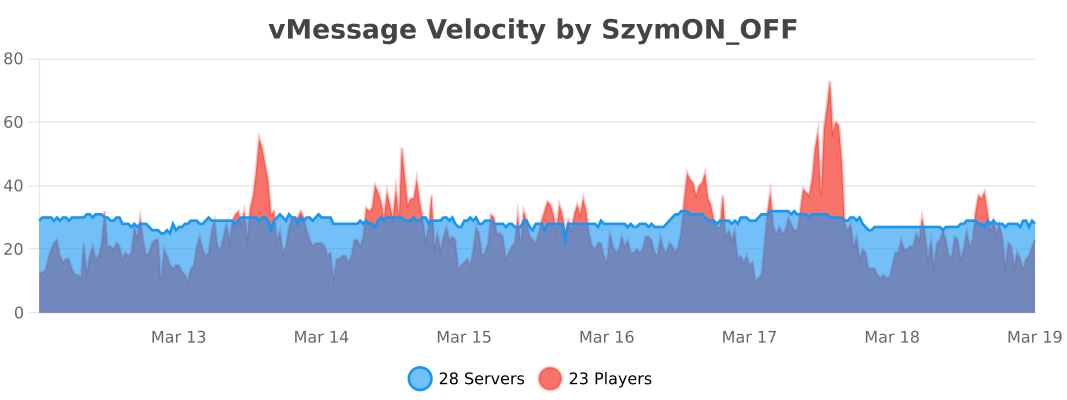
Usage Statistics
License
- Versions ≤ 1.6.1 are licensed under the MIT License.
- Versions ≥ 1.7.0 are licensed under the GNU General Public License v3.0 (GPL-3.0).
You can find the full text of each license in the corresponding release archive, or in the repository under the LICENSE file for that version.