
Logo
MINECRAFTBIBLE
Items
Items

All game items

Blocks
Blocks

Building blocks

Mobs
Mobs

Creatures & monsters

Biomes
Biomes

World biomes

Structures
Structures

Generated structures

Recipes
Recipes

Crafting guides

Advancements
Advancements

Achievements

Loot Tables
Loot Tables

Drop rates

Tags
Tags

Item groupings

All Versions
View all data →
Capes
Cape ArchiveNEW

Browse rare Minecon capes, OptiFine capes, and custom capes from players worldwide

Browse

Player Database
Player DatabasePopular

Search any player

Skin Browser
Skin Browser

Browse & download skins

Cape Gallery
Cape GalleryNEW

Minecon & OptiFine capes

Seed Vault
Seed Vault

Curated seeds

Learn

Guides
GuidesNew

Tutorials & tips

Blog
Blog

News & updates

Community

Community Hub
Community HubHub

Posts, discussions & more

All Versions
View community →
Seed Analyzer
Seed Analyzer

World seed analysis

Loot Explorer
Loot Explorer

Drop rates

Crafting Calculator
Crafting Calculator

Material planning

Enchant Calculator
Enchant Calculator

Probability math

Redstone Lab
Redstone Lab

Signal timing

Trading Profit
Trading Profit

Villager ROI

All Versions
View all tools →
Mods
Mods

Browse all mods

Plugins
Plugins

Server plugins

Resource Packs
Resource Packs

Textures & sounds

Shaders
Shaders

Visual enhancements

Datapacks
Datapacks

World logic

Scanner
Mod Intelligence

Scan & analyze any mod

All Versions
View all mods →
Loading...
IntroductionIntroductionVersion HistoryVersion HistoryGuidesGuidesBlog & NewsBlog & News
ItemsItemsBlocksBlocksMobsMobsRecipesRecipesBiomesBiomesStructuresStructuresAdvancementsAdvancementsLoot TablesLoot TablesTagsTags
ModsModsPluginsPluginsResource PacksResource PacksShadersShadersDatapacksDatapacks

MinecraftBible

The Ultimate Wiki

Logo
MINECRAFTBIBLE

The ultimate Minecraft reference. Every item, block, mob, and recipe documented with precision.

Community

  • Skin Browser
  • Cape Gallery
  • Seed Vault
  • Blog
  • Guides

Database

  • Items
  • Blocks
  • Mobs
  • Recipes
  • Biomes
  • Structures

Tools

  • Seed Analyzer
  • Mod Intelligence
  • Crafting Calculator
  • Enchant Calculator

Mods & Packs

  • Mods
  • Plugins
  • Resource Packs
  • Shaders
  • Datapacks

Site & Legal

  • About
  • Authors
  • Editorial Policy
  • Corrections
  • Contact
  • Privacy Policy
  • Terms of Service
  • DMCA
  • Sitemap

© 2026 MinecraftBible. Not affiliated with Mojang or Microsoft.

PrivacyTermsContact
VillagerTradeEdit
PluginGPL-3.0-only

VillagerTradeEdit

Shopkeeper for Folia. Can trade and change professions

3.2K
Downloads
6
Followers
5 months ago
Updated
📦
13
Versions
economygame-mechanicsfoliapaperpurpur
Download Latestv1.4.9View on Modrinth

📖About VillagerTradeEdit

VillagerTradeEdit

VillagerTradeEdit is a Minecraft plugin that empowers players with the necessary permissions to edit the trades of villagers in-game. Through an intuitive in-game UI, users can easily and efficiently customize any villager's trades to suit their needs.

This plugin provides similar functionality to the Shopkeepers plugin but stands out by allowing edits to any villager directly. Plus, it supports Folia for those who want enhanced compatibility.

"I just couldn't wait for Shopkeepers to support Folia, so... I made one myself. its quite rough don't expect much."

Features

  • Easy Villager Trade Editing: Shift-right-click on a villager to start editing.
  • In-Game UI: Modify trades directly in-game without any hassle.
  • Unlimited-Trade: Create as much trade as you want.
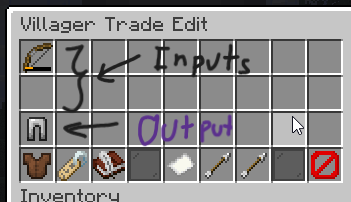
Input and Outputs Slot#

Dependencies

Ysklib

Commands and Permissions

Commands

  • /vte reload — Reloads the plugin configuration file.
  • /vte summon — Summons a static villager.

Permissions

  • villagertradeedit.command — Permission to use any command from the plugin.
  • villagertradeedit.open — Permission to open the villager trade edit menu.
  • villagertradeedit.command.reload — Permission to reload the plugin configuration file.
  • villagertradeedit.command.summon — Permission to summon a static villager.

Setup

  1. Download the latest version of the VillagerTradeEdit plugin.
  2. Place the downloaded .jar file into the plugins directory of your server files.
  3. Restart your server to load the plugin.

👥 Team & Contributors

YusakiDev
YusakiDevOwner

⚙️ Compatibility

Environment
🖥️ Server-side
Loaders
foliapaperpurpur
Minecraft Versions
1.211.21.11.21.21.21.31.21.41.21.51.21.61.21.7+4 more

🔗 Links

Modrinth Page