
MINECRAFTBIBLE
Loading...
10 soulbound vault items with unique abilities, PvP rank-swap mechanics, and permanent passive effects for Paper 1.21+.
VaultSMP is a Paper 1.21.1 plugin that introduces 10 unique physical vault items to your Minecraft server, each with its own distinct ability — ranging from active powers like teleportation and absorption to passive effects such as permanent potion buffs and on-hit crowd control. Vaults are fully soulbound: players cannot drop them, trade them, store them in chests, place them as blocks, or put them in item frames or armor stands. This ensures vaults remain a persistent, risk-managed asset tied directly to the player.
The core PvP mechanic works on a rank-based swap. When a player (the killer) eliminates another player (the victim), the killer's weakest vault is exchanged for the victim's strongest vault — provided the victim's vault is a higher rank (lower rank number) than the killer's weakest. This creates a dynamic, competitive economy where holding high-rank vaults paints a target on your back, but also rewards aggressive play with vault progression.
Example: If the killer holds a Void (rank 1) and a Wind (rank 6), and the victim holds a Necro (rank 3), the swap gives the killer the Necro and the victim the Wind, since Necro outranks Wind.
| Rank | Vault | Type | Cooldown | Ability Description |
|---|---|---|---|---|
| 1 | Void | Active | 60s | Right-click to teleport 15 blocks forward in the direction you're looking. Great for escapes and map traversal. |
| 2 | Dragon | Active | 10min | Right-click to gain +5 extra hearts (10 absorption HP) for 60 seconds. A powerful survival boost in prolonged fights. |
| 3 | Necro | Passive | Instant | Killing any player instantly restores your health to maximum. No cooldown — triggers on every elim. |
| 4 | Shadow | Active | 60s | Sneak for 3 seconds to become fully invisible for 5 seconds. Ideal for ambushes and retreats. |
| 5 | King | Passive | Always | Grants permanent Resistance I and Strength I while holding the vault. A massive all-around combat advantage. |
| 6 | Wind | Passive | Always | Permanent Jump Boost II and a 10% chance on each hit to apply extra knockback. Controls engagement distance. |
| 7 | Storm | Passive | Always | Permanent Speed I and a 20% chance on critical hits to summon a lightning visual. High mobility. |
| 8 | Frost | Passive | Always | Every hit on a player has a 15% chance to freeze them in place for 3 seconds. Strong crowd control. |
| 9 | Blaze | Passive | Always | Grants permanent Fire Resistance. Essential for Nether exploration and lava-based PvP. |
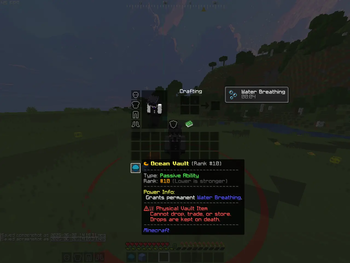
| 10 | Ocean | Passive | Always | Grants permanent Water Breathing. Dominates水上 fights and underwater exploration. |
New players receive 2 random vaults on their first join, selected using a weighted random system that pulls from all 10 vault types. The weights are fully configurable in config.yml, so server admins can control the rarity distribution — making high-rank vaults rare and low-rank vaults common, or any custom balance they prefer.
Vaults are automatically removed from death drops and the player's inventory on death, stored in a persistent pending queue, and restored on respawn or next server join. This prevents vault loss from dying and eliminates the possibility of vaults spilling onto the ground. The system also handles disconnects during death: if a player quits before respawning, their vaults are saved to disk and restored on their next login.
| Command | Description |
|---|---|
| /vaultsmp give | Gives a specific vault item to a player (max 2 vaults per player). |
| /vaultsmp remove | Removes a specific vault from a player's inventory. |
| /vaultsmp list [player] | Lists all vaults in a player's inventory with their ranks. |
| /vaultsmp reload | Reloads the configuration file and applies weight/cooldown changes. |
Permission: vaultsmp.admin
# config.yml
vault-weights:
  VOID: 60
  DRAGON: 60
  NECRO: 40
  SHADOW: 40
  KING: 20
  WIND: 20
  STORM: 15
  FROST: 10
  BLAZE: 5
  OCEAN: 5

vault-cooldowns:
  VOID: 60
  DRAGON: 600
  SHADOW: 60
Higher weight = more likely to be given as a starter vault.