Team-HomeGUI-Plugin
Version 1.3.0 | PaperMC 1.21 | Java 21
A feature-rich PaperMC plugin combining a team system with a GUI-based home manager,
cooldowns, economy support, PlaceholderAPI integration, and Essentials override.
Features
| Category |
Feature |
| Teams |
Create, invite, leave, kick, disband |
| Roles |
Owner / Admin / Member hierarchy |
| Team Chat |
Toggle private/global chat per-player |
| Team Home |
Set and teleport to team home |
| Personal Homes |
Up to 5 personal homes via inventory GUI |
| Confirm Delete |
Confirmation GUI before deleting a home |
| Cooldowns |
Per-player teleport cooldown |
| Warmup |
XP-bar countdown with optional freeze |
| Economy |
Vault-based charges for set / teleport / create |
| Anti-PvP |
Disable friendly fire between team members |
| PlaceholderAPI |
%team_*% placeholders |
| Essentials |
Intercepts /home and /sethome to open the GUI |
Requirements
| Dependency |
Required |
| PaperMC 1.21 |
✅ |
| Java 21 |
✅ |
| Vault |
Optional (economy features) |
| PlaceholderAPI |
Optional |
| EssentialsX |
Optional (GUI override) |
Installation
- Build with Maven:
mvn clean package
- Copy the resulting
.jar from target/ to your server's plugins/ folder
- Start the server — config files are generated automatically
- Edit
plugins/Team-HomeGUI-Plugin/team-config.yml and home-config.yml
- Reload with
/reload confirm or restart
Commands
Player Commands
| Command |
Description |
/team create <name> |
Create a new team |
/team invite <player> |
Invite a player to your team |
/team invite accept |
Accept a pending invite |
/team invite deny |
Deny a pending invite |
/team leave |
Leave your team (owner must confirm) |
/team kick <player> |
Kick a member (owner/admin) |
/team info [team] |
Show team info |
/team members [team] |
List team members |
/team list [page] |
Browse all teams |
/team home |
Teleport to team home |
/team sethome |
Set the team home (owner/admin) |
/team chat enable|disable |
Toggle team-only chat |
/team msg <message> |
Send a team message |
/team color <color> |
Change team display color |
/team settings name <name> |
Rename your team |
/team settings color <color> |
Change color |
/team settings members-can-invite <on|off> |
Toggle invite permissions |
/team settings promote <player> |
Promote to Admin |
/team settings demote <player> |
Demote from Admin |
/team settings transfer <player> |
Transfer ownership |
/home |
Open home GUI |
/sethome [name] |
Set a home (opens GUI) |
/delhome <name> |
Delete a home |
Admin Commands
| Command |
Description |
/team admin create <password> |
Create the admin team |
/team admin add <player> |
Add player to admin team |
/team admin ban <player> |
Ban from admin commands |
/team admin unban <player> |
Unban from admin commands |
/team admin manage <team> |
Show team details |
/team admin remove <team> |
Disband a team |
/team admin list |
List all teams |
/team admin settings <team> <option> [value] |
Modify any team's settings |
Permissions
| Permission |
Description |
Default |
teamplugin.create |
Create a team |
true |
teamplugin.admin |
Admin commands |
op |
teamplugin.sethome |
Set team home |
true |
teamplugin.homes.3 |
Unlock 3 personal homes |
false |
teamplugin.homes.4 |
Unlock 4 personal homes |
false |
teamplugin.homes.5 |
Unlock 5 personal homes |
false |
teamplugin.color |
Change team color |
true |
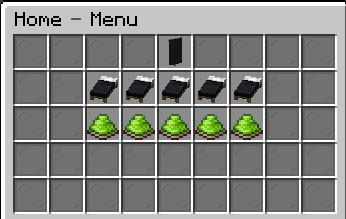
Home GUI Layout
[ ][ ][ ][ ][T][ ][ ][ ][ ]    ← T = Team Home
[ ][1][2][3][4][5][ ][ ][ ]    ← Personal homes (bed icons)
[ ][ ][ ][ ][ ][ ][ ][ ][ ]
[ ][S][S][S][S][S][ ][ ][ ]    ← S = Set (lime dye) or Delete (red dye)
[ ][ ][ ][ ][ ][ ][ ][ ][ ]
Delete Confirmation GUI (new in 1.3.0)
[ ][ ][ ][ ][ ][ ][ ][ ][ ]
[ ][ ][🔴][ ][🛏][ ][🟢][ ][ ]
[ ][ ][ ][ ][ ][ ][ ][ ][ ]
    No      Delete?    Yes
  (slot 12) (slot 14) (slot 16)   ← user-visible slot numbers (1-indexed)
PlaceholderAPI
| Placeholder |
Returns |
%team_name% |
Team display name |
%team_color% |
Team color code |
%team_role% |
Player role (Owner/Admin/Member) |
%team_count% |
Number of members |
%team_has_home% |
true / false |
%team_homes_count% |
Number of personal homes set |
Building
git clone <repo>
cd Team-HomeGUI-Plugin
mvn clean package
# Output: target/Team-HomeGUI-Plugin-1.3.0.jar