Logo
MINECRAFTBIBLE
Items
Items

All game items

Blocks
Blocks

Building blocks

Mobs
Mobs

Creatures & monsters

Biomes
Biomes

World biomes

Structures
Structures

Generated structures

Recipes
Recipes

Crafting guides

Advancements
Advancements

Achievements

Loot Tables
Loot Tables

Drop rates

Tags
Tags

Item groupings

All Versions
View all data →
Capes
Cape ArchiveNEW

Browse rare Minecon capes, OptiFine capes, and custom capes from players worldwide

Browse

Player Database
Player DatabasePopular

Search any player

Skin Browser
Skin Browser

Browse & download skins

Cape Gallery
Cape GalleryNEW

Minecon & OptiFine capes

Seed Vault
Seed Vault

Curated seeds

Learn

Guides
GuidesNew

Tutorials & tips

Blog
Blog

News & updates

Community

Community Hub
Community HubHub

Posts, discussions & more

All Versions
View community →
Seed Analyzer
Seed Analyzer

World seed analysis

Loot Explorer
Loot Explorer

Drop rates

Crafting Calculator
Crafting Calculator

Material planning

Enchant Calculator
Enchant Calculator

Probability math

Redstone Lab
Redstone Lab

Signal timing

Trading Profit
Trading Profit

Villager ROI

All Versions
View all tools →
Mods
Mods

Browse all mods

Plugins
Plugins

Server plugins

Resource Packs
Resource Packs

Textures & sounds

Shaders
Shaders

Visual enhancements

Datapacks
Datapacks

World logic

Scanner
Mod Intelligence

Scan & analyze any mod

All Versions
View all mods →
Loading...
IntroductionIntroductionVersion HistoryVersion HistoryGuidesGuidesBlog & NewsBlog & News
ItemsItemsBlocksBlocksMobsMobsRecipesRecipesBiomesBiomesStructuresStructuresAdvancementsAdvancementsLoot TablesLoot TablesTagsTags
ModsModsPluginsPluginsResource PacksResource PacksShadersShadersDatapacksDatapacks

MinecraftBible

The Ultimate Wiki

Logo
MINECRAFTBIBLE

The ultimate Minecraft reference. Every item, block, mob, and recipe documented with precision.

Community

  • Player Database
  • Skin Browser
  • Cape Gallery
  • Community Hub
  • Seed Vault

Database

  • Items
  • Blocks
  • Mobs
  • Recipes
  • Biomes
  • Structures

Tools

  • Seed Analyzer
  • Mod Intelligence
  • Crafting Calculator
  • Enchant Calculator

Mods & Packs

  • Mods
  • Plugins
  • Resource Packs
  • Shaders
  • Datapacks

© 2026 MinecraftBible. Not affiliated with Mojang or Microsoft.

PrivacyTermsContact
SweetInventory
PluginAGPL-3.0-only

SweetInventory

A handy Chest-GUI menu plugin.

34
Downloads
0
Followers
2 months ago
Updated
📦
2
Versions
game-mechanicsutilitybukkitfoliapaperpurpurspigot
Download Latestv1.0.5View on Modrinth

📖About SweetInventory

SweetInventory

A Minecraft Menu Plugin

Default configurations are in Chinese. Check localization repository for English or other language.
And I am sorry about that the wiki is only Chinese available right now. In the future, we may translate it to English.

Introduction

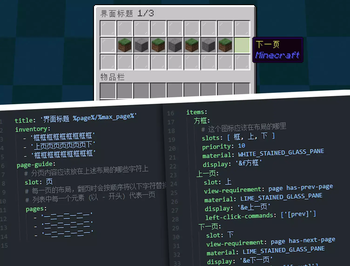
A menu plugin built based on the PluginBase menu module. It uses an intuitive layout format similar to the example below:

inventory:
- 'ooooooooo'
- 'upppppppd'
- 'ooooooooo'
# "o" means frame icon
# "u" means "up", aka previous-page button
# "d" means "down", aka next-page button
# "p" means page content

Icons can have "display conditions", "click conditions", "click actions", and more. It supports various click types such as Left Click, Right Click, Shift + Left Click, Shift + Right Click, Q, and Ctrl + Q.

For more details, see the documentation on MCIO Plugins.

Features

  • Uses a more intuitive layout design
  • Supports pagination, allowing a single menu to display multiple pages of content
  • Supports registering custom commands for menus, effective immediately after reloading
  • Supports detecting file save operations and automatically reloading menus upon saving
  • Rich condition and display priority mechanisms to satisfy simple use cases
  • Supports expressions in conditions such as %vault_eco_balance% >= 100

Commands

The root command is /sweetinventory, with aliases /sinv, /si, or /menu
Parameters wrapped in <> are required, and parameters wrapped in [] are optional.

Command Description Permission
/menu open <menu> Opens the specified menu. Requires permission to open the menu sweet.inventory.open
/menu open <menu> - [..menu arguments] Opens the specified menu. Requires permission to open the menu sweet.inventory.open
/menu open <menu> <player> [..menu arguments] Opens the specified menu for a player. The target player does not need permission to open the menu sweet.inventory.open.other
/menu list View the list of menus sweet.inventory.list
/menu reload Reload the plugin configuration files OP/Console

Opening a menu requires the permission sweet.inventory.open.menu.<menu>

👥 Team & Contributors

MrXiaoM
MrXiaoMOwner

⚙️ Compatibility

Environment
🖥️ Server-side
Loaders
bukkitfoliapaperpurpurspigot
Minecraft Versions
1.81.91.101.111.121.131.141.15+7 more

🔗 Links

Modrinth Page