MINECRAFTBIBLE
Loading...
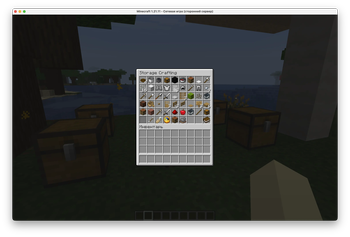

Craft from nearby chests through a vanilla-compatible storage crafting menu for Paper servers.
Turn a storage room into a crafting station.
StorageWorkbench is a server-side Paper plugin that lets players craft using items from their own inventory and nearby chests.
Place a crafting table in your storage room, sneak-right-click it, and craft from a vanilla-compatible storage crafting menu. Ingredients are consumed directly from nearby storage. Players do not need to carry every plank, ingot, stick, stone, and gem in their inventory first.
It is built for servers that want powerful storage crafting without client mods, resource packs, custom textures, or Java-only UI tricks.
StorageWorkbench works especially well with:
| Plugin | What it adds |
|---|---|
| ExpandedChests | Adds huge server-side storage containers. StorageWorkbench can craft from their contents when both plugins are installed. |
| OpenChestSorter | Automatically sorts ordinary chest contents when players open chests. |
Together, they turn a storage wall into a practical workshop: sort ordinary chests, store bulk materials in expanded chests, and craft from the whole room through one crafting table.
| Before | After |
|---|---|
| Move ingredients from chests into your inventory. | Craft directly from nearby storage. |
| Stop crafting because your inventory is full of materials. | Keep ingredients in storage and craft from the menu. |
| Search through multiple chests manually. | Use recipe categories, sorting, pagination, and refresh. |
| Bedrock players can be excluded by client-side mods. | The menu uses normal server inventory screens and vanilla items. |
| Storage rooms only store items. | Storage rooms become real crafting rooms. |
Regular right-click still opens the normal vanilla crafting table.
Players can also look at a crafting table and run:
/swb open
| Feature | Details |
|---|---|
| Storage crafting menu | Server-side inventory GUI opened from normal crafting tables. |
| Nearby chest support | Uses items from the player inventory and nearby vanilla chests. |
| ExpandedChests support | Also reads nearby ExpandedChests storage when that optional plugin is installed. |
| Direct chest consumption | Chest ingredients are consumed directly from storage, not moved into the player inventory first. |
| Full inventory support | Crafting still works when the player inventory is full. |
| Categories | All, Building, Tools, Combat, Redstone, Food, Transport, Ingredients, Misc. |
| Sorting | Name, Available, Output, Category. |
| Max crafting | Shift-left-click crafts the maximum available amount. |
| Controller-friendly max mode | A max-mode button helps Bedrock/Xbox players use maximum crafting. |
| Chest highlights | Included chests get lightweight vanilla particle highlights while the menu is open. |
| Multiplayer-aware sessions | Each player has an independent crafting session. |
| Server-side only | No client mod, no resource pack, no custom UI assets, no custom packets. |
| Standalone-first design | Works without companion plugins; integrations are optional. |
| Target | Support |
|---|---|
| Platform | Paper |
| Minecraft versions | 1.21.x and 26.1.x |
| Java for 1.21.x servers | Java 21 |
| Java for 26.1.x servers | Java 25 or newer |
| Client-side install | Not required |
| Resource pack | Not required |
| Dependencies | None |
| Optional integrations | ExpandedChests, OpenChestSorter |
| Geyser/Floodgate | Designed around vanilla server inventory screens for better cross-client behavior. |
StorageWorkbench is a server-side Paper plugin. It is not a Fabric, Forge, or NeoForge client mod.
Default range around the crafting table:
| Direction | Blocks |
|---|---|
| North | 5 |
| South | 5 |
| East | 5 |
| West | 5 |
| Up | 5 |
| Down | 0 |
Horizontal directions use world axes because crafting table blocks do not have a facing direction. Diagonal chests inside the resulting rectangular area are included.
Server operators can change the range through commands or in plugins/StorageWorkbench/config.yml.
Player command:
| Command | Permission | Description |
|---|---|---|
/swb open |
storageworkbench.use |
Opens the storage crafting menu while looking at a crafting table. |
Admin commands:
| Command | Permission | Description |
|---|---|---|
/swb status |
storageworkbench.admin |
Shows plugin status and active sessions. |
/swb range show |
storageworkbench.admin |
Shows the current chest search range. |
/swb range default |
storageworkbench.admin |
Restores the default range. |
/swb range horizontal <blocks> |
storageworkbench.admin |
Sets all four horizontal directions at once. |
/swb range set <north|south|east|west|up|down> <blocks> |
storageworkbench.admin |
Sets one direction. |
/swb reload |
storageworkbench.admin |
Reloads the plugin config. |
| Permission | Default | Purpose |
|---|---|---|
storageworkbench.use |
Everyone | Allows using StorageWorkbench crafting. |
storageworkbench.admin |
Operators | Allows changing StorageWorkbench settings in game. |
world, world_nether, world_the_end, plugins, and config files.storage-workbench-1.0.1.jar into the server plugins folder.plugins/StorageWorkbench/config.yml if needed.enabled: true
storage-range:
north: 5
south: 5
east: 5
west: 5
up: 5
down: 0
storage-menu-enabled: true
highlight-chests-enabled: true
highlight-batch-size: 12
highlight-ticks-between-batches: 2
highlight-refresh-ticks: 20
borrow-custom-chest-items: false
debug-logging: false
StorageWorkbench is built to avoid repeated expensive world scans:
StorageWorkbench does not generate chunks, edit blocks, rewrite world files, migrate world data, use a database, or make external network calls.
It does move items between player inventories and chest inventories during crafting, so test it before installing on a valuable live world.
Recommended rollout:
StorageWorkbench is designed to coexist with OpenChestSorter.
OpenChestSorter reacts to normal chest inventory opens. StorageWorkbench uses its own storage crafting menu and reads nearby chest inventories directly. The plugins do not share UI state, and opening the StorageWorkbench crafting menu does not open chest inventories through OpenChestSorter.
StorageWorkbench also integrates with ExpandedChests. When ExpandedChests is installed, nearby expanded chest contents can appear in the storage crafting menu and can be consumed as crafting ingredients. If ExpandedChests is not installed, StorageWorkbench simply works as a normal nearby-chest crafting plugin.
This integration is optional and reflection-based, so the plugins can be installed together or separately.
StorageWorkbench is released under the MIT License.