Logo
MINECRAFTBIBLE
Items
Items

All game items

Blocks
Blocks

Building blocks

Mobs
Mobs

Creatures & monsters

Biomes
Biomes

World biomes

Structures
Structures

Generated structures

Recipes
Recipes

Crafting guides

Advancements
Advancements

Achievements

Loot Tables
Loot Tables

Drop rates

Tags
Tags

Item groupings

All Versions
View all data →
Capes
Cape ArchiveNEW

Browse rare Minecon capes, OptiFine capes, and custom capes from players worldwide

Browse

Player Database
Player DatabasePopular

Search any player

Skin Browser
Skin Browser

Browse & download skins

Cape Gallery
Cape GalleryNEW

Minecon & OptiFine capes

Seed Vault
Seed Vault

Curated seeds

Learn

Guides
GuidesNew

Tutorials & tips

Blog
Blog

News & updates

Community

Community Hub
Community HubHub

Posts, discussions & more

All Versions
View community →
Seed Analyzer
Seed Analyzer

World seed analysis

Loot Explorer
Loot Explorer

Drop rates

Crafting Calculator
Crafting Calculator

Material planning

Enchant Calculator
Enchant Calculator

Probability math

Redstone Lab
Redstone Lab

Signal timing

Trading Profit
Trading Profit

Villager ROI

All Versions
View all tools →
Mods
Mods

Browse all mods

Plugins
Plugins

Server plugins

Resource Packs
Resource Packs

Textures & sounds

Shaders
Shaders

Visual enhancements

Datapacks
Datapacks

World logic

Scanner
Mod Intelligence

Scan & analyze any mod

All Versions
View all mods →
Loading...
IntroductionIntroductionVersion HistoryVersion HistoryGuidesGuidesBlog & NewsBlog & News
ItemsItemsBlocksBlocksMobsMobsRecipesRecipesBiomesBiomesStructuresStructuresAdvancementsAdvancementsLoot TablesLoot TablesTagsTags
ModsModsPluginsPluginsResource PacksResource PacksShadersShadersDatapacksDatapacks

MinecraftBible

The Ultimate Wiki

Logo
MINECRAFTBIBLE

The ultimate Minecraft reference. Every item, block, mob, and recipe documented with precision.

Community

  • Skin Browser
  • Cape Gallery
  • Seed Vault
  • Blog
  • Guides

Database

  • Items
  • Blocks
  • Mobs
  • Recipes
  • Biomes
  • Structures

Tools

  • Seed Analyzer
  • Mod Intelligence
  • Crafting Calculator
  • Enchant Calculator

Mods & Packs

  • Mods
  • Plugins
  • Resource Packs
  • Shaders
  • Datapacks

Site & Legal

  • About
  • Authors
  • Editorial Policy
  • Corrections
  • Contact
  • Privacy Policy
  • Terms of Service
  • DMCA
  • Sitemap

© 2026 MinecraftBible. Not affiliated with Mojang or Microsoft.

PrivacyTermsContact
skTrace
PluginApache-2.0

skTrace

This project adds a profiler for Skript that shows which triggers and lines are eating your server's tick time, and turns the results into an interactive report you can share with one link.

191
Downloads
6
Followers
1 months ago
Updated
📦
5
Versions
optimizationtechnologyutilitypaperpurpur
Download Latestv0.1.4View on Modrinth

📖About skTrace

skTrace

A profiler for Skript that shows you exactly where your server's tick time is going, then turns it into an interactive report you can share with one link.

skTrace measures your Skript triggers, events, and individual lines while your server runs, then builds a clean, interactive HTML report. Open it in your browser, or let skTrace upload it and hand off a single link to whoever's helping you debug the lag.

What's inside every report

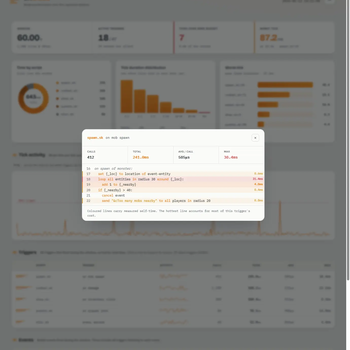
  • Per-trigger timing - which triggers and events cost the most time, with calls, average, and max.
  • Line-level hotspots - open a trigger to see the exact lines that are heaviest.
  • Tick activity - Skript time per tick charted against the 50ms server budget. Drag the chart to zoom into any range.
  • Time by script - see which script files are eating the window.
  • Worst tick - the single heaviest frame and exactly which triggers ran during it.
  • Source viewer - read the relevant script with its hottest lines highlighted, right in the report.

How it works

  1. Record - run /skTrace start and let real activity happen, or grab the last few seconds on demand with /skTrace clip.
  2. Report - run /skTrace report. skTrace builds the report and saves it to plugins/SkTrace/reports/.
  3. Share - the report is auto-uploaded and you get a skTrace.kal.pe/<code> link to the interactive view.

Commands

/skTrace start            Begin profiling
/skTrace stop             Stop profiling
/skTrace status           Show the current summary in chat
/skTrace report           Write a report and upload it for a link
/skTrace clip             Snapshot the last N seconds (rolling buffer)
/skTrace rolling on|off   Toggle the always-on rolling buffer
/skTrace reset            Clear collected stats

Flags for report/clip: --include-files (embed script source), --no-upload (keep it local), --show-secrets (disable masking).

Sharing and privacy

  • Share links last 24 hours. The report file saved on your server is yours to keep.
  • Secrets stay private: tokens and passwords in script options: are masked before anything is uploaded.
  • Source is opt-in: script source is only embedded when you add --include-files.
  • Set upload-endpoint to an empty string in the config to disable uploads entirely (reports are still written locally).

Requirements

  • Paper or a Paper-based fork (Purpur, Pufferfish, UniverseSpigot, etc.).
  • Skript.
  • Minecraft 1.20.6+ / 1.21.x on Java 21.

Links

  • Discord: https://discord.gg/KS2aVQjFPz
  • Web: https://sktrace.kal.pe

AI has been partially used in the creation of this project.

skTrace is an independent project. It is not affiliated with, endorsed by, or part of the SkriptLang team or the Skript project.

👥 Team & Contributors

Kalpe
KalpeOwner

⚙️ Compatibility

Environment
🖥️ Server-side
Loaders
paperpurpur
Minecraft Versions
1.201.20.11.20.21.20.31.20.41.20.51.20.61.21+14 more

🔗 Links

Modrinth Page