Logo
MINECRAFTBIBLE
Items
Items

All game items

Blocks
Blocks

Building blocks

Mobs
Mobs

Creatures & monsters

Biomes
Biomes

World biomes

Structures
Structures

Generated structures

Recipes
Recipes

Crafting guides

Advancements
Advancements

Achievements

Loot Tables
Loot Tables

Drop rates

Tags
Tags

Item groupings

All Versions
View all data →
Capes
Cape ArchiveNEW

Browse rare Minecon capes, OptiFine capes, and custom capes from players worldwide

Browse

Player Database
Player DatabasePopular

Search any player

Skin Browser
Skin Browser

Browse & download skins

Cape Gallery
Cape GalleryNEW

Minecon & OptiFine capes

Seed Vault
Seed Vault

Curated seeds

Learn

Guides
GuidesNew

Tutorials & tips

Blog
Blog

News & updates

Community

Community Hub
Community HubHub

Posts, discussions & more

All Versions
View community →
Seed Analyzer
Seed Analyzer

World seed analysis

Loot Explorer
Loot Explorer

Drop rates

Crafting Calculator
Crafting Calculator

Material planning

Enchant Calculator
Enchant Calculator

Probability math

Redstone Lab
Redstone Lab

Signal timing

Trading Profit
Trading Profit

Villager ROI

All Versions
View all tools →
Mods
Mods

Browse all mods

Plugins
Plugins

Server plugins

Resource Packs
Resource Packs

Textures & sounds

Shaders
Shaders

Visual enhancements

Datapacks
Datapacks

World logic

Scanner
Mod Intelligence

Scan & analyze any mod

All Versions
View all mods →
Loading...
IntroductionIntroductionVersion HistoryVersion HistoryGuidesGuidesBlog & NewsBlog & News
ItemsItemsBlocksBlocksMobsMobsRecipesRecipesBiomesBiomesStructuresStructuresAdvancementsAdvancementsLoot TablesLoot TablesTagsTags
ModsModsPluginsPluginsResource PacksResource PacksShadersShadersDatapacksDatapacks

MinecraftBible

The Ultimate Wiki

Logo
MINECRAFTBIBLE

The ultimate Minecraft reference. Every item, block, mob, and recipe documented with precision.

Community

  • Skin Browser
  • Cape Gallery
  • Seed Vault
  • Blog
  • Guides

Database

  • Items
  • Blocks
  • Mobs
  • Recipes
  • Biomes
  • Structures

Tools

  • Seed Analyzer
  • Mod Intelligence
  • Crafting Calculator
  • Enchant Calculator

Mods & Packs

  • Mods
  • Plugins
  • Resource Packs
  • Shaders
  • Datapacks

Site & Legal

  • About
  • Authors
  • Editorial Policy
  • Corrections
  • Contact
  • Privacy Policy
  • Terms of Service
  • DMCA
  • Sitemap

© 2026 MinecraftBible. Not affiliated with Mojang or Microsoft.

PrivacyTermsContact
SimpleReportPlugin
PluginLicenseRef-All-Rights-Reserved

SimpleReportPlugin

ReportPlugin is a lightweight Spigot/Paper report system that lets players report others with anti-spam limits, allows staff to review reports in a GUI to ban or delete them, and persists all reports in a JSON file across restarts.

41
Downloads
2
Followers
2 months ago
Updated
📦
3
Versions
game-mechanicsmanagementsocialbukkitpaperpurpurspigot
Download Latestv1.3View on Modrinth

📖About SimpleReportPlugin

SimpleReportPlugin

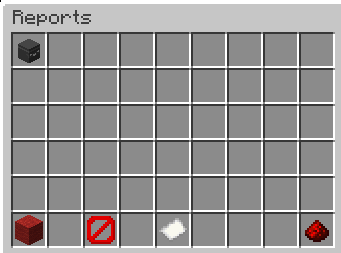
A simple and lightweight player report system for Spigot/Paper 1.21.x. Players can report other players with a reason, while staff/OPs can review all reports in a clean inventory GUI and decide to ban the reported player or delete the report.

All reports are stored persistently in a JSON file, so they remain available after server restarts.


Features

  • /report: Players can report other players (including a reason)
  • Anti-spam protection
    • A player can report the same target only once as long as that report still exists
    • Global 5 minute cooldown: a player can only create one new report every 5 minutes
  • Staff GUI / Reports overview
    • OPs can view reports in an inventory GUI
    • Select a report by clicking the player head
    • Actions via buttons:
      • Ban (Red Wool): bans the reported player and removes the selected report
      • Delete (Barrier): deletes the selected report (no ban)
      • Close (Redstone): closes the GUI
      • Reports stay after restart
  • Configuration (config.yml)

The plugin automatically generates a configuration file on the first startup. It allows you to paste a Discord Webhook URL to receive instant logs in your Discord channel whenever a report is made, with an optional toggle to ping a specific role or @everyone.


Commands

/report <player> <reason>

Creates a report for the given player.

Examples:

  • /report Steve Fly hacks
  • /report Alex Chat harassment

Rules:

  • You cannot report yourself
  • You cannot report the same player multiple times while the report exists
  • You can only create one report every 5 minutes

/reports

Opens the reports GUI.

  • OP only by default (default: op)
  • Shows each report as a player head item including:
    • reporter
    • reason
    • timestamp

Staff GUI Usage

  1. Run /reports
  2. Click a head to select a report
    (the paper item will show Selected: <playername>)
  3. Click one of the action buttons:
    • Ban (Red Wool): bans the player and removes the selected report
    • Delete (Barrier): deletes the selected report only
    • Close (Redstone): closes the GUI

Data Storage

  • Reports are automatically saved when:
    • a report is created
    • a report is deleted
    • the server stops / plugin disables

Note: Only reports are saved. The 5-minute cooldown is currently stored in memory and resets after server restart (reports remain saved).


Compatibility

  • Designed for Spigot/Paper 1.21.x
  • Recommended: Paper for best performance
  • Java: Java 21

Installation

  1. Put the .jar into your server plugins/ folder
  2. Start the server
  3. The plugin will automatically create plugins/ReportPlugin/reports.json once reports exist

Support

If you find a bug add me on Discord Petarhrv16

👥 Team & Contributors

Petarhrv16
Petarhrv16
Project Leader

⚙️ Compatibility

Environment
🖥️ Server-side
Loaders
bukkitpaperpurpurspigot
Minecraft Versions
1.21.11

🔗 Links

Modrinth Page