Logo
MINECRAFTBIBLE
Items
Items

All game items

Blocks
Blocks

Building blocks

Mobs
Mobs

Creatures & monsters

Biomes
Biomes

World biomes

Structures
Structures

Generated structures

Recipes
Recipes

Crafting guides

Advancements
Advancements

Achievements

Loot Tables
Loot Tables

Drop rates

Tags
Tags

Item groupings

All Versions
View all data →
Capes
Cape ArchiveNEW

Browse rare Minecon capes, OptiFine capes, and custom capes from players worldwide

Browse

Player Database
Player DatabasePopular

Search any player

Skin Browser
Skin Browser

Browse & download skins

Cape Gallery
Cape GalleryNEW

Minecon & OptiFine capes

Seed Vault
Seed Vault

Curated seeds

Learn

Guides
GuidesNew

Tutorials & tips

Blog
Blog

News & updates

Community

Community Hub
Community HubHub

Posts, discussions & more

All Versions
View community →
Seed Analyzer
Seed Analyzer

World seed analysis

Loot Explorer
Loot Explorer

Drop rates

Crafting Calculator
Crafting Calculator

Material planning

Enchant Calculator
Enchant Calculator

Probability math

Redstone Lab
Redstone Lab

Signal timing

Trading Profit
Trading Profit

Villager ROI

All Versions
View all tools →
Mods
Mods

Browse all mods

Plugins
Plugins

Server plugins

Resource Packs
Resource Packs

Textures & sounds

Shaders
Shaders

Visual enhancements

Datapacks
Datapacks

World logic

Scanner
Mod Intelligence

Scan & analyze any mod

All Versions
View all mods →
Loading...
IntroductionIntroductionVersion HistoryVersion HistoryGuidesGuidesBlog & NewsBlog & News
ItemsItemsBlocksBlocksMobsMobsRecipesRecipesBiomesBiomesStructuresStructuresAdvancementsAdvancementsLoot TablesLoot TablesTagsTags
ModsModsPluginsPluginsResource PacksResource PacksShadersShadersDatapacksDatapacks

MinecraftBible

The Ultimate Wiki

Logo
MINECRAFTBIBLE

The ultimate Minecraft reference. Every item, block, mob, and recipe documented with precision.

Community

  • Skin Browser
  • Cape Gallery
  • Seed Vault
  • Blog
  • Guides

Database

  • Items
  • Blocks
  • Mobs
  • Recipes
  • Biomes
  • Structures

Tools

  • Seed Analyzer
  • Mod Intelligence
  • Crafting Calculator
  • Enchant Calculator

Mods & Packs

  • Mods
  • Plugins
  • Resource Packs
  • Shaders
  • Datapacks

Site & Legal

  • About
  • Authors
  • Editorial Policy
  • Corrections
  • Contact
  • Privacy Policy
  • Terms of Service
  • DMCA
  • Sitemap

© 2026 MinecraftBible. Not affiliated with Mojang or Microsoft.

PrivacyTermsContact
ShulkerPreviewer
PluginGPL-3.0-only

ShulkerPreviewer

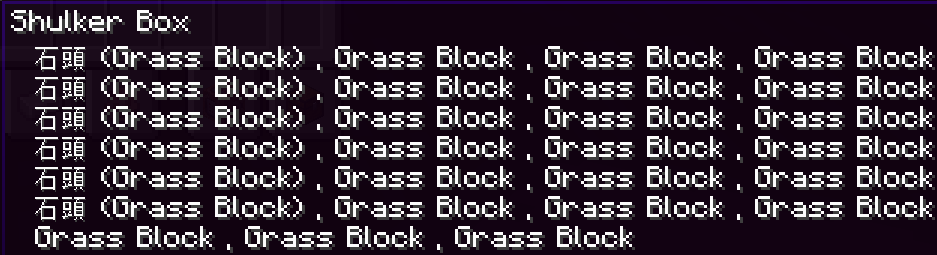
You can see the fully items inside shulker box without opening it.

14
Downloads
1
Followers
1 months ago
Updated
📦
2
Versions
game-mechanicsmanagementutilityfoliapaperpurpur
Download Latestv1.2aView on Modrinth

📖About ShulkerPreviewer

ShulkerPreviewer

Supported Versions: 1.20 ~ 26.X

-> Click here to contact us for support <-


As a server owner,
I find it despicable when players abuse the fact that shulker boxes
don't reveal all their contents to commit trade scams.

Yes, there are shulker preview mods out there,
but some new players don't know how to install mods —
especially on Bedrock-supported servers, where Bedrock players
have no such resources available at all.
So we built a convenient plugin that lets players see every item inside a shulker box,
giving server players peace of mind — and it causes no server lag!
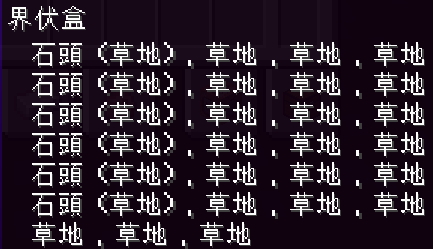
Preview Example 1
Preview Example 2


🧩 Features

  • Preview the hidden items inside a shulker box
  • Customizable plugin language file
    • Switches displayed text based on the player's client language
  • Highly customizable display format
    • How many items to preview per line
    • Separator between each item
    • Prefix at the start of each line
    • Item preview display format
    • Whether to merge and show combined amounts

📥 How to Use

  • Download this plugin
  • Drop the plugin.jar into your server's plugins folder (plugins)
  • Done! (If you use a plugin loader, remember to load the plugin)

⚠️ If you are on Windows, add the following to your server startup arguments, before the -jar argument:
-Dfile.encoding=UTF8
Otherwise the plugin won't read Chinese and other language files correctly.


⚙️ Configuration

After the plugin starts successfully, you'll find a config.yml file in the plugins/ShulkerPreviewer directory, which contains all of the plugin's settings.


💬 Commands

  • /shulkerview reload — Reload the plugin (Permission: OP)
  • /shulkerview on — Enable shulker box preview
  • /shulkerview off — Disable shulker box preview

🔓 Permissions

  • command.shulkerview.reload — Permission to use /shulkerview reload
  • command.shulkerview.switch — Permission to use /shulkerview on/off

🧷 Open Source

Github


🔧 How It Works

  • When a player opens / closes a configured container, picks up a shulker box, or switches the item in hand
  • The plugin updates the shulker box's "Lore" so the preview is displayed

📢 Notice

Please do not sell plugins developed by the Brilliant Team, or sell their features.
All of our plugins are provided to servers free of charge,
so we earn no real income from developing them.

Such behavior will, to some extent, reduce our willingness to keep developing,
and may lead us to consider turning free, open-source plugins into paid, closed-source ones. We hope you understand.


footer

👥 Team & Contributors

No authors recorded.

⚙️ Compatibility

Environment
🖥️ Server-side
Loaders
foliapaperpurpur
Minecraft Versions
1.2.11.2.21.2.31.2.41.2.51.201.20.11.20.2+20 more

🔗 Links

Modrinth Page