Logo
MINECRAFTBIBLE
Items
Items

All game items

Blocks
Blocks

Building blocks

Mobs
Mobs

Creatures & monsters

Biomes
Biomes

World biomes

Structures
Structures

Generated structures

Recipes
Recipes

Crafting guides

Advancements
Advancements

Achievements

Loot Tables
Loot Tables

Drop rates

Tags
Tags

Item groupings

All Versions
View all data →
Capes
Cape ArchiveNEW

Browse rare Minecon capes, OptiFine capes, and custom capes from players worldwide

Browse

Player Database
Player DatabasePopular

Search any player

Skin Browser
Skin Browser

Browse & download skins

Cape Gallery
Cape GalleryNEW

Minecon & OptiFine capes

Seed Vault
Seed Vault

Curated seeds

Learn

Guides
GuidesNew

Tutorials & tips

Blog
Blog

News & updates

Community

Community Hub
Community HubHub

Posts, discussions & more

All Versions
View community →
Seed Analyzer
Seed Analyzer

World seed analysis

Loot Explorer
Loot Explorer

Drop rates

Crafting Calculator
Crafting Calculator

Material planning

Enchant Calculator
Enchant Calculator

Probability math

Redstone Lab
Redstone Lab

Signal timing

Trading Profit
Trading Profit

Villager ROI

All Versions
View all tools →
Mods
Mods

Browse all mods

Plugins
Plugins

Server plugins

Resource Packs
Resource Packs

Textures & sounds

Shaders
Shaders

Visual enhancements

Datapacks
Datapacks

World logic

Scanner
Mod Intelligence

Scan & analyze any mod

All Versions
View all mods →
Loading...
IntroductionIntroductionVersion HistoryVersion HistoryGuidesGuidesBlog & NewsBlog & News
ItemsItemsBlocksBlocksMobsMobsRecipesRecipesBiomesBiomesStructuresStructuresAdvancementsAdvancementsLoot TablesLoot TablesTagsTags
ModsModsPluginsPluginsResource PacksResource PacksShadersShadersDatapacksDatapacks

MinecraftBible

The Ultimate Wiki

Logo
MINECRAFTBIBLE

The ultimate Minecraft reference. Every item, block, mob, and recipe documented with precision.

Community

  • Skin Browser
  • Cape Gallery
  • Seed Vault
  • Blog
  • Guides

Database

  • Items
  • Blocks
  • Mobs
  • Recipes
  • Biomes
  • Structures

Tools

  • Seed Analyzer
  • Mod Intelligence
  • Crafting Calculator
  • Enchant Calculator

Mods & Packs

  • Mods
  • Plugins
  • Resource Packs
  • Shaders
  • Datapacks

Site & Legal

  • About
  • Authors
  • Editorial Policy
  • Corrections
  • Contact
  • Privacy Policy
  • Terms of Service
  • DMCA
  • Sitemap

© 2026 MinecraftBible. Not affiliated with Mojang or Microsoft.

PrivacyTermsContact
ServerEasyWeb
PluginMIT

ServerEasyWeb

A lightweight Minecraft plugin that serves customizable web pages from a local folder
80
Downloads
2
Followers
9 months ago
Updated
📦
1
Versions
utilitybukkitpaperpurpurspigot
Download Latestv1.0.0View on Modrinth

📖About ServerEasyWeb

ServerEasyWeb

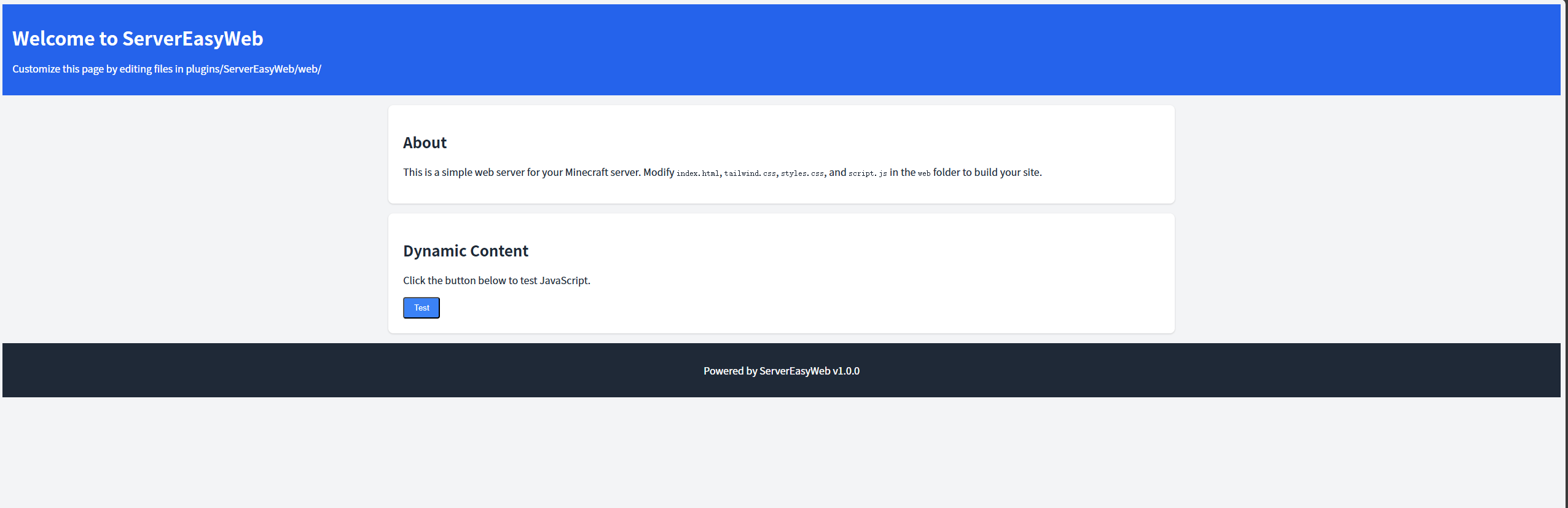
Example
A lightweight Minecraft plugin that serves customizable web pages from a local folder, allowing server owners to create a custom web interface for their Minecraft server. Built for compatibility with Minecraft 1.8–1.21 and Java 8–21, it uses Jetty to serve static files (HTML, CSS, JS) from plugins/ServerEasyWeb/web/.

Features

  • Customizable Web Interface: Serve static web files (HTML, CSS, JS) from the plugins/ServerEasyWeb/web/ folder.
  • Modern Default Design: Includes a responsive default page with Tailwind CSS and basic JavaScript interactivity.
  • Reload Command: Use /servereasyweb reload to reload the configuration and restart the web server.
  • Lightweight and Compatible: Works with Minecraft 1.8–1.21 (Spigot/Paper) and avoids legacy material warnings in newer versions.
  • No Log Spam: File-serving logs are suppressed to keep the server console clean.

Requirements

  • Minecraft Server: Spigot or Paper, versions 1.8–1.21.
  • Java: Version 8 or higher.
  • Port Access: The configured web-port (default: 8080) must be open and not used by other applications.

Installation

  1. Download:

    • Grab the latest ServerEasyWeb.jar.
  2. Deploy:

    • Place the JAR in the plugins/ folder of your Minecraft server.
    • Delete any existing plugins/ServerEasyWeb/ folder to ensure fresh file extraction.
  3. Start the Server:

    • Run your server to generate the plugins/ServerEasyWeb/ folder, including config.yml and the web/ folder with default files (index.html, styles.css, script.js).
  4. Verify:

    • Check server logs for:
      [ServerEasyWeb] Loaded configuration: web-port=8080, check-updates=true
      [ServerEasyWeb] Extracted web file: .../plugins/ServerEasyWeb/web/index.html
      [ServerEasyWeb] Web server started on port 8080
      
    • Access http://<server-ip>:8080/ in a browser to see the default web page.

Configuration

The plugin uses plugins/ServerEasyWeb/config.yml for settings:

web-port: 8080
check-updates: true
  • web-port: The port for the web server (default: 8080). Ensure it’s open and not in use.
  • check-updates: Enable (true) or disable (false) checking for plugin updates on GitHub.

To apply changes, edit config.yml and run /servereasyweb reload.

Customization

Customize the web interface by editing files in plugins/ServerEasyWeb/web/:

  • index.html: The default page, styled with Tailwind CSS (via CDN) and linked to styles.css and script.js.
  • styles.css: Additional CSS to complement Tailwind.
  • script.js: JavaScript for interactivity (e.g., button click events).
  • Additional Files: Add images, extra HTML pages, or other assets to the web/ folder. They will be served automatically (e.g., http://<server-ip>:8080/image.png).

After editing files, refresh the browser to see changes. Use /servereasyweb reload to re-extract default files if needed.

Commands

  • /servereasyweb reload:
    • Reloads config.yml, re-extracts web files, and restarts the web server.
    • Permission: servereasyweb.admin (default: operators only).
    • Tab completion: Type /servereasyweb and press Tab to see reload.

Example:

/servereasyweb reload

Permissions

  • servereasyweb.admin:
    • Allows use of /servereasyweb reload.
    • Default: Operators (op).

Debugging

If issues occur:

  • Web Page Not Loading:
    • Check logs for errors like “Failed to start web server.” or “File not found.”
    • Verify plugins/ServerEasyWeb/web/index.html exists.
    • Ensure the web-port (default: 8080) is open (netstat -tuln | grep 8080 on Linux).
    • Check file permissions (chmod -R u+rw plugins/ServerEasyWeb on Linux).

License

MIT License. See LICENSE for details.

👥 Team & Contributors

xwwsdd
xwwsddOwner

⚙️ Compatibility

Environment
🖥️ Server-side
Loaders
bukkitpaperpurpurspigot
Minecraft Versions
1.81.8.11.8.21.8.31.8.41.8.51.8.61.8.7+59 more

🔗 Links

Modrinth Page