Logo
MINECRAFTBIBLE
Items
Items

All game items

Blocks
Blocks

Building blocks

Mobs
Mobs

Creatures & monsters

Biomes
Biomes

World biomes

Structures
Structures

Generated structures

Recipes
Recipes

Crafting guides

Advancements
Advancements

Achievements

Loot Tables
Loot Tables

Drop rates

Tags
Tags

Item groupings

All Versions
View all data →
Capes
Cape ArchiveNEW

Browse rare Minecon capes, OptiFine capes, and custom capes from players worldwide

Browse

Player Database
Player DatabasePopular

Search any player

Skin Browser
Skin Browser

Browse & download skins

Cape Gallery
Cape GalleryNEW

Minecon & OptiFine capes

Seed Vault
Seed Vault

Curated seeds

Learn

Guides
GuidesNew

Tutorials & tips

Blog
Blog

News & updates

Community

Community Hub
Community HubHub

Posts, discussions & more

All Versions
View community →
Seed Analyzer
Seed Analyzer

World seed analysis

Loot Explorer
Loot Explorer

Drop rates

Crafting Calculator
Crafting Calculator

Material planning

Enchant Calculator
Enchant Calculator

Probability math

Redstone Lab
Redstone Lab

Signal timing

Trading Profit
Trading Profit

Villager ROI

All Versions
View all tools →
Mods
Mods

Browse all mods

Plugins
Plugins

Server plugins

Resource Packs
Resource Packs

Textures & sounds

Shaders
Shaders

Visual enhancements

Datapacks
Datapacks

World logic

Scanner
Mod Intelligence

Scan & analyze any mod

All Versions
View all mods →
Loading...
IntroductionIntroductionVersion HistoryVersion HistoryGuidesGuidesBlog & NewsBlog & News
ItemsItemsBlocksBlocksMobsMobsRecipesRecipesBiomesBiomesStructuresStructuresAdvancementsAdvancementsLoot TablesLoot TablesTagsTags
ModsModsPluginsPluginsResource PacksResource PacksShadersShadersDatapacksDatapacks

MinecraftBible

The Ultimate Wiki

Logo
MINECRAFTBIBLE

The ultimate Minecraft reference. Every item, block, mob, and recipe documented with precision.

Community

  • Skin Browser
  • Cape Gallery
  • Seed Vault
  • Blog
  • Guides

Database

  • Items
  • Blocks
  • Mobs
  • Recipes
  • Biomes
  • Structures

Tools

  • Seed Analyzer
  • Mod Intelligence
  • Crafting Calculator
  • Enchant Calculator

Mods & Packs

  • Mods
  • Plugins
  • Resource Packs
  • Shaders
  • Datapacks

Site & Legal

  • About
  • Authors
  • Editorial Policy
  • Corrections
  • Contact
  • Privacy Policy
  • Terms of Service
  • DMCA
  • Sitemap

© 2026 MinecraftBible. Not affiliated with Mojang or Microsoft.

PrivacyTermsContact
Rules Plugin
PluginLicenseRef-RPCLA-v1.2

Rules Plugin

Paper, GUI, Rules, Admin Tools

2.3K
Downloads
3
Followers
1 months ago
Updated
📦
5
Versions
managementutilitybukkitpaperspigot
Download Latestv1.3.1View on Modrinth

📖About Rules Plugin

RulesPlugin Logo

📜 RulesPlugin - Custom GUI Rules Acceptance

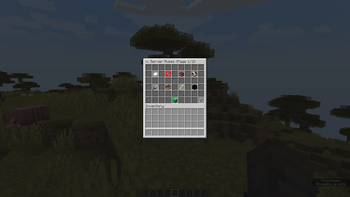
RulesPlugin is a lightweight Minecraft server plugin that shows your server rules in a clean GUI and requires players to accept them before playing.

It is designed for server owners who want a customizable rules menu, acceptance tracking, reloadable configuration, and safer GUI handling without building a custom system from scratch.


🚨 Latest Update

v1.3.1 - "The" RulesPlugin Update is focused on stability, safer GUI handling, config reload reliability, and Minecraft 26.1.x compatibility.

  • 🛡️ Stronger GUI protection against item leaks and duplication attempts.
  • 🔄 Safer /rules reload with YAML validation.
  • 🧩 Better Spigot compatibility by avoiding unnecessary Paper-only calls.
  • 📡 Clearer update-check messages for offline or no-network servers.

See more on the Blog post


✨ Features

  • 🧩 Fully customizable through config.yml.
  • 📄 Unlimited rules with automatic GUI pagination.
  • 🎨 Custom rule titles, descriptions, punishments, and item icons.
  • 🧱 Custom accept button item and display name.
  • ↔️ Custom previous/next page buttons.
  • 🚫 Blocks player actions until the rules are accepted.
  • 💾 Tracks accepted players in data.yml.
  • 🗂️ Optional acceptance log in rules.log.
  • 🔎 Recent logs and version-specific logs with pagination.
  • 🔁 Rule versioning: increase rules-version to force players to re-accept updated rules.
  • ⚙️ In-game reload command with YAML validation.
  • 📣 Force-open the rules GUI for one player or everyone online.
  • 🔐 Permission support for admin commands.
  • 🧠 Tab completion for RulesPlugin commands.
  • 📦 Update checker with official download links.
  • 🧭 Targets Minecraft 26.1.x servers.

🧰 Commands

Command Description Permission
/rules Opens the rules GUI. If already accepted, opens it in view-only mode. rulespl.rules
/rules reload Reloads and validates the configuration. rulespl.reload
/rules logs Shows recent rule acceptances. rulespl.seelogs
/rules logs v<version> [page] Shows acceptances for a specific rules version with pagination. rulespl.seelogs
/rules show <player> Force-opens the first-join rules GUI for one player. rulespl.show
/rules show everyone Force-opens the first-join rules GUI for everyone online. rulespl.show

📁 Configuration Preview

rules-version: 1
gui-title: "📜 Server Rules"

accept-button:
  name: "§aClick here to accept the rules"
  item: EMERALD_BLOCK

previous-page:
  name: "§a< Previous Page"
  item: ARROW

next-page:
  name: "§aNext Page >"
  item: ARROW

accepted-message: "§aYou've accepted the server rules!"
error-message: "§cYou must accept the rules before doing anything!"
rules-updated-message: "§cThe rules have been updated. Please review and accept them again."
update-check-failed-message: "§e[RulesPlugin] Could not reach the update API. Offline servers can ignore this; the plugin will keep working."

rules:
  - title: "§e1. Be respectful"
    description: "§7Treat all players with kindness."
    punishment: "§cPunishment: 1h mute"
    item: PAPER

  - title: "§e2. No hacking"
    description: "§7Mods and hacks are not allowed."
    punishment: "§cPunishment: Permanent ban"
    item: BARRIER

Use Bukkit material names for icons, such as STICKY_PISTON, DIAMOND_SWORD, PAPER, or EMERALD_BLOCK.

Full configuration guide: RulesPlugin Config


📥 Installation

  1. Download the latest .jar from the official RulesPlugin pages.
  2. Place it inside your server's /plugins folder.
  3. Start or restart the server.
  4. Edit config.yml if you want to customize rules, messages, or GUI items.
  5. Run /rules reload after changing the config.

Official downloads:

  • Modrinth
  • SpigotMC

🧩 Compatibility

RulesPlugin v1.3.1 targets Minecraft 26.1.x servers.

The plugin is built against the Spigot API and avoids unnecessary Paper-only calls where Spigot compatibility is expected.


🛡️ Security Notes

RulesPlugin GUI items are internally tagged by the plugin. If a client desync, lag spike, creative interaction, drag action, or crafting-slot edge case moves a GUI item outside the menu, RulesPlugin detects the tag and removes the item automatically.

This protection runs during inventory events and through a periodic cleanup task for online players.


📜 License

RulesPlugin is distributed under the RulesPlugin Custom License Agreement (RPCLA).

Redistribution, re-uploading, selling, sublicensing, or distributing modified builds is not allowed unless explicitly authorized by CorruptedWindows.

License page: RulesPlugin License


🔗 Links

  • Website: rulesplugin.netlify.app
  • Modrinth: modrinth.com/plugin/rulesplugin
  • SpigotMC: RulesPlugin on SpigotMC

👥 Team & Contributors

CorruptedWindows
CorruptedWindowsOwner

⚙️ Compatibility

Environment
🖥️ Server-side
Loaders
bukkitpaperspigot
Minecraft Versions
26.126.1.126.1.2

🔗 Links

Modrinth Page