Logo
MINECRAFTBIBLE
Items
Items

All game items

Blocks
Blocks

Building blocks

Mobs
Mobs

Creatures & monsters

Biomes
Biomes

World biomes

Structures
Structures

Generated structures

Recipes
Recipes

Crafting guides

Advancements
Advancements

Achievements

Loot Tables
Loot Tables

Drop rates

Tags
Tags

Item groupings

All Versions
View all data →
Capes
Cape ArchiveNEW

Browse rare Minecon capes, OptiFine capes, and custom capes from players worldwide

Browse

Player Database
Player DatabasePopular

Search any player

Skin Browser
Skin Browser

Browse & download skins

Cape Gallery
Cape GalleryNEW

Minecon & OptiFine capes

Seed Vault
Seed Vault

Curated seeds

Learn

Guides
GuidesNew

Tutorials & tips

Blog
Blog

News & updates

Community

Community Hub
Community HubHub

Posts, discussions & more

All Versions
View community →
Seed Analyzer
Seed Analyzer

World seed analysis

Loot Explorer
Loot Explorer

Drop rates

Crafting Calculator
Crafting Calculator

Material planning

Enchant Calculator
Enchant Calculator

Probability math

Redstone Lab
Redstone Lab

Signal timing

Trading Profit
Trading Profit

Villager ROI

All Versions
View all tools →
Mods
Mods

Browse all mods

Plugins
Plugins

Server plugins

Resource Packs
Resource Packs

Textures & sounds

Shaders
Shaders

Visual enhancements

Datapacks
Datapacks

World logic

Scanner
Mod Intelligence

Scan & analyze any mod

All Versions
View all mods →
Loading...
IntroductionIntroductionVersion HistoryVersion HistoryGuidesGuidesBlog & NewsBlog & News
ItemsItemsBlocksBlocksMobsMobsRecipesRecipesBiomesBiomesStructuresStructuresAdvancementsAdvancementsLoot TablesLoot TablesTagsTags
ModsModsPluginsPluginsResource PacksResource PacksShadersShadersDatapacksDatapacks

MinecraftBible

The Ultimate Wiki

Logo
MINECRAFTBIBLE

The ultimate Minecraft reference. Every item, block, mob, and recipe documented with precision.

Community

  • Skin Browser
  • Cape Gallery
  • Seed Vault
  • Blog
  • Guides

Database

  • Items
  • Blocks
  • Mobs
  • Recipes
  • Biomes
  • Structures

Tools

  • Seed Analyzer
  • Mod Intelligence
  • Crafting Calculator
  • Enchant Calculator

Mods & Packs

  • Mods
  • Plugins
  • Resource Packs
  • Shaders
  • Datapacks

Site & Legal

  • About
  • Authors
  • Editorial Policy
  • Corrections
  • Contact
  • Privacy Policy
  • Terms of Service
  • DMCA
  • Sitemap

© 2026 MinecraftBible. Not affiliated with Mojang or Microsoft.

PrivacyTermsContact
RtpZone
PluginLicenseRef-All-Rights-Reserved

RtpZone

A simple rtp zone plugin, like on donutsmp

1.8K
Downloads
4
Followers
8 months ago
Updated
📦
9
Versions
adventurebukkitpaperpurpurspigot
Download Latestv1.218View on Modrinth

📖About RtpZone

TCRtpZone - Dynamic Zone-based Random Teleport Plugin

TCRtpZone is a flexible and configurable Bukkit/Spigot/Paper plugin that allows you to designate specific areas and automatically teleport players within those zones to a predefined, random location in your world. It's ideal for combat arenas, event zones, or any area from which you want players to be automatically moved.

Key Features:

  • Zone-based Teleportation: Create multiple RTP (Random Teleport) zones within your world.
  • Timed RTP: Configurable timer for each zone to determine how often teleportation occurs.
  • Safe Teleportation:
    • The plugin automatically searches for safe locations within the target area, avoiding teleporting players into water, lava, solid blocks, or dangerous blocks (e.g., magma blocks, cacti).
    • A "top-down" search mechanism ensures more reliable and safer spawn points.
    • Asynchronous Chunk Loading and Location Search: Minimizes server load when searching for new, safe teleport locations.
  • Hologram Displays: Clearly visible holograms indicate the zone's center and the time remaining until the next teleport. Holograms automatically disappear if a zone is deleted or no longer exists in the configuration file.
  • Configurable Boundaries: Set the X and Z axis limits for the RTP target area where players can be teleported.
  • Customizable Zone Border Particle Effects:
    • Players receive visual feedback (e.g., redstone particles) at the zone border when entering or exiting an RTP zone.
    • Particle color, size, density, and display duration are fully configurable in the config.yml file.
  • Multi-language Support: Easily customize plugin messages and holograms using the language files in the lang/ folder. (Default languages: Hungarian, English).
  • Update Checker: Get notified if a new version of the plugin is available on Modrinth (toggleable in config).
  • Simple Commands: Intuitive commands for setting up and managing your zones.
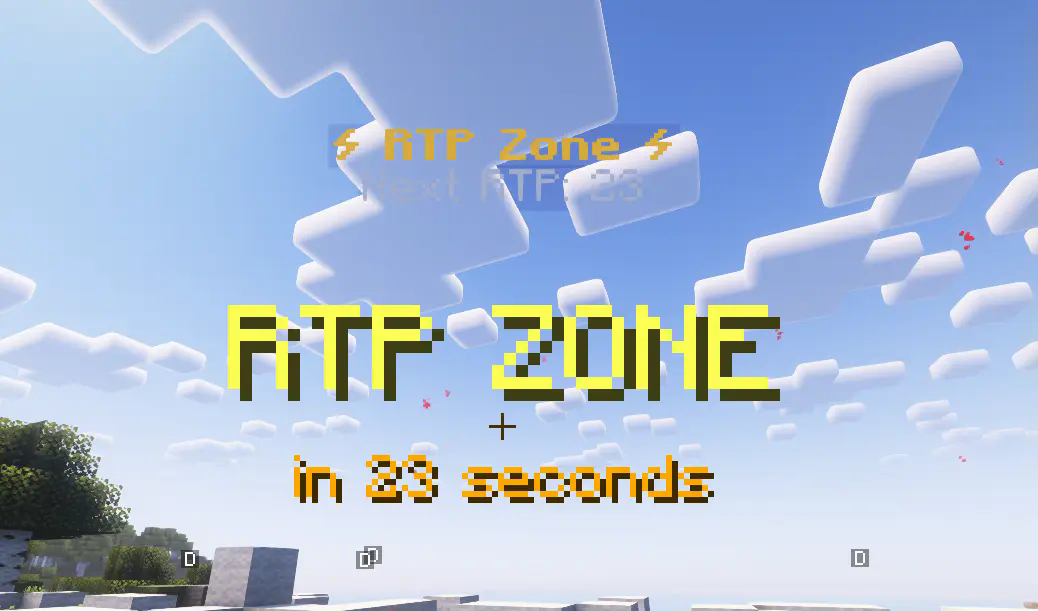
Tittle

Commands:

  • /rtpzone wand: Gives you a selection wand
  • /rtpzone create <zone_name> <target_world>: Creates the specified zone and sets its teleport target world.
  • /rtpzone delete <zone_name>: Deletes the specified zone and its hologram.
  • /rtpzone reload: Reloads the plugin configuration and language files.
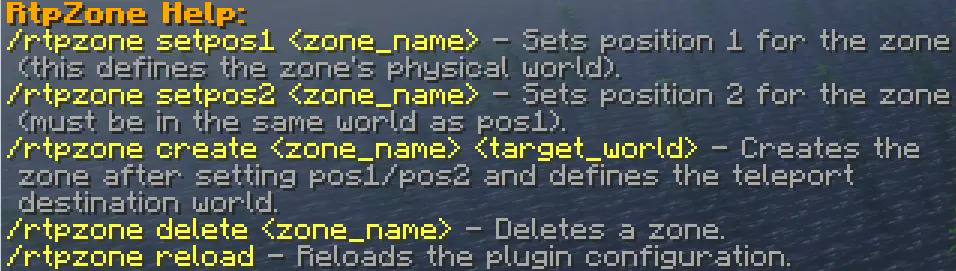
Help

Installation:

  1. Place the TCRtpZone.jar file into your server's plugins folder.
  2. Start or reload your server.
  3. Configure the generated config.yml and lang/ files to your needs.
  4. Use the commands above to set up your zones.

👥 Team & Contributors

Samudinnye
Samudinnye
Member

⚙️ Compatibility

Environment
🖥️ Server-side
Loaders
bukkitpaperpurpurspigot
Minecraft Versions
1.201.20.11.20.21.20.31.20.41.20.51.20.61.21+11 more

🔗 Links

Modrinth Page