Logo
MINECRAFTBIBLE
Items
Items

All game items

Blocks
Blocks

Building blocks

Mobs
Mobs

Creatures & monsters

Biomes
Biomes

World biomes

Structures
Structures

Generated structures

Recipes
Recipes

Crafting guides

Advancements
Advancements

Achievements

Loot Tables
Loot Tables

Drop rates

Tags
Tags

Item groupings

All Versions
View all data →
Capes
Cape ArchiveNEW

Browse rare Minecon capes, OptiFine capes, and custom capes from players worldwide

Browse

Player Database
Player DatabasePopular

Search any player

Skin Browser
Skin Browser

Browse & download skins

Cape Gallery
Cape GalleryNEW

Minecon & OptiFine capes

Seed Vault
Seed Vault

Curated seeds

Learn

Guides
GuidesNew

Tutorials & tips

Blog
Blog

News & updates

Community

Community Hub
Community HubHub

Posts, discussions & more

All Versions
View community →
Seed Analyzer
Seed Analyzer

World seed analysis

Loot Explorer
Loot Explorer

Drop rates

Crafting Calculator
Crafting Calculator

Material planning

Enchant Calculator
Enchant Calculator

Probability math

Redstone Lab
Redstone Lab

Signal timing

Trading Profit
Trading Profit

Villager ROI

All Versions
View all tools →
Mods
Mods

Browse all mods

Plugins
Plugins

Server plugins

Resource Packs
Resource Packs

Textures & sounds

Shaders
Shaders

Visual enhancements

Datapacks
Datapacks

World logic

Scanner
Mod Intelligence

Scan & analyze any mod

All Versions
View all mods →
Loading...
IntroductionIntroductionVersion HistoryVersion HistoryGuidesGuidesBlog & NewsBlog & News
ItemsItemsBlocksBlocksMobsMobsRecipesRecipesBiomesBiomesStructuresStructuresAdvancementsAdvancementsLoot TablesLoot TablesTagsTags
ModsModsPluginsPluginsResource PacksResource PacksShadersShadersDatapacksDatapacks

MinecraftBible

The Ultimate Wiki

Logo
MINECRAFTBIBLE

The ultimate Minecraft reference. Every item, block, mob, and recipe documented with precision.

Community

  • Skin Browser
  • Cape Gallery
  • Seed Vault
  • Blog
  • Guides

Database

  • Items
  • Blocks
  • Mobs
  • Recipes
  • Biomes
  • Structures

Tools

  • Seed Analyzer
  • Mod Intelligence
  • Crafting Calculator
  • Enchant Calculator

Mods & Packs

  • Mods
  • Plugins
  • Resource Packs
  • Shaders
  • Datapacks

Site & Legal

  • About
  • Authors
  • Editorial Policy
  • Corrections
  • Contact
  • Privacy Policy
  • Terms of Service
  • DMCA
  • Sitemap

© 2026 MinecraftBible. Not affiliated with Mojang or Microsoft.

PrivacyTermsContact
RTP Reset Lite
PluginLicenseRef-All-Rights-Reserved

RTP Reset Lite

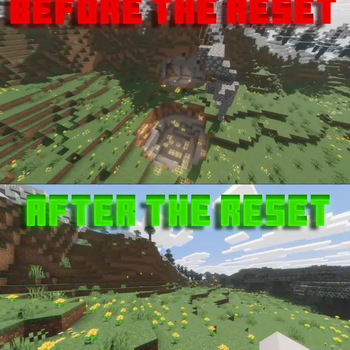
For pvp or any server that has rtp, unsaves all changes made to terrain once that player has left the area

17
Downloads
1
Followers
1 months ago
Updated
📦
1
Versions
equipmentworldgenbukkitpaperspigot
Download Latestv1.0.0View on Modrinth

📖About RTP Reset Lite

RTP Reset Lite

A lightweight RTP chunk reset plugin for keeping random teleport areas clean.


What is RTP Reset Lite?

RTP Reset Lite helps keep RTP areas cleaner by automatically restoring changed chunks after they unload.

It is made for servers that use random teleport systems and want a simple way to prevent RTP locations from being permanently destroyed, griefed, mined out, or left messy. and works well for cpvp practice servers.

This plugin is intentionally simple, lightweight, and easy to use.

Discord: https://discord.gg/A2Nx9kxDeB

Full version of the plugin at: RTP Reset


Features

  • Automatically resets changed RTP chunks
  • Helps keep random teleport areas clean
  • Lightweight design
  • Simple enable / disable control
  • World blacklist support
  • Config reload command
  • Status command
  • Paper 1.21+ support
  • Works well for survival, SMP, lifesteal, factions, and general multiplayer servers

Why use it?

Random teleport areas can get destroyed fast.

Players mine trees, break blocks, dig holes, leave floating blocks, grief terrain, or make the area look messy. Over time, RTP locations become ugly and unusable.

RTP Reset Lite helps fix that by restoring changed chunks after they unload, keeping RTP zones cleaner without needing a huge rollback plugin.


Commands

Command Description
/rtpresetlite Shows plugin help
/rtpresetlite status Shows current plugin status
/rtpresetlite reload Reloads the config
/rtpresetlite on Enables chunk resetting
/rtpresetlite off Disables chunk resetting

Permissions

Permission Description
rtpresetlite.admin Allows access to RTP Reset Lite commands

Configuration

The config is simple and easy to edit.

You can control whether the plugin is enabled and choose which worlds should be ignored.

Example:

enabled: true

blacklisted-worlds:
  - world_nether
  - world_the_end

👥 Team & Contributors

cutebow
cutebowOwner

⚙️ Compatibility

Environment
🖥️ Server-side
Loaders
bukkitpaperspigot
Minecraft Versions
1.211.21.11.21.21.21.31.21.41.21.51.21.61.21.7+4 more

🔗 Links

Modrinth Page