Logo
MINECRAFTBIBLE
Items
Items

All game items

Blocks
Blocks

Building blocks

Mobs
Mobs

Creatures & monsters

Biomes
Biomes

World biomes

Structures
Structures

Generated structures

Recipes
Recipes

Crafting guides

Advancements
Advancements

Achievements

Loot Tables
Loot Tables

Drop rates

Tags
Tags

Item groupings

All Versions
View all data →
Capes
Cape ArchiveNEW

Browse rare Minecon capes, OptiFine capes, and custom capes from players worldwide

Browse

Player Database
Player DatabasePopular

Search any player

Skin Browser
Skin Browser

Browse & download skins

Cape Gallery
Cape GalleryNEW

Minecon & OptiFine capes

Seed Vault
Seed Vault

Curated seeds

Learn

Guides
GuidesNew

Tutorials & tips

Blog
Blog

News & updates

Community

Community Hub
Community HubHub

Posts, discussions & more

All Versions
View community →
Seed Analyzer
Seed Analyzer

World seed analysis

Loot Explorer
Loot Explorer

Drop rates

Crafting Calculator
Crafting Calculator

Material planning

Enchant Calculator
Enchant Calculator

Probability math

Redstone Lab
Redstone Lab

Signal timing

Trading Profit
Trading Profit

Villager ROI

All Versions
View all tools →
Mods
Mods

Browse all mods

Plugins
Plugins

Server plugins

Resource Packs
Resource Packs

Textures & sounds

Shaders
Shaders

Visual enhancements

Datapacks
Datapacks

World logic

Scanner
Mod Intelligence

Scan & analyze any mod

All Versions
View all mods →
Loading...
IntroductionIntroductionVersion HistoryVersion HistoryGuidesGuidesBlog & NewsBlog & News
ItemsItemsBlocksBlocksMobsMobsRecipesRecipesBiomesBiomesStructuresStructuresAdvancementsAdvancementsLoot TablesLoot TablesTagsTags
ModsModsPluginsPluginsResource PacksResource PacksShadersShadersDatapacksDatapacks

MinecraftBible

The Ultimate Wiki

Logo
MINECRAFTBIBLE

The ultimate Minecraft reference. Every item, block, mob, and recipe documented with precision.

Community

  • Skin Browser
  • Cape Gallery
  • Seed Vault
  • Blog
  • Guides

Database

  • Items
  • Blocks
  • Mobs
  • Recipes
  • Biomes
  • Structures

Tools

  • Seed Analyzer
  • Mod Intelligence
  • Crafting Calculator
  • Enchant Calculator

Mods & Packs

  • Mods
  • Plugins
  • Resource Packs
  • Shaders
  • Datapacks

Site & Legal

  • About
  • Authors
  • Editorial Policy
  • Corrections
  • Contact
  • Privacy Policy
  • Terms of Service
  • DMCA
  • Sitemap

© 2026 MinecraftBible. Not affiliated with Mojang or Microsoft.

PrivacyTermsContact
ResurrectionChest
PluginGPL-3.0-only

ResurrectionChest

Let players make a death chest at home!

2.3K
Downloads
10
Followers
3 weeks ago
Updated
📦
9
Versions
equipmentgame-mechanicsutilitypaperpurpurspigot
Download Latestv2.2.4View on Modrinth

📖About ResurrectionChest

Discord Nightbreak Patreon Wiki

🟠 Why ResurrectionChest?

  • Never Lose Your Gear Again! Set up death chests that automatically collect your items when you die — no more dangerous retrieval runs, or worse, losing items in inaccessible places!
  • Simple Setup! Just place a chest, add a sign with [deathchest], and your gear is safe!
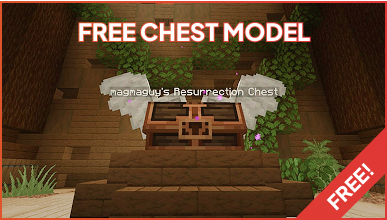
  • Custom Models! This plugin has FreeMinecraftModels integration for stunning visual upgrades!
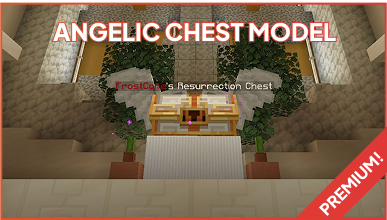
  • Premium & Free Model Packs! Choose from beautiful wooden chests (free DLC) or upgrade to premium chests for amazing designs!
  • Permission-Based Models! Control which players get access to different chest designs!
  • Double Chest Support! Works with single chests, double chests, and hoppers!
  • Plugin Compatibility! Designed to work seamlessly with protection plugins and other server systems!
  • Want an even better experience? Works great with EliteMobs, Free Minecraft Models, BetterStructures, and Resource Pack Manager — all free!

🟠 How to Setup

For Admins:

  1. Put the ResurrectionChest.jar into your server and restart your server
  2. You're done!

For Players:

  1. Place down a chest (can even be a double chest)
  2. While sneaking, place a sign on the chest (any type of sign)
  3. Write: [deathchest]
  4. That’s it!

🟠 Additional Downloads

🟠 Third Party Plugin Compatibility

This plugin was designed to avoid as many plugin conflicts as possible.
All it does is add items to a chest if the player has set that chest up properly.
It should not conflict with most protection systems, and death chests should get protected by other plugins with no issues.
Note: You need FreeMinecraftModels installed if you want to use ResurrectionChest with custom models.

🟠 Permissions

The main permission is resurrectionchest.use (true by default - use negative permissions to disable for groups/players).
Chest model permissions:

  • resurrectionchest.model.free - free model
  • resurrectionchest.model.premium- angelic model

🟠 View More by Magmaguy!

🟠 Partner servers

Matecraft is the official BetterStructures server! It’s run by me and is always up-to-date with the latest experimental features and new build packs. Cozy community, dedicated players — come see the plugins as they were designed to work!

elitesurvival.matecraft.org

👥 Team & Contributors

MagmaGuy
MagmaGuyOwner

⚙️ Compatibility

Environment
🖥️ Server-side
Loaders
paperpurpurspigot
Minecraft Versions
1.21.41.21.51.21.61.21.71.21.81.21.91.21.101.21.11+4 more

🔗 Links

Modrinth Page