Logo
MINECRAFTBIBLE
Items
Items

All game items

Blocks
Blocks

Building blocks

Mobs
Mobs

Creatures & monsters

Biomes
Biomes

World biomes

Structures
Structures

Generated structures

Recipes
Recipes

Crafting guides

Advancements
Advancements

Achievements

Loot Tables
Loot Tables

Drop rates

Tags
Tags

Item groupings

All Versions
View all data →
Capes
Cape ArchiveNEW

Browse rare Minecon capes, OptiFine capes, and custom capes from players worldwide

Browse

Player Database
Player DatabasePopular

Search any player

Skin Browser
Skin Browser

Browse & download skins

Cape Gallery
Cape GalleryNEW

Minecon & OptiFine capes

Seed Vault
Seed Vault

Curated seeds

Learn

Guides
GuidesNew

Tutorials & tips

Blog
Blog

News & updates

Community

Community Hub
Community HubHub

Posts, discussions & more

All Versions
View community →
Seed Analyzer
Seed Analyzer

World seed analysis

Loot Explorer
Loot Explorer

Drop rates

Crafting Calculator
Crafting Calculator

Material planning

Enchant Calculator
Enchant Calculator

Probability math

Redstone Lab
Redstone Lab

Signal timing

Trading Profit
Trading Profit

Villager ROI

All Versions
View all tools →
Mods
Mods

Browse all mods

Plugins
Plugins

Server plugins

Resource Packs
Resource Packs

Textures & sounds

Shaders
Shaders

Visual enhancements

Datapacks
Datapacks

World logic

Scanner
Mod Intelligence

Scan & analyze any mod

All Versions
View all mods →
Loading...
IntroductionIntroductionVersion HistoryVersion HistoryGuidesGuidesBlog & NewsBlog & News
ItemsItemsBlocksBlocksMobsMobsRecipesRecipesBiomesBiomesStructuresStructuresAdvancementsAdvancementsLoot TablesLoot TablesTagsTags
ModsModsPluginsPluginsResource PacksResource PacksShadersShadersDatapacksDatapacks

MinecraftBible

The Ultimate Wiki

Logo
MINECRAFTBIBLE

The ultimate Minecraft reference. Every item, block, mob, and recipe documented with precision.

Community

  • Player Database
  • Skin Browser
  • Cape Gallery
  • Community Hub
  • Seed Vault

Database

  • Items
  • Blocks
  • Mobs
  • Recipes
  • Biomes
  • Structures

Tools

  • Seed Analyzer
  • Mod Intelligence
  • Crafting Calculator
  • Enchant Calculator

Mods & Packs

  • Mods
  • Plugins
  • Resource Packs
  • Shaders
  • Datapacks

© 2026 MinecraftBible. Not affiliated with Mojang or Microsoft.

PrivacyTermsContact
RemmyChat 1.21.9 – Modern, Feature-Rich Minecraft Chat Plugin
PluginGPL-3.0-only

RemmyChat 1.21.9 – Modern, Feature-Rich Minecraft Chat Plugin

A modern Minecraft chat plugin with MiniMessage formatting, multi-channel support, private messaging, and advanced moderation tools.

477
Downloads
6
Followers
6 months ago
Updated
📦
6
Versions
socialutilitypaperpurpur
Download Latestv1.4.7View on Modrinth

📖About RemmyChat 1.21.9 – Modern, Feature-Rich Minecraft Chat Plugin

RemmyChat is a lightweight, feature-rich chat management solution for PaperMC servers that enhances player communication with a clean, modern design.


Version License Supporterd MC Version Documentation

Overview

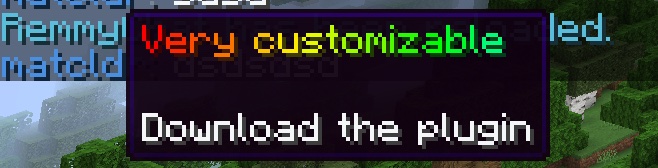
RemmyChat transforms your server's communication with a sleek, modern interface while providing powerful customization through MiniMessage formatting. From immersive proximity chat to comprehensive anti-spam features, RemmyChat balances simplicity with functionality to create the perfect chat experience.

Overview Image

Features

  • Advanced MiniMessage Formatting — Rich text with colors, gradients, hover effects, and clickable elements
  • Multi-Channel System — Global, local, staff, and trade channels with completely customizable formats
  • Proximity Chat — Configurable radius-based local chat for immersive gameplay
  • Private Messaging System — Seamless player-to-player communication with reply functionality
  • Message Toggle — Allow players to enable/disable private messages
  • Social Spy — Staff monitoring of player private messages
  • Flexible Permission System — Granular control over all plugin features and channels
  • Group-Based Formatting — Different chat formats based on player permissions
  • Custom Placeholders — Create reusable text elements for consistency across formats
  • Template System — Hover templates, channel prefixes, and name styles for easy configuration
  • Interactive Elements — Hoverable player names with customizable information tooltips
  • Automatic URL Detection — Link formatting with configurable click-to-open functionality
  • Chat Cooldown — Configurable anti-spam system to prevent message flooding
  • Message Persistence — Database storage for player preferences and chat history
  • PlaceholderAPI Integration — Unlimited customization possibilities
  • LuckPerms Integration — Seamless permission management
  • Optimized Performance — Minimal resource usage even on busy servers

Features Image

Symbols & Emoji Replacement

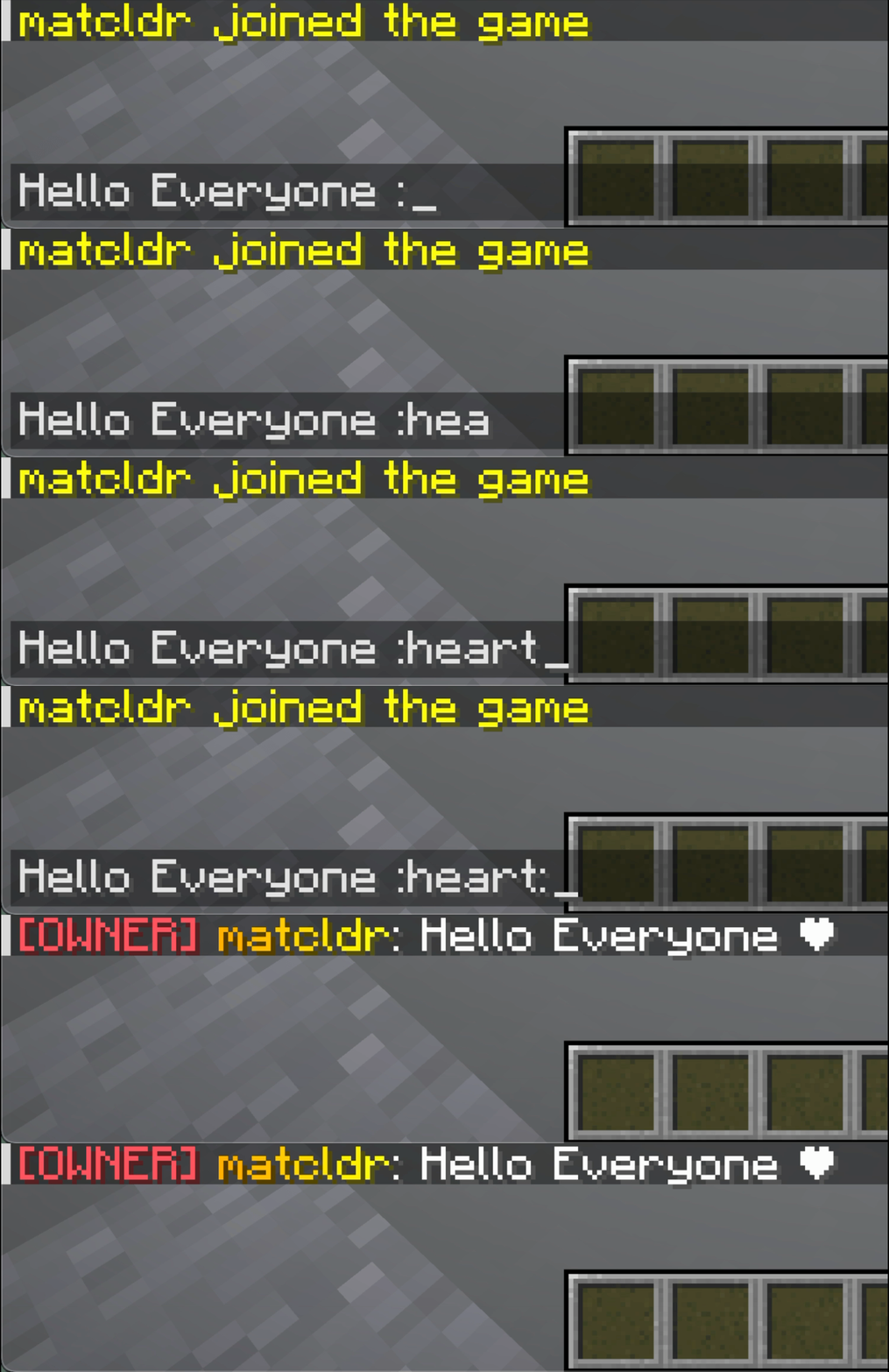
RemmyChat supports custom symbols and emoji replacement in chat messages. You can define your own codes (like :smile:, :diamond:, etc.) and their replacements (emoji, text, or MiniMessage) in a separate symbols.yml file. This feature works with both Unicode emojis and custom resource pack textures.
Symbols GIF

How it works

  • Players can type codes like :smile: in chat.
  • The plugin will automatically replace these codes with whatever you configure in symbols.yml.
  • Supports case-insensitive codes and dashes (e.g., :smile-face:).
  • Works seamlessly with resource packs for custom textures and emojis.

Example symbols.yml

symbols:
  ":smile:": "😄"
  ":heart:": "❤️"
  ":star:": "⭐"
  ":smile-face:": "😊"

You can add as many codes as you want. The replacement can be any string, emoji, or MiniMessage component. Resource pack textures will display correctly for players using the appropriate resource pack.

Getting Started

Installation is straightforward:

  1. Download the latest RemmyChat release
  2. Place the JAR file in your server's plugins folder
  3. Restart your server
  4. Configuration files will be generated automatically

For detailed setup instructions and advanced configuration, visit our official documentation.

Getting Started Image

Configuration

RemmyChat's configuration is highly flexible while remaining intuitive. Here's a sample of what you can accomplish:

Channel Configuration

# Channel configurations
channels:
  global:
    permission: "" # Empty means everyone can use
    radius: -1     # -1 means global chat
    prefix: ""     # No prefix for global
    hover: "player-info"
    display-name: ""

  local:
    permission: "remmychat.channel.local"
    radius: 100    # Chat radius in blocks
    prefix: "local" 
    hover: "local-chat"
    display-name: "<gray>[Local]</gray>"

  staff:
    permission: "remmychat.channel.staff"
    radius: -1
    prefix: "staff"
    hover: "staff-chat"
    display-name: "<gold>[Staff]</gold>"

Custom Formatting

# Group-based formatting with customizable styles
groups:
  admin:
    name-style: "admin"
    prefix: ""
    format: "%admin-hover% %player_name%: %default-message%"

  vip:
    name-style: "vip"
    prefix: ""
    format: "<click:suggest_command:'/msg %player_name%'><hover:show_text:'VIP Player'>%vip-prefix%</hover></click> %player_name%: %default-message%"

Interactive Templates

# Templates for reuse across formats
templates:
  hovers:
    player-info: "<#778899>Player information\n<#F8F9FA>Name: <#E8E8E8>%player_name%\n<#F8F9FA>Click to message"
    
  name-styles:
    default: "<#4A90E2>%player_name%"
    owner: "<bold><gradient:#FF0000:#FFAA00>%player_name%</gradient></bold>"
    admin: "<italic><color:#CC44FF>%player_name%</color></italic>"

Configuration Image

Commands

Command Description Permission
/remchat channel <name> Switch between chat channels remmychat.use
/remchat reload Reload plugin configuration remmychat.admin
/msg <player> <message> Send private message remmychat.msg
/reply <message> Reply to last private message remmychat.msg
/msgtoggle Toggle receiving private messages remmychat.msgtoggle
/socialspy Monitor private messages between players remmychat.socialspy

Permissions

Permission Description Default
remmychat.use Basic plugin access true
remmychat.msg Send private messages true
remmychat.msgtoggle Toggle private messages true
remmychat.msgtoggle.bypass Bypass message toggle op
remmychat.socialspy Use social spy feature op
remmychat.admin Administrative access op
remmychat.channel.<name> Access to specific channel Varies

Integration

PlaceholderAPI

RemmyChat automatically integrates with PlaceholderAPI if installed, allowing you to use any placeholders in your chat formats.

LuckPerms

When LuckPerms is detected, RemmyChat can use permission groups for chat formatting, simplifying setup for servers with existing permission structures.

For Developers

Building with Gradle

This project uses Gradle for building and requires Java 21 or higher.

To build:

./gradlew build

The output JAR will be in the build/libs directory.

Support & Development

  • Documentation: remmychat.noximity.com
  • Website: noximity.com
  • Issues & Feature Requests: Please use our GitHub issues tracker
  • Version: 1.4.7
  • License: GPL-3.0

👥 Team & Contributors

TehZombiJesus
TehZombiJesus
QA
matcldr
matcldr
Developer

⚙️ Compatibility

Environment
🖥️ Server-side
Loaders
paperpurpur
Minecraft Versions
1.21.9

🔗 Links

Modrinth Page
