MINECRAFTBIBLE
Loading...

[BIG UPDATE 🔥] 💰 multi-Currency Economy • Shop • Sell GUI • Physical Currency • ATM • Natural source currency⭐


RelishEconomy provides a solid economy foundation with multi-currency support, database flexibility, and seamless plugin integrations. Built for modern Minecraft servers with performance and reliability in mind.
🏦 Multi-Currency System - Support for multiple custom currencies
🚀 High Performance - Advanced caching with Caffeine for fast operations
🔧 Full Integration - Vault and PlaceholderAPI support
🗄️ Database Flexibility - SQLite and MySQL support
🌍 Multi-Language - Built-in English, Arabic, and Portuguese translations
| Component | Requirement |
|---|---|
| Minecraft | 1.21+ |
| Server | Paper, Purpur, or Paper-based forks |
| Java | 21+ |
| Soft Dependencies | Vault (recommended), PlaceholderAPI (optional) |
/balance, /pay, /baltop, /eco)/sellhand, /sellhotbar, /sellall)plugins folderconfig.yml# Quick setup commands
/re help # View all commands
/re version # Check plugin status
/re reload # Reload configuration
| Command | Description | Example |
|---|---|---|
/balance [player] [currency] |
Check balance | /bal coins |
/pay <player> <amount> |
Send money | /pay Steve 100 |
/baltop [currency] [page] |
View leaderboard | /baltop dollars 2 |
/currency <list|info> |
View currencies | /currency list |
/exchange <from> <to> <amount> |
Convert currencies | /exchange dollars coins 500 |
/shop ⭐ |
Open shop GUI | /shop |
/shop help ⭐ |
Show shop help | /shop help |
/sell [subcommands] ⭐ |
Open sell GUI | /sell price |
/re atm ⭐ |
Open ATM GUI | /re atm |
/sellhand |
Sell item in hand | /sellhand |
/sellhotbar |
Sell hotbar items | /sellhotbar |
/sellall |
Sell all items | /sellall confirm |
/withdraw <currency> <amount> ⭐ |
Get physical currency | /withdraw coins 10 |
| Command | Description | Example |
|---|---|---|
/eco <give|take|set> <player> <amount> |
Manage balances | /eco give Steve 1000 |
/re reload |
Reload configuration | /re reload |
/re migrate <plugin> <currency> |
Import from other plugins | /re migrate essentials dollars |
k = thousand (e.g., 5k = 5,000)m = million (e.g., 2m = 2,000,000) b = billion (e.g., 1b = 1,000,000,000)currencies:
dollars:
name: "dollars"
symbol: "$"
display-name: "Dollars"
color: "<green>"
default: true
starting-balance: 100.0
payments-enabled: true
permission: ""
decimals-enabled: true
exchange-rates:
coins: 0.01
physical-item:
material: PAPER
deposit-enabled: true
withdraw-enabled: true
name: "<green><bold>Dollar Bill"
lore:
- "<gray>Value: {formatted_amount}"
- "<gray>Owner: <white>{owner}"
- ""
- "<yellow>Shift + Right-Click to deposit"
crafting:
enabled: false
value: 100.0
amount: 1
coins:
name: "coins"
symbol: "◎"
display-name: "Coins"
color: "<gold>"
default: false
starting-balance: 50.0
payments-enabled: true
permission: ""
decimals-enabled: false
exchange-rates:
dollars: 100.0
physical-item:
material: GOLD_NUGGET
deposit-enabled: true
withdraw-enabled: true
name: "<gold><bold>Gold Coin"
lore:
- "<gray>Value: {formatted_amount}"
- "<gray>Owner: <white>{owner}"
- ""
- "<yellow>Shift + Right-Click to deposit"
custom-model-data: 2001
natural-source:
enabled: true
value-per-item: 1.0
match-any-meta: false
crafting:
enabled: false
value: 1.0
amount: 1
database:
  type: sqlite  # or mysql for networks

  mysql:
    host: localhost
    port: 3306
    database: relisheconomy
    username: root
    password: password
⭐ Physical currency notes and coins keep the owner name in their item metadata. /withdraw sets the owner to the player, crafted physical currency is rewritten to the crafting player, and custom model data can be applied per currency item.

⭐ Natural-source currency conversion can also turn configured gameplay item sources into the physical currency item itself. This is configured per currency.

⭐ ATM menu for physical currencies. Players can deposit supported currency items directly into the tray, switch between currencies, choose withdraw amounts, and confirm the action from a single GUI.
ATM Highlights:
ATM Config
atm:
  enabled: true
  block:
    material: LOOM
    require-sneak: true

exchange-fee-percentage: 2.5

currencies:
  dollars:
    exchange-rates:
      coins: 0.01  # 1 dollar = 0.01 coins
  coins:
    exchange-rates:
      dollars: 100.0  # 1 coin = 100 dollars
RelishEconomy can import data from other economy plugins:
Supported Plugins:
Migration Features:
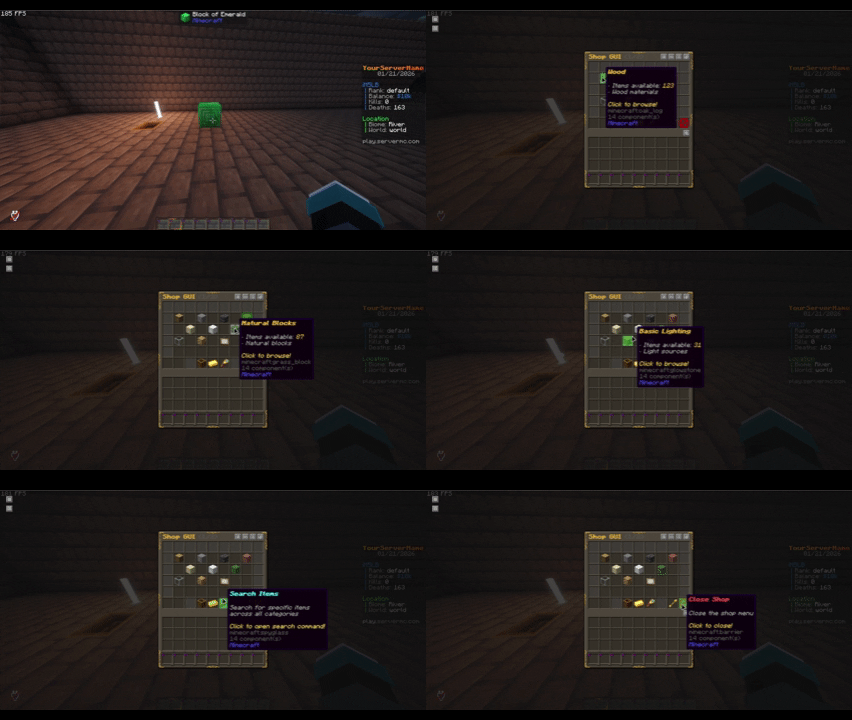
RelishEconomy's premium shop system provides a comprehensive item marketplace with intuitive GUI interfaces and flexible configuration options.

Core Shop Capabilities:
favorites.yml)page:slotshow-unpriced-items)Shop GUI Interface:
gui.yml)# shop.yml
shop:
enabled: true
buy-currency: "dollars"
buy-multiplier: 2.0
items-per-page: 28
show-unpriced-items: false
categories:
building_blocks:
display-name: "Building Blocks"
icon: STONE
enabled: true
slot: "1:0"
items:
- STONE
- COBBLESTONE
- BRICKS
# ... more items
Available Categories (Default Layout):
/shop                    # Open main shop interface
/shop help               # Show shop help
The sell system provides multiple ways for players to convert their items into currency, from quick command-based selling to an interactive GUI interface.
Sell Methods:
/sellhand, /sellhotbar, and /sellall commands (Free)
Advanced Sell Features:

/sellhand               # Sell the item in your hand
/sellhotbar             # Sell all sellable items in your hotbar
/sellall                # Sell all sellable items in inventory
/sellall confirm        # Confirm bulk selling with safety check
These commands work without a premium license. Only the sell GUI, composter selling, and sell block interactions are premium.
The premium Sell GUI provides an intuitive drag-and-drop interface for item selling:
GUI Features:
# prices.yml
sell:
  enabled: true

target-currency: "dollars"

prices:
  # Basic format
  STONE: 0.5
  COBBLESTONE: 0.3
  OAK_LOG: 1.5

  # Multi-currency format (if needed)
  DIAMOND: { price: 100, currency: "gems" }
  EMERALD: { price: 150, currency: "tokens" }
500+ Sellable Items Including:
Premium users can use physical blocks for convenient item selling:
Sell Block Features:
# config.yml
composter-selling:
  enabled: true
  cooldown: 500

sell-gui-block: COMPOSTER
shop-gui-block: EMERALD_BLOCK
Players can withdraw supported currencies into physical items, trade them, then deposit them back with Shift + Right-Click.
Each currency can control this separately:
currencies.<name>.physical-item.withdraw-enabledcurrencies.<name>.physical-item.deposit-enabledcurrencies.<name>.crafting.enabledcurrencies.<name>.physical-item.custom-model-datacurrencies.<name>.physical-item.natural-source.enabledCrafted physical currency also stores the crafting player as the owner, matching withdrawn notes and coins.
The premium shop GUI provides an elegant and user-friendly shopping experience with full customization options.
Interface Highlights:
The premium sell GUI offers an intuitive drag-and-drop experience for item selling.
Interface Features:
Premium users have full control over GUI appearance and behavior:
Customization Options:
Full economy provider implementation:
getBalance(), depositPlayer(), withdrawPlayer()/t deposit <amount> flow)Balance Placeholders:
%relisheconomy_balance_[currency]%        # Raw balance (e.g. 1000.50)
%relisheconomy_balance_[currency]_[type]_[style]%  # Formatting options (e.g. 1,250.00 via full_plain)
%relisheconomy_formatted_[currency]%      # Formatted balance (e.g. $1,000.50)
Leaderboard Placeholders:
%relisheconomy_baltop_[position]_[currency]_name%     # Player name at position
%relisheconomy_baltop_[position]_[currency]_balance%  # Formatted balance at position
%relisheconomy_baltop_[position]_[currency]_raw%      # Raw balance at position
%relisheconomy_rank_[currency]%                       # Player's rank
Currency Information:
%relisheconomy_currency_[currency]_symbol%       # Currency symbol
%relisheconomy_currency_[currency]_display%      # Display name
%relisheconomy_currency_[currency]_starting%     # Starting balance
%relisheconomy_currency_[currency]_default%      # Is default currency
Utility Placeholders:
%relisheconomy_hasenough_[amount]_[currency]%    # true/false if player has enough
%relisheconomy_exchangerate_[from]_[to]%         # Exchange rate between currencies
Server Statistics:
%relisheconomy_stats_currencies%    # Number of currencies
%relisheconomy_stats_accounts%      # Number of cached accounts
%relisheconomy_stats_dbtype%        # Database type (sqlite/mysql)
%relisheconomy_stats_dbhealthy%     # Database health status

Create lang/[code].yml files for any language:
# Example: lang/es.yml for Spanish
balance:
  current: "<green>Tu saldo: {balance}"
  other: "<green>Saldo de {player}: {balance}"
RelishEconomy is proprietary software. All rights reserved.
For full license terms, see LICENSE file.
To get a premium license key:
Made with ❤️ by M5LB