Logo
MINECRAFTBIBLE
Items
Items

All game items

Blocks
Blocks

Building blocks

Mobs
Mobs

Creatures & monsters

Biomes
Biomes

World biomes

Structures
Structures

Generated structures

Recipes
Recipes

Crafting guides

Advancements
Advancements

Achievements

Loot Tables
Loot Tables

Drop rates

Tags
Tags

Item groupings

All Versions
View all data →
Capes
Cape ArchiveNEW

Browse rare Minecon capes, OptiFine capes, and custom capes from players worldwide

Browse

Player Database
Player DatabasePopular

Search any player

Skin Browser
Skin Browser

Browse & download skins

Cape Gallery
Cape GalleryNEW

Minecon & OptiFine capes

Seed Vault
Seed Vault

Curated seeds

Learn

Guides
GuidesNew

Tutorials & tips

Blog
Blog

News & updates

Community

Community Hub
Community HubHub

Posts, discussions & more

All Versions
View community →
Seed Analyzer
Seed Analyzer

World seed analysis

Loot Explorer
Loot Explorer

Drop rates

Crafting Calculator
Crafting Calculator

Material planning

Enchant Calculator
Enchant Calculator

Probability math

Redstone Lab
Redstone Lab

Signal timing

Trading Profit
Trading Profit

Villager ROI

All Versions
View all tools →
Mods
Mods

Browse all mods

Plugins
Plugins

Server plugins

Resource Packs
Resource Packs

Textures & sounds

Shaders
Shaders

Visual enhancements

Datapacks
Datapacks

World logic

Scanner
Mod Intelligence

Scan & analyze any mod

All Versions
View all mods →
Loading...
IntroductionIntroductionVersion HistoryVersion HistoryGuidesGuidesBlog & NewsBlog & News
ItemsItemsBlocksBlocksMobsMobsRecipesRecipesBiomesBiomesStructuresStructuresAdvancementsAdvancementsLoot TablesLoot TablesTagsTags
ModsModsPluginsPluginsResource PacksResource PacksShadersShadersDatapacksDatapacks

MinecraftBible

The Ultimate Wiki

Logo
MINECRAFTBIBLE

The ultimate Minecraft reference. Every item, block, mob, and recipe documented with precision.

Community

  • Skin Browser
  • Cape Gallery
  • Seed Vault
  • Blog
  • Guides

Database

  • Items
  • Blocks
  • Mobs
  • Recipes
  • Biomes
  • Structures

Tools

  • Seed Analyzer
  • Mod Intelligence
  • Crafting Calculator
  • Enchant Calculator

Mods & Packs

  • Mods
  • Plugins
  • Resource Packs
  • Shaders
  • Datapacks

Site & Legal

  • About
  • Authors
  • Editorial Policy
  • Corrections
  • Contact
  • Privacy Policy
  • Terms of Service
  • DMCA
  • Sitemap

© 2026 MinecraftBible. Not affiliated with Mojang or Microsoft.

PrivacyTermsContact
Redcraft-SimpleTimber
PluginLicenseRef-All-Rights-Reserved

Redcraft-SimpleTimber

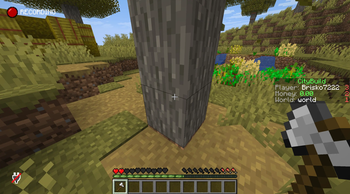
SimpleTimber is a lightweight Paper plugin that lets players chop full trees and mine connected ore veins in one action while sneaking with the correct tool. It is highly configurable .

21
Downloads
0
Followers
2 months ago
Updated
📦
1
Versions
equipmentbukkitfoliapaperpurpur
Download Latestv1.0.0View on Modrinth

📖About Redcraft-SimpleTimber

🌲⛏️ SimpleTimber

Speed up resource gathering without sacrificing survival fairness.
SimpleTimber adds two core mechanics to your Paper server:

  • Timber: break full trees at once
  • VeinMiner: mine connected ore veins in one go

It is designed to be fast, predictable, and admin-friendly.


✨ Features

🌳 Timber Mode

  • Breaks full trees from the lowest trunk block
  • Handles wider tree shapes (including acacia-style branching)
  • Optional leaf inclusion
  • Uses configurable horizontal scan distance to avoid missing side branches

🪨 VeinMiner Mode

  • Mines connected ore blocks of the same type
  • Configurable maximum blocks per chain
  • Optional Auto-Smelt for supported drops:
    • RAW_IRON → IRON_INGOT
    • RAW_GOLD → GOLD_INGOT
    • RAW_COPPER → COPPER_INGOT
    • ANCIENT_DEBRIS → NETHERITE_SCRAP

⚖️ Survival Balance & Anti-Exploit Behavior

  • Requires proper tools:
    • Axes for logs
    • Pickaxes for ores
  • Optional sneak requirement
  • Chain action only starts if the first block is actually mineable
    • Example: no chain trigger when trying to mine diamond ore with a stone pickaxe

🎒 Drop Behavior

  • Send drops to inventory or drop naturally on ground
  • Overflow handling: if inventory is full, only leftover items are dropped

🧩 Admin-Friendly Config

  • Enable/disable Timber and VeinMiner independently
  • Tune max blocks, radius, auto-smelt, drop mode, and general behavior
  • Works cleanly with normal survival progression

⚙️ Example Config

timber:
  enabled: true
  max-blocks: 256
  max-horizontal-distance: 7
  include-leaves: false
  drop-mode: "INVENTORY" # INVENTORY or DROP

veinminer:
  enabled: true
  max-blocks: 128
  auto-smelt: true
  drop-mode: "INVENTORY" # INVENTORY or DROP

general:
  require-sneak: true
  tools-only: true

  ✅ Requirements
Paper 1.21+
Java 21

💡 Why SimpleTimber?
SimpleTimber focuses on what servers actually need:

Faster gathering
Consistent gameplay rules
Minimal setup
No unnecessary complexity

👥 Team & Contributors

R
Redcrafter-CoderOwner

⚙️ Compatibility

Environment
🖥️ Server-side
Loaders
bukkitfoliapaperpurpur
Minecraft Versions
1.211.21.11.21.21.21.31.21.41.21.51.21.61.21.7+4 more

🔗 Links

Modrinth Page