PySpigot
A Python scripting engine (plugin) for Minecraft servers running Bukkit or one of its forks (Spigot, Paper, etc.).
📖About PySpigot
Description
PySpigot is a Python scripting engine for your Minecraft server. It allows you to create scripts, which act as "mini-plugins": they can register event listeners, commands, schedule tasks, and more!
PySpigot is a lot like Skript, but much more powerful. PySpigot utilizes Jython, a Python implementation that runs entirely on Java. This means that PySpigot scripts have full access to the entire Bukkit/Spigot API, as well as APIs of any other loaded plugins. In general, a PySpigot script can do anything Python can do, and anything a plugin can do as well.
Currently supports Bukkit server implementations, including Spigot, Paper, and Purpur, on Minecraft versions 1.16 and newer. There is currently an unofficial, preliminary release of PySpigot for BungeeCord available for open testing. Download it here.
For complete documentation on the plugin and writing scripts, visit the official documentation.

Join the discord for support and to stay in the loop regarding updates!
Features
- Load scripts on server start and via commands
- Stop, reload, and unload server scripts via commands
- Support for both single-file scripts and multi-file projects
- Register event listeners
- Register commands
- Schedule tasks (synchronous and asynchronous)
- Work with config files
- Register ProtocolLib packet listeners and send packets
- Register PlaceholderAPI placeholder expansions
- Comprehensive logging of errors and exceptions on a per-script basis, to file
- Load Java libraries you'd like to work with at runtime
- Write scripts in Python syntax
- Scripts have complete access to the Bukkit/Spigot API, as well as APIs of other plugins, so anything is possible.
- Support for working with SQL, Mongo, and redis servers
- And more!
Commands
/pyspigot reload: List some useful links (Documentation, Discord, etc.)/pyspigot info [scriptname/projectname]: Displays detailed information about a script or project, including uptime, registered listeners, commands, and more info/pyspigot listscripts: List loaded and unloaded scripts and projects/pyspigot load [scriptname/projectname]: Load a script or project with the given name/pyspigot loadlibrary [libraryname]: Load a Java library with the given name/pyspigot reloadall: Reload the entire plugin, including scripts, projects, libraries, and config/pyspigot reload [scriptname/projectname]: Reload a loaded script or project/pyspigot reloadconfig: Reload PySpigot's config.yml/pyspigot unload [scriptname/projectname]: Unload a script or project
Configuration
# If false, will disable collection of metrics information by bStats for PySpigot. You may also disable bStats server-wide in the bStats config.yml under /plugins/bStats.
metrics-enabled: true
# The delay for loading scripts (in ticks) after the server finishes loading.
script-load-delay: 20
# List of relocation rules for libraries in the libs folder. Format as <pattern>|<relocated pattern>
library-relocations: []
# Date/time format for timestamps in script log files, written in Java's SimpleDateFormat pattern: https://docs.oracle.com/en/java/javase/11/docs/api/java.base/java/time/format/DateTimeFormatter.html
log-timestamp-format: 'MMM dd yyyy HH:mm:ss'
# If true, will print log messages to console every time a script is loaded, run, and unloaded.
script-action-logging: true
# If true, will log all redis events to the console and to a script's logger. If false, will only log reconnect events (reconnect attempts and failures)
verbose-redis-logging: true
# If true, scripts will be automatically unloaded if a plugin the script depends on is unloaded. This is especially useful to ensure script shutdown tasks that require a depending plugin complete successfully (prior to the plugin being unloaded).
script-unload-on-plugin-disable: true
# Options that pertain to Jython. Changing options in this section requires a server restart.
jython-options:
  # If true, the Jython runtime will be initialized during plugin load/server start. If false, the Jython runtime will not be initialized until the first script is loaded.
  init-on-startup: true
  # A list of system properties that will be passed to Jython. For a complete list, see https://javadoc.io/doc/org.python/jython-standalone/latest/org/python/core/RegistryKey.html
  properties:
    - 'python.cachedir.skip=true'
  # A list of args to pass to Jython when initialized. Equivalent to sys.argv in Python.
  args:
    - ''
# Default values for script options. If one or more options are not defined in the script_options.yml for the script, then PySpigot will fall back to these values.
script-option-defaults:
  # For projects, the main script file for the project.
  main: 'main.py'
  # Whether the script is enabled
  enabled: true
  # An integer load priority for the script
  load-priority: 1
  # A list of plugins the script depends on
  plugin-depend: []
  # Whether script log messages should be logged to its respective log file
  file-logging-enabled: true
  # The minimum level to log to the console and to the script's log file
  min-logging-level: 'INFO'
  # The default permission level for permissions
  permission-default: 'op'
# Advanced debug options for scripts
debug-options:
  # If true, will print stack traces for all script-related exceptions to the server console
  print-stack-traces: false
  # If true, the plugin will show messages in console and on join (to players with the permission pyspigot.admin) when a newer version of PySpigot is available to download on spigotmc.org.
  show-update-messages: true
  # The logging level for Jython internals. Can be useful to set this to FINE or ALL for debugging purposes. Note: the server's root logger will also need to be configured to accept debug messages for Jython's debug messages to show.
  jython-logging-level: 'INFO'
  # If true, PySpigot will patch the threading module on script unload (if it's being used in the script) in order to prevent the server from hanging. For more information, see https://github.com/magicmq/pyspigot/issues/18#issue-3012022678
  patch-threading: true
Some Helpful Links
- Complete documentation: https://pyspigot-docs.magicmq.dev
- Source code: https://github.com/magicmq/pyspigot
- For developers, check out PySpigot's Javadocs here: https://javadocs.magicmq.dev/pyspigot/
Metrics
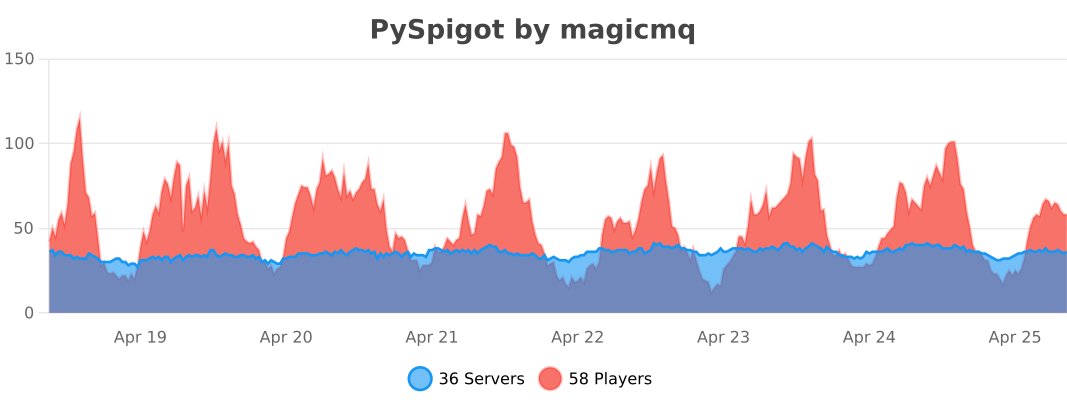
PySpigot collects anonymous server statistics via bStats, an open-source statistics collection service for Minecraft servers. You may opt out of this feature in the PySpigot config.yml or in /plugins/bStats/config.yml.