Logo
MINECRAFTBIBLE
Items
Items

All game items

Blocks
Blocks

Building blocks

Mobs
Mobs

Creatures & monsters

Biomes
Biomes

World biomes

Structures
Structures

Generated structures

Recipes
Recipes

Crafting guides

Advancements
Advancements

Achievements

Loot Tables
Loot Tables

Drop rates

Tags
Tags

Item groupings

All Versions
View all data →
Capes
Cape ArchiveNEW

Browse rare Minecon capes, OptiFine capes, and custom capes from players worldwide

Browse

Player Database
Player DatabasePopular

Search any player

Skin Browser
Skin Browser

Browse & download skins

Cape Gallery
Cape GalleryNEW

Minecon & OptiFine capes

Seed Vault
Seed Vault

Curated seeds

Learn

Guides
GuidesNew

Tutorials & tips

Blog
Blog

News & updates

Community

Community Hub
Community HubHub

Posts, discussions & more

All Versions
View community →
Seed Analyzer
Seed Analyzer

World seed analysis

Loot Explorer
Loot Explorer

Drop rates

Crafting Calculator
Crafting Calculator

Material planning

Enchant Calculator
Enchant Calculator

Probability math

Redstone Lab
Redstone Lab

Signal timing

Trading Profit
Trading Profit

Villager ROI

All Versions
View all tools →
Mods
Mods

Browse all mods

Plugins
Plugins

Server plugins

Resource Packs
Resource Packs

Textures & sounds

Shaders
Shaders

Visual enhancements

Datapacks
Datapacks

World logic

Scanner
Mod Intelligence

Scan & analyze any mod

All Versions
View all mods →
Loading...
IntroductionIntroductionVersion HistoryVersion HistoryGuidesGuidesBlog & NewsBlog & News
ItemsItemsBlocksBlocksMobsMobsRecipesRecipesBiomesBiomesStructuresStructuresAdvancementsAdvancementsLoot TablesLoot TablesTagsTags
ModsModsPluginsPluginsResource PacksResource PacksShadersShadersDatapacksDatapacks

MinecraftBible

The Ultimate Wiki

Logo
MINECRAFTBIBLE

The ultimate Minecraft reference. Every item, block, mob, and recipe documented with precision.

Community

  • Skin Browser
  • Cape Gallery
  • Seed Vault
  • Blog
  • Guides

Database

  • Items
  • Blocks
  • Mobs
  • Recipes
  • Biomes
  • Structures

Tools

  • Seed Analyzer
  • Mod Intelligence
  • Crafting Calculator
  • Enchant Calculator

Mods & Packs

  • Mods
  • Plugins
  • Resource Packs
  • Shaders
  • Datapacks

Site & Legal

  • About
  • Authors
  • Editorial Policy
  • Corrections
  • Contact
  • Privacy Policy
  • Terms of Service
  • DMCA
  • Sitemap

© 2026 MinecraftBible. Not affiliated with Mojang or Microsoft.

PrivacyTermsContact
PlugLoad
PluginLicenseRef-All-Rights-Reserved

PlugLoad

⚡ PlugLoad is a clean, live plugin management tool for Bukkit, Spigot, Paper, and Purpur servers which allows you to load, unload and reload plugins while the server is running⚡

15
Downloads
0
Followers
1 months ago
Updated
📦
2
Versions
managementtechnologyutilitybukkitpaperpurpurspigot
Download Latestv1.0View on Modrinth

📖About PlugLoad

⚡PlugLoad⚡

⚡ PlugLoad is a clean, command-only live plugin management tool for Bukkit, Spigot, Paper, and Purpur servers which allows you to load, unload and reload plugins while the server is running

It helps server administrators detect, load, unload, and reload plugins from the plugins folder


⚠️ Important safety notice

Live plugin loading, unloading, and reloading is never guaranteed to be fully safe on Bukkit-based servers. Some plugins keep background tasks, static state, services, hooks, classloader references, database connections, or dependencies that cannot always be cleaned perfectly while the server is running.

PlugLoad includes risk detection, warnings, confirmation prompts, cleanup attempts, and error logging, but the final safety of an action depends on the target plugin.
The server administrator takes full responsibility for using this plugin.


✨ Features

  • Command-only workflow with /plugload and /pg
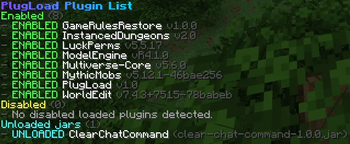
  • Detects enabled plugins, disabled plugins, and unloaded plugin .jar files
  • Lightweight plugin cache refresh
  • Dynamic tab completion based on current plugin state
  • Load plugins from the server plugins folder
  • Unload plugins with careful Bukkit cleanup steps
  • Reload plugins through unload + load where possible
  • Safety confirmation system for risky actions
  • Console logging for important actions
  • Error log file at plugins/PlugLoad/logs/errors.log
  • MiniMessage formatting when available, with graceful legacy fallback

🧭 Commands

Command Description
/pg help Shows the command list
/pg list Lists enabled, disabled, and unloaded plugin jars
/pg load <plugin> Loads a plugin from the plugins folder
/pg unload <plugin> Unloads a currently loaded plugin
/pg reload <plugin> Reloads a currently loaded plugin
/pg yes Confirms a pending risky action

/plugload can be used instead of /pg.

🔐 Permissions

Permission Default Description
plugload.admin OP Allows use of all PlugLoad commands

🛡️ Risk Detection

PlugLoad asks for confirmation before actions that appear risky, including cases such as:

  • The plugin has dependencies or soft dependencies
  • Other plugins depend on the target plugin
  • The plugin jar is large
  • The plugin looks like a core, API, hook, or library plugin
  • The plugin registers many commands, listeners, or scheduled tasks

When a risk is detected, PlugLoad will ask you to run:

/pg yes

within the configured timeout.

✅ Supported Platforms

  • Bukkit
  • Spigot
  • Paper
  • Purpur

📦 Installation

  1. Download the PlugLoad jar.
  2. Place it in your server's plugins folder.
  3. Restart the server.
  4. Configure plugins/PlugLoad/config.yml if needed.
  5. Use /pg help.

👥 Team & Contributors

wertPL
wertPLOwner

⚙️ Compatibility

Environment
🖥️ Server-side
Loaders
bukkitpaperpurpurspigot
Minecraft Versions
1.211.21.11.21.21.21.31.21.41.21.51.21.61.21.7+4 more

🔗 Links

Modrinth Page