
MINECRAFTBIBLE
Loading...
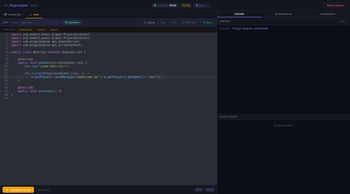

Plugin Engine is a live scripting IDE for Minecraft that lets you write and execute JavaScript or Java directly on a running server through a browser, without restarts or configuration. It also provides secure session-based access, persistent scripts, and
Write JavaScript or Java in your browser and execute it on your running server, no reload, no restart, no config.
Just drop the JAR into /plugins, type /plugin-engine in chat, click the link, and start coding. That's it.
Register Bukkit event handlers with a single line using the built-in scripting API:
on("playerJoin", (player) => {
  player.sendMessage("§aWelcome, §e" + player.name + "§a!");
  server.broadcast("§7[§a+§7] §a" + player.name + " joined.");
});

on("playerChat", (player, msg) => {
  if (msg.startsWith("!heal")) player.heal();
});
Press Ctrl+Enter → runs live on the server. No classes, no imports, no boilerplate.
Compile actual Java classes at runtime using the server's JDK. Supports implements Listener, extends EngineScript, or any class with a run(ScriptContext) method:
public class JoinScript extends EngineScript {
    @Override
    public void onEnable(ScriptContext ctx) {
        ctx.listen(PlayerJoinEvent.class, e ->
            e.getPlayer().sendMessage("§aWelcome!"));
        ctx.scheduleRepeating(() -> ctx.log("Tick!"), 20L, 20L);
    }
    @Override public void onDisable() {}
}
Requires JDK (not just JRE) on the server.
Plugin Engine automatically connects to the hosted cloud backend at gianhosting.tech. No API keys, no shared secrets, no reverse proxy setup required.
/plugin-engine → get a link → code.Share your scripts with the community and discover scripts made by others, directly from within the IDE.
Scripts keep running after your session ends, they are not tied to the browser tab.
/plugin-engine stop to explicitly stop all scripts (admin-only).plugins/PluginEngine/startup.json.Save and load your scripts from within the IDE. Storage can be:
global-storage: true, default), all players on the server share one script library.global-storage: false), each player gets their own scripts/{name}/ folder.1. Install
Drop PluginEngine-1.0.0.jar into your server's /plugins folder and restart.
2. Open the IDE
In Minecraft chat, type:
/plugin-engine
A clickable link appears in chat. Click it to open the browser IDE.
3. Write & Execute
Select JavaScript or Java, write your code, press Ctrl+Enter.
That's everything. No configuration required.
config.yml)| Option | Default | Description |
|---|---|---|
port |
5000 |
Port for the built-in web server (fallback if no backend) |
max-sessions |
5 |
Maximum number of simultaneous open sessions |
session-duration-minutes |
60 |
How long a session link stays valid |
global-storage |
true |
true = shared script folder, false = per-player folders |
backend-url |
wss://gianhosting.tech/plugin-wss |
WebSocket URL of the backend |
public-url |
https://gianhosting.tech |
Public URL used in session links |
server-id |
(auto-generated) | Unique identifier for this server, do not edit manually |
You don't have to change anything, everything is already setup.
| Permission | Default | Description |
|---|---|---|
pluginengine.use |
op |
Open a session and use the IDE |
pluginengine.admin |
op |
Access to /plugin-engine stop and revoke all |
| Command | Description |
|---|---|
/plugin-engine |
Open a new session and receive a link |
/plugin-engine revoke |
End your own sessions (scripts keep running) |
/plugin-engine stop |
Stop all running scripts [Admin] |
/plugin-engine status |
Show active sessions, script count, backend status |
/plugin-engine help |
Show all available commands |
Aliases: /pe, /peng
// Event handler
const id = on("eventName", callback)  // register
off(id)                                // unregister

// Events
"playerJoin"       // (player)
"playerQuit"       // (player)
"playerDeath"      // (player)
"playerRespawn"    // (player)
"playerMove"       // (player)
"playerInteract"   // (player)
"playerChat"       // (player, msg)
"blockBreak"       // (player, block)
"blockPlace"       // (player, block)

// Player
player.name           player.health      player.gameMode
player.sendMessage("§aText")
player.kick("reason")
player.teleport(x, y, z)
player.giveItem("DIAMOND", 1)
player.heal()
player.setGameMode("creative")

// Server
server.broadcast("§6Text")
server.runCommand("say hello")
server.getOnlinePlayers()
server.getTPS()

// Logging
log("message")
Does this work without internet?
Yes. If the cloud backend is unreachable, the plugin falls back to the built-in web server on the configured port. You can also set backend-url to blank in config.yml to always use the local server.
Are scripts persisted across reloads?
Scripts in memory are lost on /reload or restart. Use the Auto-Start feature in the IDE to re-execute scripts automatically on every server start.
Can players grief with this?
The pluginengine.use permission defaults to op. Only grant it to trusted players. Scripts run with full server permissions, treat them like plugins.
Why does Java compilation require JDK?
The javax.tools.JavaCompiler API used for runtime compilation is only available in a JDK, not a plain JRE. Most server hosting providers include a JDK; if yours doesn't, JavaScript still works without it.
Is the cloud backend safe?
The server authenticates to the backend using its auto-generated UUID server-id (stored in config.yml). This ID acts as a 128-bit random secret. Don't share your config.yml.
Built with Mozilla Rhino for JavaScript · Ace Editor · Fastify backend on Raspberry Pi via Cloudflare Tunnel