Logo
MINECRAFTBIBLE
Items
Items

All game items

Blocks
Blocks

Building blocks

Mobs
Mobs

Creatures & monsters

Biomes
Biomes

World biomes

Structures
Structures

Generated structures

Recipes
Recipes

Crafting guides

Advancements
Advancements

Achievements

Loot Tables
Loot Tables

Drop rates

Tags
Tags

Item groupings

All Versions
View all data →
Capes
Cape ArchiveNEW

Browse rare Minecon capes, OptiFine capes, and custom capes from players worldwide

Browse

Player Database
Player DatabasePopular

Search any player

Skin Browser
Skin Browser

Browse & download skins

Cape Gallery
Cape GalleryNEW

Minecon & OptiFine capes

Seed Vault
Seed Vault

Curated seeds

Learn

Guides
GuidesNew

Tutorials & tips

Blog
Blog

News & updates

Community

Community Hub
Community HubHub

Posts, discussions & more

All Versions
View community →
Seed Analyzer
Seed Analyzer

World seed analysis

Loot Explorer
Loot Explorer

Drop rates

Crafting Calculator
Crafting Calculator

Material planning

Enchant Calculator
Enchant Calculator

Probability math

Redstone Lab
Redstone Lab

Signal timing

Trading Profit
Trading Profit

Villager ROI

All Versions
View all tools →
Mods
Mods

Browse all mods

Plugins
Plugins

Server plugins

Resource Packs
Resource Packs

Textures & sounds

Shaders
Shaders

Visual enhancements

Datapacks
Datapacks

World logic

Scanner
Mod Intelligence

Scan & analyze any mod

All Versions
View all mods →
Loading...
IntroductionIntroductionVersion HistoryVersion HistoryGuidesGuidesBlog & NewsBlog & News
ItemsItemsBlocksBlocksMobsMobsRecipesRecipesBiomesBiomesStructuresStructuresAdvancementsAdvancementsLoot TablesLoot TablesTagsTags
ModsModsPluginsPluginsResource PacksResource PacksShadersShadersDatapacksDatapacks

MinecraftBible

The Ultimate Wiki

Logo
MINECRAFTBIBLE

The ultimate Minecraft reference. Every item, block, mob, and recipe documented with precision.

Community

  • Skin Browser
  • Cape Gallery
  • Seed Vault
  • Blog
  • Guides

Database

  • Items
  • Blocks
  • Mobs
  • Recipes
  • Biomes
  • Structures

Tools

  • Seed Analyzer
  • Mod Intelligence
  • Crafting Calculator
  • Enchant Calculator

Mods & Packs

  • Mods
  • Plugins
  • Resource Packs
  • Shaders
  • Datapacks

Site & Legal

  • About
  • Authors
  • Editorial Policy
  • Corrections
  • Contact
  • Privacy Policy
  • Terms of Service
  • DMCA
  • Sitemap

© 2026 MinecraftBible. Not affiliated with Mojang or Microsoft.

PrivacyTermsContact
player shop plugins
PluginApache-2.0

player shop plugins

A professional AFK player-shop plugin. Players transform into interactive stands when idle, featuring dynamic GUI slot sizes based on donor permissions, full custom NBT/lore item persistence, and automated server-tax configuration.

10
Downloads
0
Followers
1 months ago
Updated
📦
1
Versions
economygame-mechanicsutilitybukkitpaperspigot
Download Latestv1.0View on Modrinth

📖About player shop plugins

Here is a complete, professional overview of the plugin including requirements, features, and commands. You can copy and paste this directly onto your SpigotMC or BuiltByBit (McMarket) project page:

🏬 PlayerShopAFK
Turn idle players into profitable, interactive market stalls! PlayerShopAFK is a professional-grade economy plugin that allows players to set up dynamic shops and sell items seamlessly while being away from their computers (AFK).

📌 Requirements
Spigot / Paper (1.20+)

Vault (Requires a compatible economy plugin like EssentialsX, EconomyShopGUI, etc.)

✨ Key Features
NBT & Lore Persistence: Absolutely zero data loss. Keeps 100% of custom names, enchants, descriptions, and custom model data.

Anti-Duplication Safeguard: Advanced menu listeners securely clear inventory slots during pricing to prevent all item duplication glitches.

Rank-Based GUI Scaling: Dynamic chest layout sizes (from 3 to 6 rows) based on LuckPerms/donor ranks.

Automated Server Tax: Fully configurable built-in taxation system to balance your economy and prevent server inflation.

Crash & Persistence Proof: Holograms utilize scoreboard tags, automatically cleaning up ghost entities on startup even after abrupt server crashes.

💻 Commands & Permissions
Command Description Permission
/shop edit Opens the graphical interface to add/remove items and set prices. Default access
/shop open Activates the shop overhead hologram and enters AFK shop mode. Default access
/shop close Manually deactivates the shop and breaks down the hologram. Default access
👑 Rank Limits Configuration Permissions:
playershop.limit.default — Grants a 3-row inventory shop (27 slots).

playershop.limit.vip — Grants a 4-row inventory shop (36 slots).

playershop.limit.vip_plus — Grants a 5-row inventory shop (45 slots).

playershop.limit.admin — Grants a maximum 6-row inventory shop (54 slots).

⚙️ How it Works
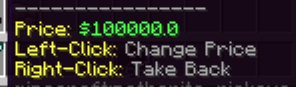
Run /shop edit, click an item from your inventory to securely move it into the shop, then type your desired price in the chat.

Position your character in the market space and execute /shop open My Awesome Store.

An immersive custom hologram will spawn over your head. As long as you remain stationary, other players can right-click you to browse and instantly buy your stock! Any movement or disconnection safely packs up your shop.

👥 Team & Contributors

moshesar7
moshesar7Owner

⚙️ Compatibility

Environment
🖥️ Server-side
Loaders
bukkitpaperspigot
Minecraft Versions
1.201.20.11.20.21.20.31.20.41.20.51.20.61.21+11 more

🔗 Links

Modrinth Page