Logo
MINECRAFTBIBLE
Items
Items

All game items

Blocks
Blocks

Building blocks

Mobs
Mobs

Creatures & monsters

Biomes
Biomes

World biomes

Structures
Structures

Generated structures

Recipes
Recipes

Crafting guides

Advancements
Advancements

Achievements

Loot Tables
Loot Tables

Drop rates

Tags
Tags

Item groupings

All Versions
View all data →
Capes
Cape ArchiveNEW

Browse rare Minecon capes, OptiFine capes, and custom capes from players worldwide

Browse

Player Database
Player DatabasePopular

Search any player

Skin Browser
Skin Browser

Browse & download skins

Cape Gallery
Cape GalleryNEW

Minecon & OptiFine capes

Seed Vault
Seed Vault

Curated seeds

Learn

Guides
GuidesNew

Tutorials & tips

Blog
Blog

News & updates

Community

Community Hub
Community HubHub

Posts, discussions & more

All Versions
View community →
Seed Analyzer
Seed Analyzer

World seed analysis

Loot Explorer
Loot Explorer

Drop rates

Crafting Calculator
Crafting Calculator

Material planning

Enchant Calculator
Enchant Calculator

Probability math

Redstone Lab
Redstone Lab

Signal timing

Trading Profit
Trading Profit

Villager ROI

All Versions
View all tools →
Mods
Mods

Browse all mods

Plugins
Plugins

Server plugins

Resource Packs
Resource Packs

Textures & sounds

Shaders
Shaders

Visual enhancements

Datapacks
Datapacks

World logic

Scanner
Mod Intelligence

Scan & analyze any mod

All Versions
View all mods →
Loading...
IntroductionIntroductionVersion HistoryVersion HistoryGuidesGuidesBlog & NewsBlog & News
ItemsItemsBlocksBlocksMobsMobsRecipesRecipesBiomesBiomesStructuresStructuresAdvancementsAdvancementsLoot TablesLoot TablesTagsTags
ModsModsPluginsPluginsResource PacksResource PacksShadersShadersDatapacksDatapacks

MinecraftBible

The Ultimate Wiki

Logo
MINECRAFTBIBLE

The ultimate Minecraft reference. Every item, block, mob, and recipe documented with precision.

Community

  • Player Database
  • Skin Browser
  • Cape Gallery
  • Community Hub
  • Seed Vault

Database

  • Items
  • Blocks
  • Mobs
  • Recipes
  • Biomes
  • Structures

Tools

  • Seed Analyzer
  • Mod Intelligence
  • Crafting Calculator
  • Enchant Calculator

Mods & Packs

  • Mods
  • Plugins
  • Resource Packs
  • Shaders
  • Datapacks

© 2026 MinecraftBible. Not affiliated with Mojang or Microsoft.

PrivacyTermsContact
PiglysUtilityTweaks
PluginGPL-3.0-only

PiglysUtilityTweaks

Customize world borders, game rules, crafting recipes, etc. in many ways beyond Vanilla. All changes can be enabled/disabled with config options.

170
Downloads
3
Followers
3 months ago
Updated
📦
8
Versions
game-mechanicsmanagementutilitypaper
Download Latestv1.4.2View on Modrinth

📖About PiglysUtilityTweaks

Pigly's Utility Tweaks

A plugin to provide customization to SMP servers, with configurable tweaks.

Tweaks

Configuration listed in this documentation is not guaranteed to be the default configuration.

World Border

enabled: true
overworld: 10000
nether: 7500
end: 20000

This allows admins to set a different world border for each dimension.

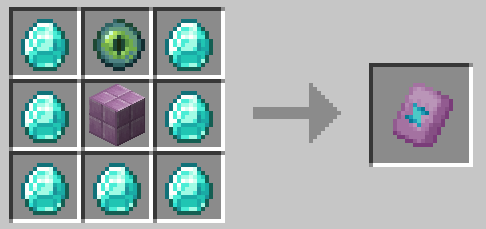
Netherite

lootBoost: true
netheriteUpgradeRecipe: true
netheriteDupeRecipe:
    enabled: true
    useDiamondBlocks: false

This allows admins to control renewability of netherite and obtainability of netherite upgrade templates.

This is useful for servers with short world borders.
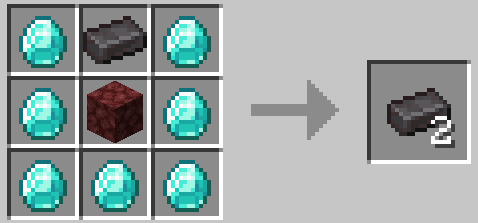
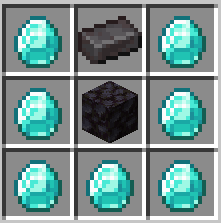
Netherite dupe recipe

Recipe in crafting grid

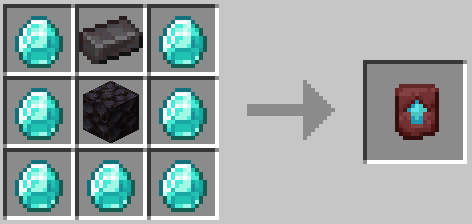
Netherite upgrade recipe

Recipe in crafting grid

Golden Apples

lightGoldenAppleCraft:
    enabled: true
    goldUsed: 4
enableNotchAppleCraft: false

This allows admins to modify the golden apple recipe, and enable crafting of enchanted golden apples.
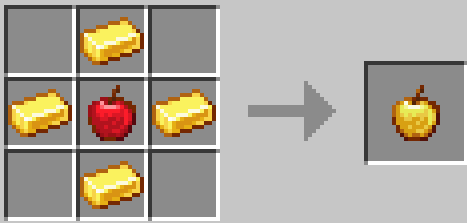
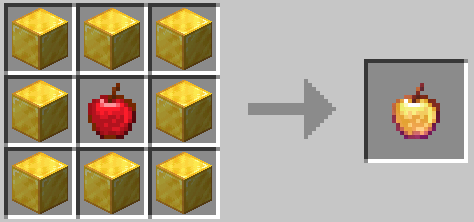
A possible golden apple recipe

Possible recipe in crafting grid

Enchanted golden apple recipe

Recipe in crafting grid

Locator Bar

locatorBar:
    overworld: false
    nether: false
    end: true

This allows changing locator bar status by dimension, also allowing a fix for a bug in Paper where locator bar works in the Nether even when disabled by a game rule.

Events

enableEnd: true
pvp: true #Removed in 1.4.0

These options are useful for events. PvP can be used for a grace period, and enableEnd can be used for an end fight.

Unlike Vanilla, PvP & end access can be toggled at any time with a command.

Cobwebs

craftableCobwebs:
    enabled: true
    resultNumber: 1

This allows a crafting recipe for cobwebs, and allowing the number of cobwebs crafted to be set.
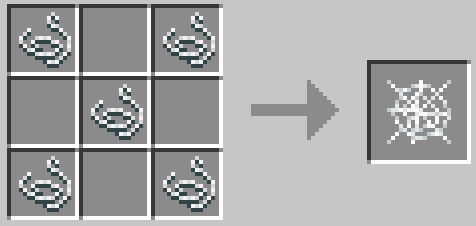
Cobweb recipe with resultNumber: 1

Recipe in crafting grid

Dimension-Based Difficulty

difficulty: #PEACEFUL, EASY, NORMAL, HARD
    overworld: HARD
    nether: HARD
    end: HARD

This must be in all caps to be parsed correctly by Paper's difficulty API.

Sleep Percentage

sleepPercentage: 100

This just sets the sleepPercentage game rule. It is here to make resetting worlds easier.

Anvil Tweaks

anvilTweaks:
    enable: true
    disableTooExpensive: true
    decreaseCost: true

If enable: false is set, then neither of the other settings in this category will apply.

decreaseCost: true halves the cost of enchantments.

End Replacements

endReplacements:
    elytraCraftingRecipe: true
    endStoneRecipe: true
    chorusFlowerRecipe: true
    spireTrimRecipe: true

Creates crafting recipes for items that are cut off without end access.
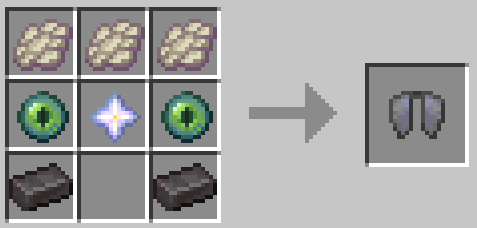
Elytra crafting recipe

Recipe in crafting grid

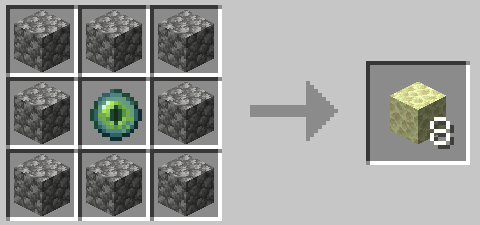
End stone crafting recipe, uses any type of cobblestone

Recipe in crafting grid

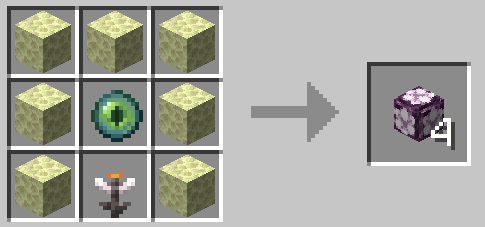
Chorus flower recipe

Recipe in crafting grid

Spire trim recipe

Recipe in crafting grid

Enchantment Tweaks

enchantmentTweaks:
    enabled: true
    prot:
        enabled: true
        maxLevel: 3
    sharp:
        enabled: true
        maxLevel: 4
    power:
        enabled: true
        maxLevel: 4

Allows setting max levels for enchantments.

PvP Settings byDimension

pvp:
    overworld: true
    nether: true
    end: true

These settings set the game rule for PvP by dimension, so you could do things like disabling PvP in the end.

Auto Restock

autoRestock: false

Auto Restock makes villagers never run out of stock. By default, it is set to false for a more vanilla-like experience.

👥 Team & Contributors

Pigly3
Pigly3Owner

⚙️ Compatibility

Environment
🖥️ Server-side
Loaders
paper
Minecraft Versions
1.21.11

🔗 Links

Modrinth Page