Logo
MINECRAFTBIBLE
Items
Items

All game items

Blocks
Blocks

Building blocks

Mobs
Mobs

Creatures & monsters

Biomes
Biomes

World biomes

Structures
Structures

Generated structures

Recipes
Recipes

Crafting guides

Advancements
Advancements

Achievements

Loot Tables
Loot Tables

Drop rates

Tags
Tags

Item groupings

All Versions
View all data →
Capes
Cape ArchiveNEW

Browse rare Minecon capes, OptiFine capes, and custom capes from players worldwide

Browse

Player Database
Player DatabasePopular

Search any player

Skin Browser
Skin Browser

Browse & download skins

Cape Gallery
Cape GalleryNEW

Minecon & OptiFine capes

Seed Vault
Seed Vault

Curated seeds

Learn

Guides
GuidesNew

Tutorials & tips

Blog
Blog

News & updates

Community

Community Hub
Community HubHub

Posts, discussions & more

All Versions
View community →
Seed Analyzer
Seed Analyzer

World seed analysis

Loot Explorer
Loot Explorer

Drop rates

Crafting Calculator
Crafting Calculator

Material planning

Enchant Calculator
Enchant Calculator

Probability math

Redstone Lab
Redstone Lab

Signal timing

Trading Profit
Trading Profit

Villager ROI

All Versions
View all tools →
Mods
Mods

Browse all mods

Plugins
Plugins

Server plugins

Resource Packs
Resource Packs

Textures & sounds

Shaders
Shaders

Visual enhancements

Datapacks
Datapacks

World logic

Scanner
Mod Intelligence

Scan & analyze any mod

All Versions
View all mods →
Loading...
IntroductionIntroductionVersion HistoryVersion HistoryGuidesGuidesBlog & NewsBlog & News
ItemsItemsBlocksBlocksMobsMobsRecipesRecipesBiomesBiomesStructuresStructuresAdvancementsAdvancementsLoot TablesLoot TablesTagsTags
ModsModsPluginsPluginsResource PacksResource PacksShadersShadersDatapacksDatapacks

MinecraftBible

The Ultimate Wiki

Logo
MINECRAFTBIBLE

The ultimate Minecraft reference. Every item, block, mob, and recipe documented with precision.

Community

  • Skin Browser
  • Cape Gallery
  • Seed Vault
  • Blog
  • Guides

Database

  • Items
  • Blocks
  • Mobs
  • Recipes
  • Biomes
  • Structures

Tools

  • Seed Analyzer
  • Mod Intelligence
  • Crafting Calculator
  • Enchant Calculator

Mods & Packs

  • Mods
  • Plugins
  • Resource Packs
  • Shaders
  • Datapacks

Site & Legal

  • About
  • Authors
  • Editorial Policy
  • Corrections
  • Contact
  • Privacy Policy
  • Terms of Service
  • DMCA
  • Sitemap

© 2026 MinecraftBible. Not affiliated with Mojang or Microsoft.

PrivacyTermsContact
peanut-sign-logs
PluginLicenseRef-All-Rights-Reserved

peanut-sign-logs

This plugin automatically logs every message written on any sign in-game.

55
Downloads
2
Followers
2 months ago
Updated
📦
13
Versions
managementtechnologyutilitybukkitpaperpurpur
Download Latestv26.1.2View on Modrinth

📖About peanut-sign-logs

About

This plugin automatically logs every message written on any sign in-game, including all standard signs and hanging signs across supported Minecraft versions. Whenever a player places, edits, or updates a sign, the plugin captures the full text and logs it directly to the server console in real time.

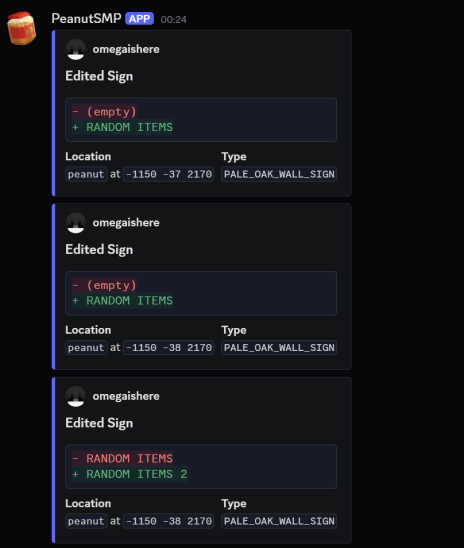
It also includes built-in Discord webhook support, allowing all sign activity to be mirrored to a Discord channel for moderation and monitoring purposes. Webhook logs can include useful information such as;

  • Player Name,
  • World Name,
  • Coords of the sign,
  • Sign type (oak sign, hanging sign, etc.),
  • Full sign text/content
  • Timestamp of the action

The plugin is designed for moderation, staff logging, and anti-abuse purposes, making it easy to track inappropriate sign usage, advertisements, hidden messages, or player activity across the server.

Features

  • Supports all sign variants, including hanging signs.
  • Real-time console logging.
  • Discord webhook integration.
  • Clean and configurable message formatting.
  • Lightweight and optimized performance.
  • Compatible with modern Minecraft versions. (1.21.x+)
  • Detailed logging with location and player information.

Default Configuration

# Messages format in console
console:
  edited: "<player> edited <sign> in <world> at X=<x> Y=<y> Z=<z>: [<old>] -> [<new>]"
  removed: "<player> removed <sign> in <world> at X=<x> Y=<y> Z=<z>: [<front>] [<back>]"

webhook:
  enabled: false
  url: https://discord.com/api/webhooks/...
  edited:
    embeds:
      - title: Edited Sign
        description: |-
          ```diff
          - <old>
          + <new>
          ```
        fields:
          - name: Location
            value: "`<world>` at `<x> <y> <z>`"
            inline: true
          - name: Type
            value: "`<sign>`"
            inline: true
        author:
          name: <player>
          icon_url: https://mc-heads.net/avatar/<player>
        color: 6514417
  removed:
    embeds:
      - title: Removed Sign
        fields:
          - name: Front
            value: <front>
            inline: true
          - name: Back
            value: <back>
            inline: true
          - name: Location
            value: "`<world>` at `<x> <y> <z>`"
            inline: false
          - name: Type
            value: "`<sign>`"
            inline: false
        author:
          name: <player>
          icon_url: https://mc-heads.net/avatar/<player>
        color: 15680580

empty:
  text: (empty)
  player: (Unknown)

Commands

  • /peanut-sign-logs reload - Reloads config and messages.
  • /peanut-sign-logs version - Shows plugin version.

Permissions

peanutsignlogs.admin - Access to reload the plugin, and view the plugin version.

Support

If you encounter any issues, bugs, or need assistance while using the plugin, feel free to join our Discord server. Support is available for setup help, configuration questions, troubleshooting, and general plugin assistance.

👥 Team & Contributors

00retromf
00retromfOwner

⚙️ Compatibility

Environment
🖥️ Server-side
Loaders
bukkitpaperpurpur
Minecraft Versions
26.1.2

🔗 Links

Modrinth Page