Logo
MINECRAFTBIBLE
Items
Items

All game items

Blocks
Blocks

Building blocks

Mobs
Mobs

Creatures & monsters

Biomes
Biomes

World biomes

Structures
Structures

Generated structures

Recipes
Recipes

Crafting guides

Advancements
Advancements

Achievements

Loot Tables
Loot Tables

Drop rates

Tags
Tags

Item groupings

All Versions
View all data →
Capes
Cape ArchiveNEW

Browse rare Minecon capes, OptiFine capes, and custom capes from players worldwide

Browse

Player Database
Player DatabasePopular

Search any player

Skin Browser
Skin Browser

Browse & download skins

Cape Gallery
Cape GalleryNEW

Minecon & OptiFine capes

Seed Vault
Seed Vault

Curated seeds

Learn

Guides
GuidesNew

Tutorials & tips

Blog
Blog

News & updates

Community

Community Hub
Community HubHub

Posts, discussions & more

All Versions
View community →
Seed Analyzer
Seed Analyzer

World seed analysis

Loot Explorer
Loot Explorer

Drop rates

Crafting Calculator
Crafting Calculator

Material planning

Enchant Calculator
Enchant Calculator

Probability math

Redstone Lab
Redstone Lab

Signal timing

Trading Profit
Trading Profit

Villager ROI

All Versions
View all tools →
Mods
Mods

Browse all mods

Plugins
Plugins

Server plugins

Resource Packs
Resource Packs

Textures & sounds

Shaders
Shaders

Visual enhancements

Datapacks
Datapacks

World logic

Scanner
Mod Intelligence

Scan & analyze any mod

All Versions
View all mods →
Loading...
IntroductionIntroductionVersion HistoryVersion HistoryGuidesGuidesBlog & NewsBlog & News
ItemsItemsBlocksBlocksMobsMobsRecipesRecipesBiomesBiomesStructuresStructuresAdvancementsAdvancementsLoot TablesLoot TablesTagsTags
ModsModsPluginsPluginsResource PacksResource PacksShadersShadersDatapacksDatapacks

MinecraftBible

The Ultimate Wiki

Logo
MINECRAFTBIBLE

The ultimate Minecraft reference. Every item, block, mob, and recipe documented with precision.

Community

  • Skin Browser
  • Cape Gallery
  • Seed Vault
  • Blog
  • Guides

Database

  • Items
  • Blocks
  • Mobs
  • Recipes
  • Biomes
  • Structures

Tools

  • Seed Analyzer
  • Mod Intelligence
  • Crafting Calculator
  • Enchant Calculator

Mods & Packs

  • Mods
  • Plugins
  • Resource Packs
  • Shaders
  • Datapacks

Site & Legal

  • About
  • Authors
  • Editorial Policy
  • Corrections
  • Contact
  • Privacy Policy
  • Terms of Service
  • DMCA
  • Sitemap

© 2026 MinecraftBible. Not affiliated with Mojang or Microsoft.

PrivacyTermsContact
Magnet
PluginGPL-3.0-only

Magnet

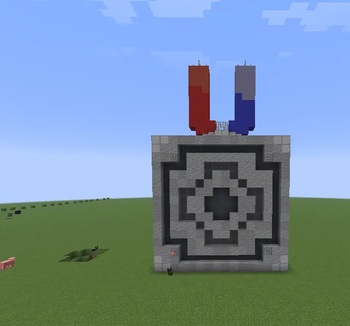
A plugin for the Magnet structure (schematic for the Litematica mod, available in the GitHub repository) and the Magnet item.

25
Downloads
0
Followers
1 months ago
Updated
📦
3
Versions
game-mechanicstechnologyutilitypaper
Download Latestv0.1.2View on Modrinth

📖About Magnet

Magnet

Magnet is a Paper plugin for Minecraft that adds portable magnets and stationary magnetic cores.

Portable magnets attract nearby dropped metal items while held by a player. Stationary magnetic cores are 2x2x2 block structures that pull dropped metal items toward their center.

Features

  • Portable magnet item issued with /magnet give
  • Portable magnets work from the main hand and off hand
  • Stationary 2x2x2 magnetic cores
  • Configurable core radius and strength
  • Core material profiles configurable in config.yml
  • Magnetic frame scanning around cores
  • Damaged cores disable attraction until repaired or rescanned
  • Core diagnostics with /magnet core info <id>
  • Saved cores in cores.yml
  • English and Russian messages
  • Example structure in schematic/Magnet.litematic

Requirements

  • Minecraft / Paper: 1.21.11
  • Java: 21

Commands

Command Description
/magnet Shows help
/magnet give Gives the player a portable magnet
/magnet core create <id> [radius] [strength] Creates a core from a 2x2x2 structure
/magnet core createat <id> <x> <y> <z> [radius] [strength] Creates a core at coordinates
/magnet core remove <id> Removes a saved core
/magnet core list Lists saved cores
/magnet core info <id> Shows core diagnostics
/magnet core rescan <id> Rescans the core frame
/magnet core refresh <id> Recalculates the core after replacing blocks
/magnet core set <id> <radius;strength> <value> Changes one core's radius or strength
/magnet core reload Reloads cores and settings
/magnet profile list Lists material profiles
/magnet profile info <material> Shows one material profile
/magnet profile set <material> <radius;strength;priority> <value> Updates a material profile
/magnet profile reload Reloads material profiles

Portable Magnet

The portable magnet is an amethyst shard marked with PersistentDataContainer, so the plugin can distinguish it from a regular item.

Every 2 ticks, the plugin checks online players. If a player is holding a portable magnet, supported dropped items within 7 blocks are pulled toward the player.

Strongly attracted items include iron items, chainmail armor, anvils, rails, minecarts, buckets, shears, compasses, and similar metal items.

Netherite items are attracted with reduced force.

Magnetic Cores

A stationary magnetic core is created from a complete 2x2x2 cube of configured core materials.

Look at one of the eight core blocks and run:

/magnet core create <id>

👥 Team & Contributors

Garde1
Garde1Owner

⚙️ Compatibility

Environment
🖥️ Server-side
Loaders
paper
Minecraft Versions
1.21.11

🔗 Links

Modrinth Page