

Open Inventory
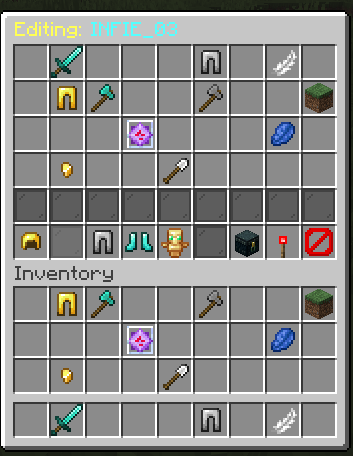
OpenInv is a powerful Minecraft admin plugin that lets staff view and edit player inventories and ender chests using /inv commands, featuring a modern GUI, database-backed inventory snapshots, rollback support, and multiple Minecraft version support.
📖About Open Inventory
🎒 OpenInv – Ultimate Multi-World Inventory Suite
OpenInv is a professional-grade administration plugin designed for Paper, Spigot, and Bukkit servers. It provides staff members with absolute control over player data through a sleek, interactive GUI system. Whether a player is online in another world or completely offline, OpenInv ensures you can always manage their items with precision and security.
🚀 What’s New in v1.4? (The Premium GUI & Logging Update)
- Ender Chest GUI Overhaul: The Ender Chest viewer (
/invec) has been fully upgraded! It now features quick-access buttons to switch to the player's inventory, clear the Ender Chest, and exit. - Advanced Command Logging: Security is paramount. We've introduced a dedicated
/logs/folder. Every OpenInv command executed by staff is now strictly logged with timestamps, the executor's name, and their exact location, ensuring 100% staff accountability. - Premium
/openinv infoMenu: A brand-new, beautifully styled in-game info command. It features interactive links and a dynamic version checker that automatically alerts you if an update is available! - Enhanced Background Auto-Save: Optimized MySQL and SQLite auto-saving logic ensures that any live edits made to inventories or Ender Chests are securely saved without ever lagging the main server thread.
⭐ Core Features
🎒 Advanced GUI Management
- Live Interactive Editing: Watch items move in real-time as a player organizes their inventory.
- Native Multi-World Support: Track and edit inventories for different worlds natively without external bridges.
- Shulker Box Peeking: Right-click any Shulker Box inside an OpenInv GUI to see its contents without placing it down.
🕒 Snapshot Time Machine
- Automatic Backups: Silently saves player inventories in the background at configurable intervals.
- Death Captures: Automatically takes a perfect snapshot of a player's inventory the exact second they die.
- Visual History: Use
/openinv history <player>to open a menu of past saves. Click a backup to instantly restore lost items.
🛡️ Unbreakable Security & Protections
- Master Modify Key: Only staff with
openinv.modifycan move items. Others are locked in "View-Only" mode. - Rank Exemption: Apply
openinv.exemptto Admins to prevent lower-ranked staff from opening their inventory. - The Override System: High-ranking Head Admins can use
openinv.overrideto bypass exemptions in emergencies.
❄️ Investigation Tools
- Inventory Freeze: Use
/openinv freeze <player>to lock a player's inventory. - Global Item Search: Use
/openinv search <item> <player>to instantly find if a player is hiding specific or illegal items.
⚡ Commands Cheat Sheet
Here is every single command available in OpenInv.
Base Commands & Aliases
| Command | Description |
|---|---|
/openinv |
The main command to access all sub-features. |
/invsee |
A direct alias for /openinv. |
/inv <player> |
Shortcut for /openinv check (Opens an online player's inventory). |
/invec <player> |
Shortcut for /openinv echeck (Opens an online player's Ender Chest). |
/offlineinv <player> [world] |
Shortcut for /openinv offlineinv (Opens an offline player's inventory). |
/offlineec <player> [world] |
Shortcut for /openinv offlineec (Opens an offline player's Ender Chest). |
/invhistory <player> |
Shortcut for /openinv invhistory (View inventory backup history). |
/echistory <player> |
Shortcut for /openinv echistory (View Ender Chest backup history). |
Subcommands (/openinv <subcommand>)
| Subcommand | Description |
|---|---|
help |
Displays the help menu with hover descriptions. |
info |
View plugin info, version update status, and quick links. |
check <player> |
Open a live player's inventory. |
echeck <player> |
Open a live player's Ender Chest. |
offlineinv <player> [world] |
Open an offline player's inventory. |
offlineec <player> [world] |
Open an offline player's Ender Chest. |
invhistory <player> |
Open the visual snapshot history for a player's inventory. |
echistory <player> |
Open the visual snapshot history for a player's Ender Chest. |
search <item> <player> |
Search for a specific item in a player's inventory. |
freeze <player> |
Lock a player's inventory (prevents usage/drops/movement). |
unfreeze <player> |
Unlock a player's inventory. |
preview <id> |
Preview a specific inventory snapshot by its database ID. |
reload |
Reloads config.yml, messages.yml, and reconnects the database if needed. |
🔑 Permissions Breakdown
Every single permission node is documented here for granular setup (e.g., with LuckPerms).
Global Access
openinv.*: Gives access to absolutely all OpenInv commands and features.openinv.admin: Gives access to all administrative commands (freeze, history, search, override).
Usage Permissions
openinv.use: Basic access required to use the base command and help menu.openinv.check: Permission to use/invor/openinv check.openinv.enderchest: Permission to use/invecor/openinv echeck.openinv.offlinecheck: Permission to use/offlineinv.openinv.offlineecheck: Permission to use/offlineec.openinv.self: Allows a player to view their own inventory/enderchest via the GUI.openinv.history: Permission to use/invhistoryand/echistory.openinv.search: Permission to use/openinv search.openinv.freeze: Permission to freeze a player's inventory.openinv.unfreeze: Permission to unfreeze a player.openinv.preview: Permission to preview snapshots directly via ID.openinv.container: Permission to open Shulker Boxes inside the GUI by right-clicking.openinv.silent: Allows silent inventory operations (prevents notifications).
Modification Permissions
openinv.modify: Master modification permission (allows moving/clicking items in all GUIs).openinv.modify.*: Explicitly grants bothinvandecmodify permissions.openinv.modify.inv: Specifically allows editing standard inventories.openinv.modify.ec: Specifically allows editing Ender Chests.
Protection & Exemptions
openinv.exempt: Prevents the player's inventory from being opened by others.openinv.override: Allows staff to bypass theopeninv.exemptprotection and open their inventory anyway.openinv.exempt.modify: Prevents the player's inventory from being modified by others (can be viewed, but not touched).openinv.override.modify: Allows staff to bypass theopeninv.exempt.modifyprotection.
⚙️ Technical Details
- Asynchronous Processing: Heavy tasks like database saves and offline sync happen on background threads, ensuring 20.0 TPS even on high-population servers.
- Database Engine: Supports local SQLite (standard) or network-wide MySQL.
- Auto-Cleanup: Automatically purges old snapshots to save disk space based on your config settings.
- Global Support: Pre-packaged with 20+ language files. Fully customizable
messages.ymlandconfig.yml. - Modern Compatibility: Full support for Minecraft 1.16.x through 1.21.x. Requires Java 17 or higher.
Developed with ❤️ by INFIE03. Ensuring staff integrity and inventory security since 2025.