Logo
MINECRAFTBIBLE
Items
Items

All game items

Blocks
Blocks

Building blocks

Mobs
Mobs

Creatures & monsters

Biomes
Biomes

World biomes

Structures
Structures

Generated structures

Recipes
Recipes

Crafting guides

Advancements
Advancements

Achievements

Loot Tables
Loot Tables

Drop rates

Tags
Tags

Item groupings

All Versions
View all data →
Capes
Cape ArchiveNEW

Browse rare Minecon capes, OptiFine capes, and custom capes from players worldwide

Browse

Player Database
Player DatabasePopular

Search any player

Skin Browser
Skin Browser

Browse & download skins

Cape Gallery
Cape GalleryNEW

Minecon & OptiFine capes

Seed Vault
Seed Vault

Curated seeds

Learn

Guides
GuidesNew

Tutorials & tips

Blog
Blog

News & updates

Community

Community Hub
Community HubHub

Posts, discussions & more

All Versions
View community →
Seed Analyzer
Seed Analyzer

World seed analysis

Loot Explorer
Loot Explorer

Drop rates

Crafting Calculator
Crafting Calculator

Material planning

Enchant Calculator
Enchant Calculator

Probability math

Redstone Lab
Redstone Lab

Signal timing

Trading Profit
Trading Profit

Villager ROI

All Versions
View all tools →
Mods
Mods

Browse all mods

Plugins
Plugins

Server plugins

Resource Packs
Resource Packs

Textures & sounds

Shaders
Shaders

Visual enhancements

Datapacks
Datapacks

World logic

Scanner
Mod Intelligence

Scan & analyze any mod

All Versions
View all mods →
Loading...
IntroductionIntroductionVersion HistoryVersion HistoryGuidesGuidesBlog & NewsBlog & News
ItemsItemsBlocksBlocksMobsMobsRecipesRecipesBiomesBiomesStructuresStructuresAdvancementsAdvancementsLoot TablesLoot TablesTagsTags
ModsModsPluginsPluginsResource PacksResource PacksShadersShadersDatapacksDatapacks

MinecraftBible

The Ultimate Wiki

Logo
MINECRAFTBIBLE

The ultimate Minecraft reference. Every item, block, mob, and recipe documented with precision.

Community

  • Skin Browser
  • Cape Gallery
  • Seed Vault
  • Blog
  • Guides

Database

  • Items
  • Blocks
  • Mobs
  • Recipes
  • Biomes
  • Structures

Tools

  • Seed Analyzer
  • Mod Intelligence
  • Crafting Calculator
  • Enchant Calculator

Mods & Packs

  • Mods
  • Plugins
  • Resource Packs
  • Shaders
  • Datapacks

Site & Legal

  • About
  • Authors
  • Editorial Policy
  • Corrections
  • Contact
  • Privacy Policy
  • Terms of Service
  • DMCA
  • Sitemap

© 2026 MinecraftBible. Not affiliated with Mojang or Microsoft.

PrivacyTermsContact
NewsFlash(日本対応)
PluginMIT

NewsFlash(日本対応)

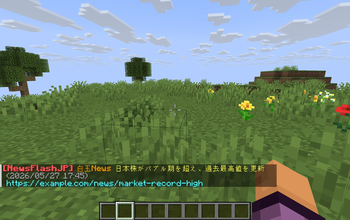
A Minecraft plugin that provides real-time chat notifications for earthquake information, international safety updates, and news, mainly for users in Japan. It supports earthquake reports, tsunami advisories, Earthquake Early Warnings, overseas safety info

18
Downloads
0
Followers
2 months ago
Updated
📦
2
Versions
socialtechnologyutilitypaperspigot
Download Latestv0.1.1View on Modrinth

📖About NewsFlash(日本対応)

NewsFlash Plugin

NewsFlash brings real-time news and emergency alerts directly into your Minecraft server chat.

It focuses on Japanese earthquake and safety information, while also supporting custom RSS/Atom feeds for international servers and communities.

※ Please make sure to follow the terms of use and distribution policies of each RSS/Atom feed provider.

Supported Information Sources

Custom RSS / Atom Feeds
Allows server administrators to configure their own news feeds and deliver custom news notifications to server chat.

P2PQuake WebSocket API
Provides earthquake reports, tsunami advisories, and Earthquake Early Warnings.

MOFA Overseas Safety Information Open Data
Provides the latest overseas safety information published by Japan’s Ministry of Foreign Affairs.

Flexible Notification Control

NewsFlash supports regional targeting, keyword filters, duplicate prevention, and reloadable configuration.
This makes it easier to deliver only the alerts and news that matter, whether you run a private server or a public community.

Multi-language Support

NewsFlash is designed for both Japanese servers and international communities.
It supports Japanese, English, Chinese Simplified, Chinese Traditional, Korean, German, French, Spanish, Brazilian Portuguese, and Russian.

Server administrators can set a default language for the entire server, while each player can choose their own personal language.

Persistent Player Settings

Player language preferences can be saved using SQLite, allowing settings to remain available even after server restarts.

Disclaimer

NewsFlash supports custom RSS/Atom feeds, but server administrators are responsible for selecting and configuring the feeds they use.

Please make sure to follow the terms of use, redistribution rules, rate limits, and access policies of each RSS/Atom feed provider.

The developer is not responsible for any issues caused by the use of external RSS/Atom feeds, including access restrictions, feed suspension, service interruptions, or violations of provider policies.

👥 Team & Contributors

shiratamala
shiratamalaOwner

⚙️ Compatibility

Environment
🖥️ Server-side
Loaders
paperspigot
Minecraft Versions
1.20.61.211.21.11.21.21.21.31.21.41.21.51.21.6+8 more

🔗 Links

Modrinth Page