
MINECRAFTBIBLE
Loading...


a lightweight essentials plugin featuring core commands, customizable chat formatting, motd and tab list
Modern Essentials is a lightweight Paper plugin that provides essential
commands and features.
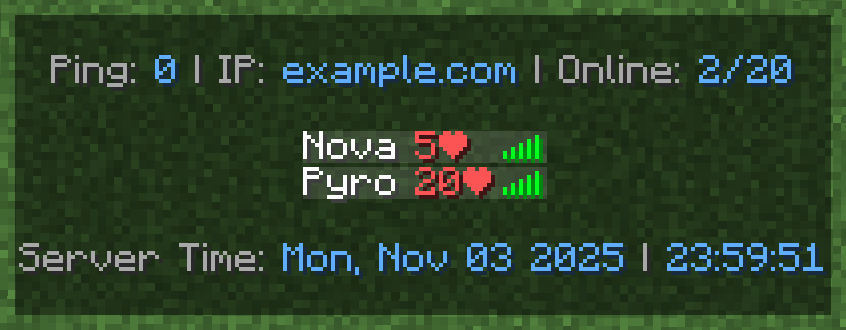
| MOTD | Chat | Tab List |
|---|---|---|
 |
 |
 |
| Command | Description | Permission |
|---|---|---|
/warp <name> |
Teleport to the specified warp | essentials.warp |
/setwarp <name> |
Create a new warp | essentials.setwarp |
/delwarp <name> |
Delete an existing warp | essentials.delwarp |
/home <name> |
Teleport to the specified home | essentials.home |
/sethome <name> |
Create or update a home | essentials.sethome |
/delhome <name> |
Delete an existing home | essentials.delhome |
/tpa <target> |
Send a teleport request to a player (requires essentials.tpa.accept permission) |
essentials.tpa |
/spawn |
Teleport to the server spawn | essentials.spawn |
/world <world> |
Teleport to another world | essentials.world |
/jump |
Jump to the nearest block in your line of sight | essentials.jump |
/top |
Teleport to the highest block at your location | essentials.top |
/bottom |
Teleport to the lowest safe block at your location | essentials.bottom |
/back |
Return to your previous location before teleporting (doesn't work on folia) | essentials.back |
/fly |
Toggle flight mode | essentials.fly |
/god |
Enable invincibility | essentials.god |
/vanish |
Become invisible to other players | essentials.vanish |
/fullbright |
Enable full-bright vision | essentials.fullbright |
/speed <speed> |
Set walk speed | essentials.speed |
/flyspeed <speed> |
Set fly speed | essentials.flyspeed |
/nickname <nickname> |
Change your own nickname | essentials.nickname |
/nickname <target> <nickname> |
Change the target player's nickname | essentials.nickname.others |
/heal |
Restore your health completely | essentials.heal |
/heal <targets> |
Restore the target players' health completely | essentials.heal.others |
/feed |
Restore your hunger completely | essentials.feed |
/feed <targets> |
Restore the target players' hunger completely | essentials.feed.others |
/enderchest |
Open your Ender Chest from anywhere | essentials.enderchest |
/enderchest <target> |
Open the target player's Ender Chests | essentials.enderchest.others |
/inventorysee <target> |
View the target player's inventory | essentials.inventorysee |
/craftingtable |
Open a crafting table | essentials.craftingtable |
/anvil |
Open an anvil | essentials.anvil |
/cartographytable |
Open a cartographytable | essentials.cartographytable |
/grindstone |
Open a grindstone | essentials.grindstone |
/loom |
Open a loom | essentials.loom |
/smithingtable |
Open a smithingtable | essentials.smithingtable |
/stonecutter |
Open a stonecutter | essentials.stonecutter |
/repair hand|all |
Repair the main-hand item or all items in your inventory | essentials.repair |
/day|night|noon|midnight|sunrise|sunset |
Set the time of day | essentials.time |
/sun|/rain|/thunder |
Change the weather | essentials.weather |
/kickall |
Kick all other players from the server | essentials.kickall |
/mute <targets> |
Prevent the target players from chatting | essentials.mute |
/unmute <targets> |
Allow the target players to chat again | essentials.unmute |
/essentials reload|version |
Reload config or check version | essentials.reload |
Modern Essentials supports MiniPlaceholders but also has some built-in
placeholders
| Placeholder | Description |
|---|---|
<online> |
Current number of online players |
<online_max> |
Maximum allowed players on the server |
<time:'format'> |
Current real-world time in your specified format, for example 'EEE, LLL dd yyyy HH:mm:ss' |
<player> |
Player's username |
<displayname> |
Player's display name (may include prefix/suffix) |
<nickname> |
Player's nickname or their username if no nickname is set |
<player_head> |
Player's head texture as a symbol |
<uuid> |
Player's UUID |
<ping> |
Player's current ping |
<world> |
Name of the world the player is currently in |
<health> |
Player's current health |