Logo
MINECRAFTBIBLE
Items
Items

All game items

Blocks
Blocks

Building blocks

Mobs
Mobs

Creatures & monsters

Biomes
Biomes

World biomes

Structures
Structures

Generated structures

Recipes
Recipes

Crafting guides

Advancements
Advancements

Achievements

Loot Tables
Loot Tables

Drop rates

Tags
Tags

Item groupings

All Versions
View all data →
Capes
Cape ArchiveNEW

Browse rare Minecon capes, OptiFine capes, and custom capes from players worldwide

Browse

Player Database
Player DatabasePopular

Search any player

Skin Browser
Skin Browser

Browse & download skins

Cape Gallery
Cape GalleryNEW

Minecon & OptiFine capes

Seed Vault
Seed Vault

Curated seeds

Learn

Guides
GuidesNew

Tutorials & tips

Blog
Blog

News & updates

Community

Community Hub
Community HubHub

Posts, discussions & more

All Versions
View community →
Seed Analyzer
Seed Analyzer

World seed analysis

Loot Explorer
Loot Explorer

Drop rates

Crafting Calculator
Crafting Calculator

Material planning

Enchant Calculator
Enchant Calculator

Probability math

Redstone Lab
Redstone Lab

Signal timing

Trading Profit
Trading Profit

Villager ROI

All Versions
View all tools →
Mods
Mods

Browse all mods

Plugins
Plugins

Server plugins

Resource Packs
Resource Packs

Textures & sounds

Shaders
Shaders

Visual enhancements

Datapacks
Datapacks

World logic

Scanner
Mod Intelligence

Scan & analyze any mod

All Versions
View all mods →
Loading...
IntroductionIntroductionVersion HistoryVersion HistoryGuidesGuidesBlog & NewsBlog & News
ItemsItemsBlocksBlocksMobsMobsRecipesRecipesBiomesBiomesStructuresStructuresAdvancementsAdvancementsLoot TablesLoot TablesTagsTags
ModsModsPluginsPluginsResource PacksResource PacksShadersShadersDatapacksDatapacks

MinecraftBible

The Ultimate Wiki

Logo
MINECRAFTBIBLE

The ultimate Minecraft reference. Every item, block, mob, and recipe documented with precision.

Community

  • Skin Browser
  • Cape Gallery
  • Seed Vault
  • Blog
  • Guides

Database

  • Items
  • Blocks
  • Mobs
  • Recipes
  • Biomes
  • Structures

Tools

  • Seed Analyzer
  • Mod Intelligence
  • Crafting Calculator
  • Enchant Calculator

Mods & Packs

  • Mods
  • Plugins
  • Resource Packs
  • Shaders
  • Datapacks

Site & Legal

  • About
  • Authors
  • Editorial Policy
  • Corrections
  • Contact
  • Privacy Policy
  • Terms of Service
  • DMCA
  • Sitemap

© 2026 MinecraftBible. Not affiliated with Mojang or Microsoft.

PrivacyTermsContact
MobSteer | Ride Mobs & WASD Control
PluginLicenseRef-All-Rights-Reserved

MobSteer | Ride Mobs & WASD Control

Ride mobs and control any mob that can move using WASD movement!

406
Downloads
1
Followers
1 months ago
Updated
📦
12
Versions
game-mechanicsmobstransportationpaperpurpur
Download Latestv1.4.0View on Modrinth

📖About MobSteer | Ride Mobs & WASD Control

MobSteer

Take full control over practically any mob in Minecraft!

✅ Versions: 1.21.x – 26.2

⚠️ Required: Paper / Purpur or other Paper-based forks

🚫 Not supported: Folia / Spigot

Description

MobSteer is a Rideable mobs plugin that allows you to ride and control almost any mob in the game. Do you want to fly with a bee, swim with a dolphin, or just walk around with a chicken? This plugin lets you do just that! You can control almost all mobs using the WASD keys.

Features

  • Right-Click & Ride: No commands needed, simply right-click any mob and start controlling it instantly.
  • Full Control: Take charge of almost any mob using WASD (fly, swim, walk).
  • Compatibility: Works with most monsters and animals, optimized for Purpur and Paper.
  • Customization: Fully configurable dismount style, speeds, and taming rules.
  • Ender Dragon: Can be ridden, but beware it may break blocks!

Gameplay

Gameplay GIF

Commands

Use /steer to mount a mob, and /msr for configuration.

  • /steer - Use this command to mount and control a mob.
  • /msr reload - Reloads the configuration file.
  • /msr blacklist [add|remove] <mob> - Manages the mob blacklist.
  • /msr ride [all|user] <true|false> - Allows riding and /steer for everyone or a specific player.
  • /msr hover <true|false> - Toggle hover mode.
  • /msr autostep <true|false> - Toggle auto step.

Notes

  • Horses and similar mobs have a custom vanilla like taming system provided by this plugin by default.

Configuration

  • Custom Dismount: Choose between vanilla dismounting or requiring a triple shift to get off.
  • Speed Control: Override speed for all mobs or set specific speeds for Ender Dragons, Withers, etc.
  • Blacklist: Easily restrict certain mobs from being ridden.
  • Taming System: Control if players can ride their own pets or pets belonging to others.
  • Invulnerability: Make the mob invulnerable while being ridden.
  • Messages & ActionBar: Fully customize all plugin messages (supports MiniMessage and legacy colors).
  • Hooks: Integration with WorldGuard, LuckPerms (group-based restrictions) and GadgetsMenu pets.

Permissions

  • mobsteer.use - Allows riding mobs.
  • mobsteer.steer - Allows using the /steer command. (requires mobsteer.use to work)
  • mobsteer.admin - Access to administrative commands (/msr) and bypasses all mount restrictions.
  • mobsteer.* - Full access to the plugin.

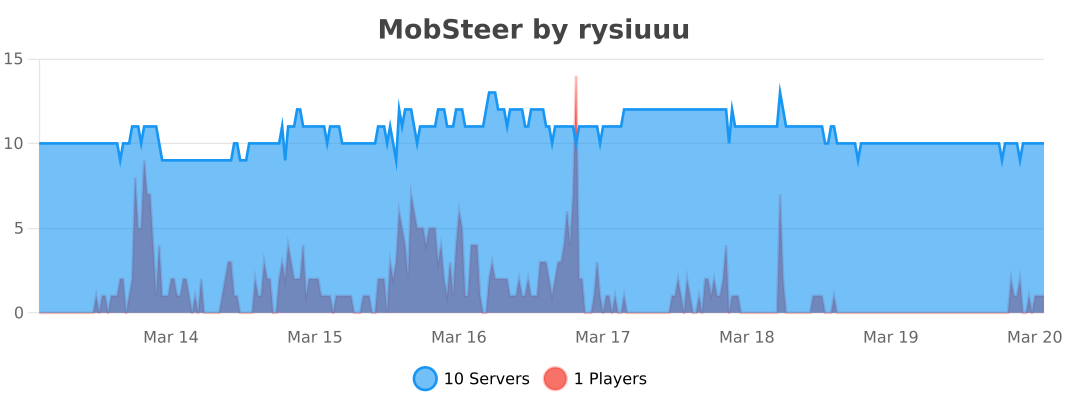
Statistics

bStats

👥 Team & Contributors

Rysiuuu
RysiuuuOwner

⚙️ Compatibility

Environment
🖥️ Server-side
Loaders
paperpurpur
Minecraft Versions
1.211.21.11.21.21.21.31.21.41.21.51.21.61.21.7+8 more

🔗 Links

Modrinth Page