Logo
MINECRAFTBIBLE
Items
Items

All game items

Blocks
Blocks

Building blocks

Mobs
Mobs

Creatures & monsters

Biomes
Biomes

World biomes

Structures
Structures

Generated structures

Recipes
Recipes

Crafting guides

Advancements
Advancements

Achievements

Loot Tables
Loot Tables

Drop rates

Tags
Tags

Item groupings

All Versions
View all data →
Capes
Cape ArchiveNEW

Browse rare Minecon capes, OptiFine capes, and custom capes from players worldwide

Browse

Player Database
Player DatabasePopular

Search any player

Skin Browser
Skin Browser

Browse & download skins

Cape Gallery
Cape GalleryNEW

Minecon & OptiFine capes

Seed Vault
Seed Vault

Curated seeds

Learn

Guides
GuidesNew

Tutorials & tips

Blog
Blog

News & updates

Community

Community Hub
Community HubHub

Posts, discussions & more

All Versions
View community →
Seed Analyzer
Seed Analyzer

World seed analysis

Loot Explorer
Loot Explorer

Drop rates

Crafting Calculator
Crafting Calculator

Material planning

Enchant Calculator
Enchant Calculator

Probability math

Redstone Lab
Redstone Lab

Signal timing

Trading Profit
Trading Profit

Villager ROI

All Versions
View all tools →
Mods
Mods

Browse all mods

Plugins
Plugins

Server plugins

Resource Packs
Resource Packs

Textures & sounds

Shaders
Shaders

Visual enhancements

Datapacks
Datapacks

World logic

Scanner
Mod Intelligence

Scan & analyze any mod

All Versions
View all mods →
Loading...
IntroductionIntroductionVersion HistoryVersion HistoryGuidesGuidesBlog & NewsBlog & News
ItemsItemsBlocksBlocksMobsMobsRecipesRecipesBiomesBiomesStructuresStructuresAdvancementsAdvancementsLoot TablesLoot TablesTagsTags
ModsModsPluginsPluginsResource PacksResource PacksShadersShadersDatapacksDatapacks

MinecraftBible

The Ultimate Wiki

Logo
MINECRAFTBIBLE

The ultimate Minecraft reference. Every item, block, mob, and recipe documented with precision.

Community

  • Player Database
  • Skin Browser
  • Cape Gallery
  • Community Hub
  • Seed Vault

Database

  • Items
  • Blocks
  • Mobs
  • Recipes
  • Biomes
  • Structures

Tools

  • Seed Analyzer
  • Mod Intelligence
  • Crafting Calculator
  • Enchant Calculator

Mods & Packs

  • Mods
  • Plugins
  • Resource Packs
  • Shaders
  • Datapacks

© 2026 MinecraftBible. Not affiliated with Mojang or Microsoft.

PrivacyTermsContact
MemCheck
PluginGPL-3.0-only

MemCheck

Output Spigot/Paper memory statistics

619
Downloads
5
Followers
2 years ago
Updated
📦
1
Versions
managementoptimizationutilitybukkitpaperspigot
Download Latestv1.03View on Modrinth

📖About MemCheck

Description

Want to find out how much heap space your server really needs? Want to check that your hosting provider is giving you what you paid for? Other plugins, such as Essentials, will provided memory statistics, but they're probably not what you really want to know. MemCheck provides the amount of heap used and the total amount of free heap space in real time.

MemCheck adds a /mem command which outputs the amount of used heap in MB and as a percentage of the maximum heap size, and the total free heap in MB. It also provides statistics about the Java "Metaspace" use. As a bonus, the server's current TPS as calculated by Essentials, the CPU load, the average garbage collection time in the previous minute, and the total number of loaded chunks are shown.

At startup, the number of processors (threads), total physical memory, maximum heap, server view distance, server simulation distance, Java garbage collector name(s), and Java command line options are written to the server log file.

This allows the server owner to see how much memory is being used and if the memory available for additional objects is too small, too big, or just right.

Details

The memory values reported by Essentials come directly from Java, and don't really show what a server owner needs to know. The explanation will be easier with the help of the following diagram from Stackoverflow:
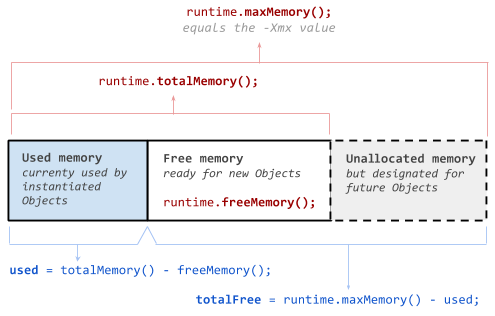
Java heap structure

Java provides, and Essentials reports, the three values shown in red. This is not really what a server owner needs. The more relevant values are the two shown in blue at the bottom: used, which is the amount of the heap currently used by the program, and totalFree, which is the amount of memory available for additional objects on the heap. More information is shown below.

Commands

/mem - This outputs the current memory statistics. Note that the heap is constantly changing, so you'll see the values change from second to second, as more objects are allocated or the Java garbage collector runs.

Sample output from MemCheck

The output includes the following:

  • General:
    • TPS - If you're also running Essentials, the current TPS will be output.
    • CPU - The current CPU load as a percentage of all available cores.
    • GC - The average time needed to run the garbage collector, updated once per minute.
    • Chunks - The total number of loaded chunks from all worlds.
  • Heap:
    • Heap used - The current amount of heap space used by your server.
    • Free - The amount of additional heap space available, up to the maximum allowed.
    • Alloc - The amount of heap space currently allocated. This is useful if you specify an -Xms values that is less than -Xmx. It tells you how much heap space Java thinks is necessary.
  • Metaspace:
    • Metaspace used - The current amount of Metaspace used by your server.
    • Free - If a maximum value for the Metaspace has been given, this shows the amount which is free.
    • Alloc - The amount of Metaspace currently allocated.

Permissions

memcheck.mem - Required to use the mem command. Defaults to op.

Configuration

None.

Miscellaneous

This plugin uses the bStats metrics system to provide anonymous usage data. You may opt-out globally by changing plugins/bStats/config.yml. The metrics are available at https://bstats.org/plugin/bukkit/MemCheck
👥 Team & Contributors

Bobcat00
Bobcat00Owner

⚙️ Compatibility

Environment
🖥️ Server-side
Loaders
bukkitpaperspigot
Minecraft Versions
1.121.12.11.12.21.131.13.11.13.21.141.14.1+41 more

🔗 Links

Modrinth Page