Logo
MINECRAFTBIBLE
Items
Items

All game items

Blocks
Blocks

Building blocks

Mobs
Mobs

Creatures & monsters

Biomes
Biomes

World biomes

Structures
Structures

Generated structures

Recipes
Recipes

Crafting guides

Advancements
Advancements

Achievements

Loot Tables
Loot Tables

Drop rates

Tags
Tags

Item groupings

All Versions
View all data →
Capes
Cape ArchiveNEW

Browse rare Minecon capes, OptiFine capes, and custom capes from players worldwide

Browse

Player Database
Player DatabasePopular

Search any player

Skin Browser
Skin Browser

Browse & download skins

Cape Gallery
Cape GalleryNEW

Minecon & OptiFine capes

Seed Vault
Seed Vault

Curated seeds

Learn

Guides
GuidesNew

Tutorials & tips

Blog
Blog

News & updates

Community

Community Hub
Community HubHub

Posts, discussions & more

All Versions
View community →
Seed Analyzer
Seed Analyzer

World seed analysis

Loot Explorer
Loot Explorer

Drop rates

Crafting Calculator
Crafting Calculator

Material planning

Enchant Calculator
Enchant Calculator

Probability math

Redstone Lab
Redstone Lab

Signal timing

Trading Profit
Trading Profit

Villager ROI

All Versions
View all tools →
Mods
Mods

Browse all mods

Plugins
Plugins

Server plugins

Resource Packs
Resource Packs

Textures & sounds

Shaders
Shaders

Visual enhancements

Datapacks
Datapacks

World logic

Scanner
Mod Intelligence

Scan & analyze any mod

All Versions
View all mods →
Loading...
IntroductionIntroductionVersion HistoryVersion HistoryGuidesGuidesBlog & NewsBlog & News
ItemsItemsBlocksBlocksMobsMobsRecipesRecipesBiomesBiomesStructuresStructuresAdvancementsAdvancementsLoot TablesLoot TablesTagsTags
ModsModsPluginsPluginsResource PacksResource PacksShadersShadersDatapacksDatapacks

MinecraftBible

The Ultimate Wiki

Logo
MINECRAFTBIBLE

The ultimate Minecraft reference. Every item, block, mob, and recipe documented with precision.

Community

  • Skin Browser
  • Cape Gallery
  • Seed Vault
  • Blog
  • Guides

Database

  • Items
  • Blocks
  • Mobs
  • Recipes
  • Biomes
  • Structures

Tools

  • Seed Analyzer
  • Mod Intelligence
  • Crafting Calculator
  • Enchant Calculator

Mods & Packs

  • Mods
  • Plugins
  • Resource Packs
  • Shaders
  • Datapacks

Site & Legal

  • About
  • Authors
  • Editorial Policy
  • Corrections
  • Contact
  • Privacy Policy
  • Terms of Service
  • DMCA
  • Sitemap

© 2026 MinecraftBible. Not affiliated with Mojang or Microsoft.

PrivacyTermsContact
Locator Bar Configuration
PluginLGPL-3.0-or-later

Locator Bar Configuration

Let players configure their locator bar in a menu. Per-user enable/disable toggle, colour configuration and range configuration from the pause menu.

795
Downloads
6
Followers
2 months ago
Updated
📦
9
Versions
managementsocialutilityfoliapaperpurpur
Download Latestv1.0.5View on Modrinth

📖About Locator Bar Configuration

Locator Bar Configuration

A small paper plugin that allows players to change their locator bar settings without needing to use commands.
Inspired by RedSyven's Datapack Locator Bar Options.

You can access the menu from the pause screen (either through Locator Bar Configuration or Custom Options and then Locator Bar Configuration)
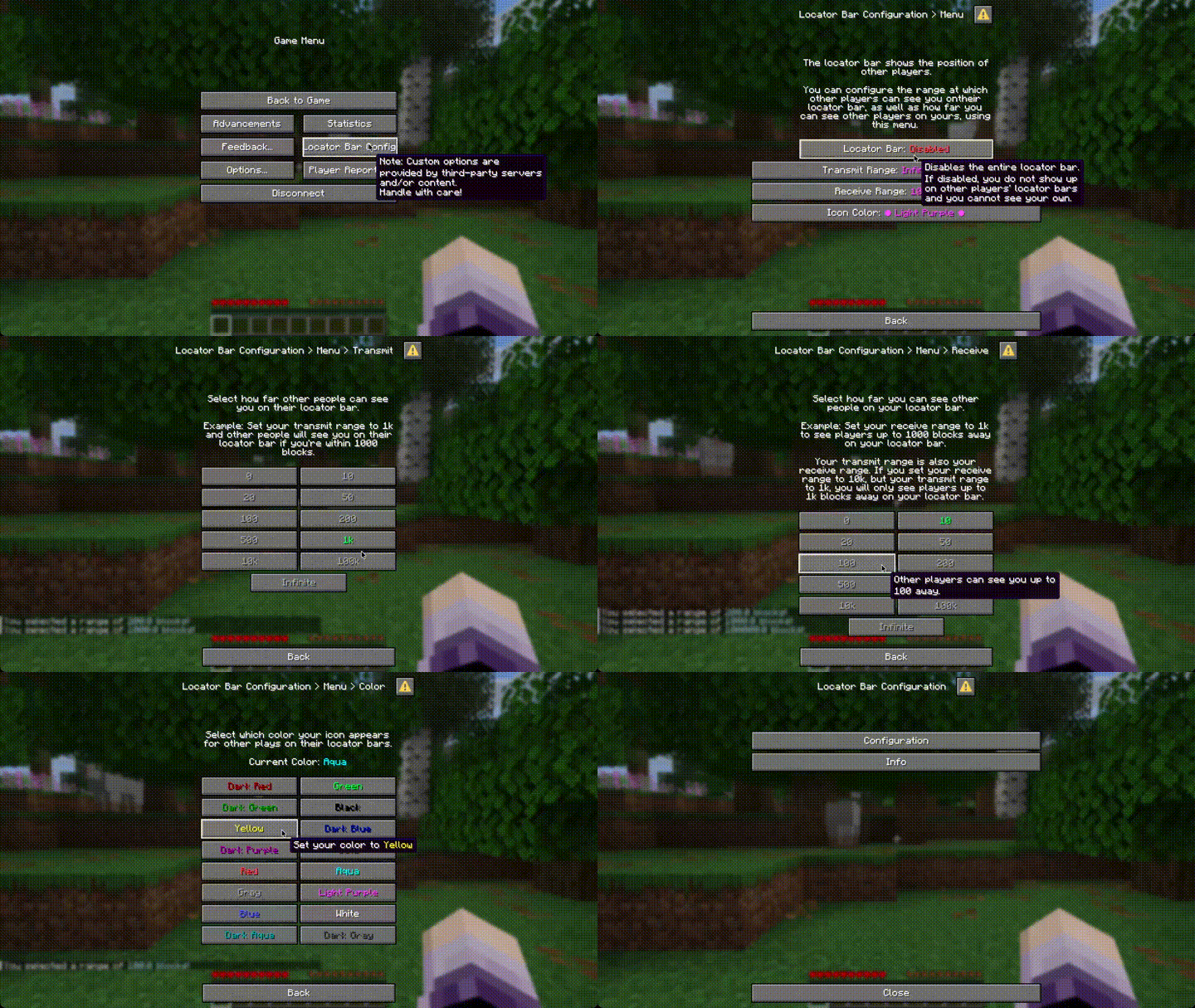
usage-gif

Features

Supported Minecraft Versions: 1.21.8 - 26.1.1

Each player can

  • toggle their locator bar on and off
  • customize their transmit and receive range
  • customize the colour their waypoint appears to others.

Administrators can

  • configure which range values and colors players can choose
  • disable player customization of range or color entirely (or both but what's the point of this plugin then)
  • seamlessly migrate data from RedSyven's Datapack

Configuration

The default configuration is automatically created inside the LocatorBarConfiguration directory inside your plugin directory (so usually inside plugins/LocatorBarConfiguration).
You can add or remove options for transmit range, receive range and the icon color.

If the receiveRanges option is not set, players will have the same options as for transmitting.
If you set an option to an empty list (iconColors: []) the option will be locked for players.

You can reload the config using /lbc reload. This requires the lbc.reload permission.

Migration from Locator Bar Options

To migrate from Locator Bar Options, simply install the plugin and disable the LocatorBarOptions datapack.
User data will automatically be migrated once they (re-)join. They will be notified about this migration so they can ensure the migration worked correctly.

More notes about migration can be found in the wiki.

Folia

Folia doesn't support waypoints yet. Folia forks that implement waypoint support will likely work already, though. CanvasMC is one such fork and officially supported.

Why?

While RedSyven's datapack worked fine for our purposes, some players ran into undiagnosable issues with their options not being updated.
Since the server I used the datapack on might switch to Folia soon and datapacks aren't enabled in Folia, I wanted to see
what Paper's experimental support for the Dialog API can do.

It now offers some features datapacks cannot offer, like configuring available options for player.

👥 Team & Contributors

nikkischnelle
nikkischnelleOwner

⚙️ Compatibility

Environment
🖥️ Server-side
Loaders
foliapaperpurpur
Minecraft Versions
1.21.81.21.91.21.101.21.1126.126.1.126.1.2

🔗 Links

Modrinth Page