Logo
MINECRAFTBIBLE
Items
Items

All game items

Blocks
Blocks

Building blocks

Mobs
Mobs

Creatures & monsters

Biomes
Biomes

World biomes

Structures
Structures

Generated structures

Recipes
Recipes

Crafting guides

Advancements
Advancements

Achievements

Loot Tables
Loot Tables

Drop rates

Tags
Tags

Item groupings

All Versions
View all data →
Capes
Cape ArchiveNEW

Browse rare Minecon capes, OptiFine capes, and custom capes from players worldwide

Browse

Player Database
Player DatabasePopular

Search any player

Skin Browser
Skin Browser

Browse & download skins

Cape Gallery
Cape GalleryNEW

Minecon & OptiFine capes

Seed Vault
Seed Vault

Curated seeds

Learn

Guides
GuidesNew

Tutorials & tips

Blog
Blog

News & updates

Community

Community Hub
Community HubHub

Posts, discussions & more

All Versions
View community →
Seed Analyzer
Seed Analyzer

World seed analysis

Loot Explorer
Loot Explorer

Drop rates

Crafting Calculator
Crafting Calculator

Material planning

Enchant Calculator
Enchant Calculator

Probability math

Redstone Lab
Redstone Lab

Signal timing

Trading Profit
Trading Profit

Villager ROI

All Versions
View all tools →
Mods
Mods

Browse all mods

Plugins
Plugins

Server plugins

Resource Packs
Resource Packs

Textures & sounds

Shaders
Shaders

Visual enhancements

Datapacks
Datapacks

World logic

Scanner
Mod Intelligence

Scan & analyze any mod

All Versions
View all mods →
Loading...
IntroductionIntroductionVersion HistoryVersion HistoryGuidesGuidesBlog & NewsBlog & News
ItemsItemsBlocksBlocksMobsMobsRecipesRecipesBiomesBiomesStructuresStructuresAdvancementsAdvancementsLoot TablesLoot TablesTagsTags
ModsModsPluginsPluginsResource PacksResource PacksShadersShadersDatapacksDatapacks

MinecraftBible

The Ultimate Wiki

Logo
MINECRAFTBIBLE

The ultimate Minecraft reference. Every item, block, mob, and recipe documented with precision.

Community

  • Skin Browser
  • Cape Gallery
  • Seed Vault
  • Blog
  • Guides

Database

  • Items
  • Blocks
  • Mobs
  • Recipes
  • Biomes
  • Structures

Tools

  • Seed Analyzer
  • Mod Intelligence
  • Crafting Calculator
  • Enchant Calculator

Mods & Packs

  • Mods
  • Plugins
  • Resource Packs
  • Shaders
  • Datapacks

Site & Legal

  • About
  • Authors
  • Editorial Policy
  • Corrections
  • Contact
  • Privacy Policy
  • Terms of Service
  • DMCA
  • Sitemap

© 2026 MinecraftBible. Not affiliated with Mojang or Microsoft.

PrivacyTermsContact
LightDeathMessages
PluginMIT

LightDeathMessages

A lightweight, configurable plugin for clean custom Minecraft death messages.

10
Downloads
1
Followers
1 months ago
Updated
📦
1
Versions
equipmentminigamemobsbukkitfoliapaperspigot
Download Latestv1.0.0View on Modrinth

📖About LightDeathMessages

LightDeathMessages is a lightweight, configurable Minecraft death messages plugin for modern Paper/Spigot servers. It replaces vanilla death messages with clean custom messages, supports themes, PlaceholderAPI, broadcast controls, and safe fallbacks for current and future damage types.

Why It Is Different

Most death message plugins either feel heavy, mix settings with messages, or depend too much on version-specific behavior. LightDeathMessages is built to stay simple: configs are cached, death events stay lightweight, themes are file-based, vanilla messages are hidden safely, and unknown/custom damage types fall back without crashing your server.

Features

  • Custom death messages for PvP, mobs, projectiles, explosions, environment deaths, and unknown/custom damage.
  • Global, world-only, radius-based, or disabled broadcasts.
  • PlaceholderAPI support when installed.
  • Legacy color support and safe formatting fallback.
  • Command-only prefix messages.
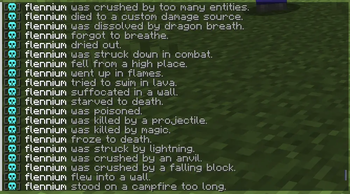
  • Death messages with literal skull icons in the message strings.
  • Built-in themes plus unlimited custom themes.

View Gallery →

Themes

Themes live in:

plugins/LightDeathMessages/themes/

To add your own theme, create a new file such as:

plugins/LightDeathMessages/themes/random.yml

Then select it in config.yml:

themes:
  selected-theme: random

No Java code changes are needed for custom themes. The plugin scans the themes folder and can load any valid .yml theme by file name.

Commands

/deathmessages help
/deathmessages reload
/deathmessages version
/deathmessages test <type|all> [self|global|world|radius|disabled]
/deathmessages theme list
/deathmessages theme preview <theme>
/deathmessages theme apply <theme>

Aliases:

/dm
/deathmsg

👥 Team & Contributors

flennium
flenniumOwner

⚙️ Compatibility

Environment
🖥️ Server-side
Loaders
bukkitfoliapaperspigot
Minecraft Versions
1.211.21.11.21.21.21.31.21.41.21.51.21.61.21.7+7 more

🔗 Links

Modrinth Page