Logo
MINECRAFTBIBLE
Items
Items

All game items

Blocks
Blocks

Building blocks

Mobs
Mobs

Creatures & monsters

Biomes
Biomes

World biomes

Structures
Structures

Generated structures

Recipes
Recipes

Crafting guides

Advancements
Advancements

Achievements

Loot Tables
Loot Tables

Drop rates

Tags
Tags

Item groupings

All Versions
View all data →
Capes
Cape ArchiveNEW

Browse rare Minecon capes, OptiFine capes, and custom capes from players worldwide

Browse

Player Database
Player DatabasePopular

Search any player

Skin Browser
Skin Browser

Browse & download skins

Cape Gallery
Cape GalleryNEW

Minecon & OptiFine capes

Seed Vault
Seed Vault

Curated seeds

Learn

Guides
GuidesNew

Tutorials & tips

Blog
Blog

News & updates

Community

Community Hub
Community HubHub

Posts, discussions & more

All Versions
View community →
Seed Analyzer
Seed Analyzer

World seed analysis

Loot Explorer
Loot Explorer

Drop rates

Crafting Calculator
Crafting Calculator

Material planning

Enchant Calculator
Enchant Calculator

Probability math

Redstone Lab
Redstone Lab

Signal timing

Trading Profit
Trading Profit

Villager ROI

All Versions
View all tools →
Mods
Mods

Browse all mods

Plugins
Plugins

Server plugins

Resource Packs
Resource Packs

Textures & sounds

Shaders
Shaders

Visual enhancements

Datapacks
Datapacks

World logic

Scanner
Mod Intelligence

Scan & analyze any mod

All Versions
View all mods →
Loading...
IntroductionIntroductionVersion HistoryVersion HistoryGuidesGuidesBlog & NewsBlog & News
ItemsItemsBlocksBlocksMobsMobsRecipesRecipesBiomesBiomesStructuresStructuresAdvancementsAdvancementsLoot TablesLoot TablesTagsTags
ModsModsPluginsPluginsResource PacksResource PacksShadersShadersDatapacksDatapacks

MinecraftBible

The Ultimate Wiki

Logo
MINECRAFTBIBLE

The ultimate Minecraft reference. Every item, block, mob, and recipe documented with precision.

Community

  • Skin Browser
  • Cape Gallery
  • Seed Vault
  • Blog
  • Guides

Database

  • Items
  • Blocks
  • Mobs
  • Recipes
  • Biomes
  • Structures

Tools

  • Seed Analyzer
  • Mod Intelligence
  • Crafting Calculator
  • Enchant Calculator

Mods & Packs

  • Mods
  • Plugins
  • Resource Packs
  • Shaders
  • Datapacks

Site & Legal

  • About
  • Authors
  • Editorial Policy
  • Corrections
  • Contact
  • Privacy Policy
  • Terms of Service
  • DMCA
  • Sitemap

© 2026 MinecraftBible. Not affiliated with Mojang or Microsoft.

PrivacyTermsContact
KeepBody
PluginLicenseRef-All-Rights-Reserved

KeepBody

KeepBody is a plugin that prevents players from disappearing when they log out.(Rust Like)
57
Downloads
4
Followers
2 months ago
Updated
📦
3
Versions
adventuregame-mechanicspaperspigot
Download Latestvv1.1.1View on Modrinth

📖About KeepBody

KeepBody

KeepBody plugin banner
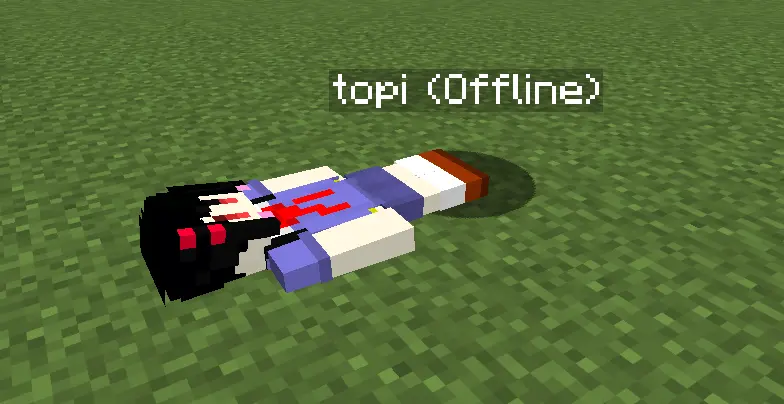
Inspired by the offline body mechanic in Rust, this plugin brings a similar experience to your Minecraft server. When a player logs out, a Citizens NPC (player-type) is spawned at their location as an offline "body".
Upon login, the NPC's state (location, HP, inventory) is synced back to the player and the NPC is removed.


Requirements

Server Spigot or Paper 1.21.1+
Java 21+
Required Plugin Citizens

Features

  • Offline body — Spawns an NPC with the player's skin and equipment at logout
  • State sync — Restores location, HP, and inventory to the player on login
  • NPC death — If the NPC is killed while the player is offline, items drop naturally and the player dies on next login
  • Inventory access — Right-clicking the NPC opens its inventory (configurable)

Required Plugin

Plugin Checked version Download
Citizens 2.0.35-SNAPSHOT https://ci.citizensnpcs.co/job/citizens2/

Citizens must be placed in the plugins/ folder. KeepBody declares it as a required dependency so Citizens is always enabled first.


Installation

  1. Download Citizens and place it in plugins/
  2. Download KeepBody and place KeepBody-1.0-SNAPSHOT.jar in plugins/
  3. Start the server

Configuration (plugins/KeepBody/config.yml)

# Whether right-clicking the NPC allows editing its inventory
# true: items can be added/removed  /  false: inventory cannot be opened
allow-inventory-edit: true
# Whether the NPC lies down (uses SleepTrait) at the player's logout position
sleep-npc: true
# Whether to keep the NPC frozen in place when hit
# true: velocity and position are restored each hit so the NPC never moves
immobilize-npc: false
# Whether the NPC is invincible (takes no damage while the player is offline)
# Hurt animation and knockback still occur; only HP tracking is skipped
invincible-npc: false
# Language setting: 'en' (English) or 'ja' (Japanese)
language: 'en'
# Ghost NPC cleanup interval in seconds
# A "ghost" is an untracked "(Offline)" NPC left behind by a crash or reload.
# This interval controls how often the plugin scans for and removes them,
# and respawns any missing body NPCs for currently-offline players.
ghost-cleanup-interval: 300
# Debug mode
# true: show debug messages in console and in-game (OP only)
debug: false
# In-game messages. Color codes using '&' are supported (e.g. &cRed, &aGreen).
messages:
  en:
    inventory-name: "%s's inventory"
    barrier-name: "&cUnavailable"
    npc-spawned: "Spawned body of %s."
    npc-died: "Body of %s has died."
    inventory-opened: "'%s' opened the body of '%s'."
  ja:
    inventory-name: "%sのインベントリ"
    barrier-name: "&c使用不可"
    npc-spawned: "%s のボディーを生成しました。"
    npc-died: "%s のボディーが死亡しました。"
    inventory-opened: "'%s' が '%s' のボディーを開きました。"

👥 Team & Contributors

topi-k
topi-kOwner

⚙️ Compatibility

Environment
🖥️ Server-side
Loaders
paperspigot
Minecraft Versions
1.211.21.11.21.21.21.31.21.41.21.51.21.61.21.7+7 more

🔗 Links

Modrinth Page