
MINECRAFTBIBLE
Loading...

AuraUpgrade: An advanced RPG system allowing players to upgrade weapons and armor using custom magical stones, featuring risky failure gambles.
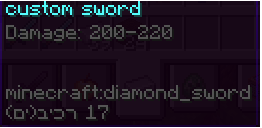
Changes the damage form of swords according to the sword's lore
🌟 AuraUpgrade Pro
The ultimate high-risk, high-reward RPG upgrade system for your Minecraft server!
AuraUpgrade brings a thrilling, custom-tailored enhancement dynamic to your server. Players can forge their weapons and armor using mythical ores, gamble on success rates, and secure their hard-earned gear using protective charms. Fully optimized for high player counts, it features a completely customizable GUI layout to match your server's unique aesthetic.
💎 Key Features
🗺️ 100% Dynamic GUI Layout: Design the menu layout directly from the config.yml using a simple text-matrix grid. Move slots, resize the inventory, and add custom decorative items seamlessly.
⚔️ Dual-Path Scaling: Automatically detects item types. Swords require Power Ores to increase damage, while armor sets require Defense Ores to boost protection.
📝 Smart Lore Parsing: Scans and upgrades exact damage/armor values (both flat numbers and ranges like 10-20) within the item's Lore, preserving your original color codes.
🎲 The High-Risk Gamble: Players can attempt upgrades using only standard stones. If they fail, the item is completely shattered and lost forever!
☀️ Insurance Mechanics: Players can optionally insert Sun Ores into the designated slot. If the upgrade fails, the Sun Ore is consumed, but the precious equipment is saved from destruction.
🔄 Hot-Reload Support: Change messages, modify success rates, or completely overhaul the GUI design on the fly with a single reload command.
🎮 How It Works (The Gameplay Flow)
A player executes /spell to open the beautifully crafted AuraUpgrade interface.
They place their piece of gear (Sword/Armor) into the designated Weapon Slot.
They insert the required amount of upgrade ores (Power or Defense) into the Upgrade Slot.
(Optional) They insert Sun Ores into the Insurance Slot to protect their item from breaking.
They click the Nether Star (Confirm Button) to trigger the spell.
The Outcome: On success, the item gains a +1 level and its stats multiply. On failure, without a Sun Ore, the item breaks!
💻 Commands & Permissions
🔓 Player Commands
/spell
Description: Opens the dynamic upgrade GUI for the player.
Permission: auraupgrade.use (or moshespell.use)
🛡️ Admin Commands
/spell
Description: Force-opens the upgrade GUI for a specific target player.
Permission: auraupgrade.admin
/moshespell setpower
Description: Saves the custom item currently held in your main hand as the official Power Ore.
Permission: auraupgrade.admin
/moshespell setdefense
Description: Saves the custom item currently held in your main hand as the official Defense Ore.
Permission: auraupgrade.admin
/moshespell setsun
Description: Saves the custom item currently held in your main hand as the official Sun Ore (Insurance Charm).
Permission: auraupgrade.admin
/moshespell reload
Description: Reloads the entire configuration file, messages, and inventory matrix without requiring a server restart.
Permission: auraupgrade.admin
⚙️ Default Configuration Quick-Look
YAML
lore-detection:
multiplier-per-level: 0.05
prefixes:
- "power:"
- "damage:"
levels:
1:
upgrade-stones: 1
sun-stones: 0
success-chance: 100.0
2:
upgrade-stones: 5
sun-stones: 1
success-chance: 75.0
No responsibility is taken for any malfunction that may occur.