
Logo
MINECRAFTBIBLE
Items
Items

All game items

Blocks
Blocks

Building blocks

Mobs
Mobs

Creatures & monsters

Biomes
Biomes

World biomes

Structures
Structures

Generated structures

Recipes
Recipes

Crafting guides

Advancements
Advancements

Achievements

Loot Tables
Loot Tables

Drop rates

Tags
Tags

Item groupings

All Versions
View all data →
Capes
Cape ArchiveNEW

Browse rare Minecon capes, OptiFine capes, and custom capes from players worldwide

Browse

Player Database
Player DatabasePopular

Search any player

Skin Browser
Skin Browser

Browse & download skins

Cape Gallery
Cape GalleryNEW

Minecon & OptiFine capes

Seed Vault
Seed Vault

Curated seeds

Learn

Guides
GuidesNew

Tutorials & tips

Blog
Blog

News & updates

Community

Community Hub
Community HubHub

Posts, discussions & more

All Versions
View community →
Seed Analyzer
Seed Analyzer

World seed analysis

Loot Explorer
Loot Explorer

Drop rates

Crafting Calculator
Crafting Calculator

Material planning

Enchant Calculator
Enchant Calculator

Probability math

Redstone Lab
Redstone Lab

Signal timing

Trading Profit
Trading Profit

Villager ROI

All Versions
View all tools →
Mods
Mods

Browse all mods

Plugins
Plugins

Server plugins

Resource Packs
Resource Packs

Textures & sounds

Shaders
Shaders

Visual enhancements

Datapacks
Datapacks

World logic

Scanner
Mod Intelligence

Scan & analyze any mod

All Versions
View all mods →
Loading...
IntroductionIntroductionVersion HistoryVersion HistoryGuidesGuidesBlog & NewsBlog & News
ItemsItemsBlocksBlocksMobsMobsRecipesRecipesBiomesBiomesStructuresStructuresAdvancementsAdvancementsLoot TablesLoot TablesTagsTags
ModsModsPluginsPluginsResource PacksResource PacksShadersShadersDatapacksDatapacks

MinecraftBible

The Ultimate Wiki

Logo
MINECRAFTBIBLE

The ultimate Minecraft reference. Every item, block, mob, and recipe documented with precision.

Community

  • Player Database
  • Skin Browser
  • Cape Gallery
  • Community Hub
  • Seed Vault

Database

  • Items
  • Blocks
  • Mobs
  • Recipes
  • Biomes
  • Structures

Tools

  • Seed Analyzer
  • Mod Intelligence
  • Crafting Calculator
  • Enchant Calculator

Mods & Packs

  • Mods
  • Plugins
  • Resource Packs
  • Shaders
  • Datapacks

© 2026 MinecraftBible. Not affiliated with Mojang or Microsoft.

PrivacyTermsContact
HostBenchmark
PluginLicenseRef-All-Rights-Reserved

HostBenchmark

HostBenchmark is a Minecraft server benchmarking plugin that measures CPU, disk and optional memory performance using real in-game workloads and lets you publish results to the global leaderboard on hostbenchmark.net.

158
Downloads
5
Followers
4 months ago
Updated
📦
2
Versions
bukkitbungeecordfoliapaperpurpurspigot
Download Latestv1.1.0View on Modrinth

📖About HostBenchmark

HostBenchmark

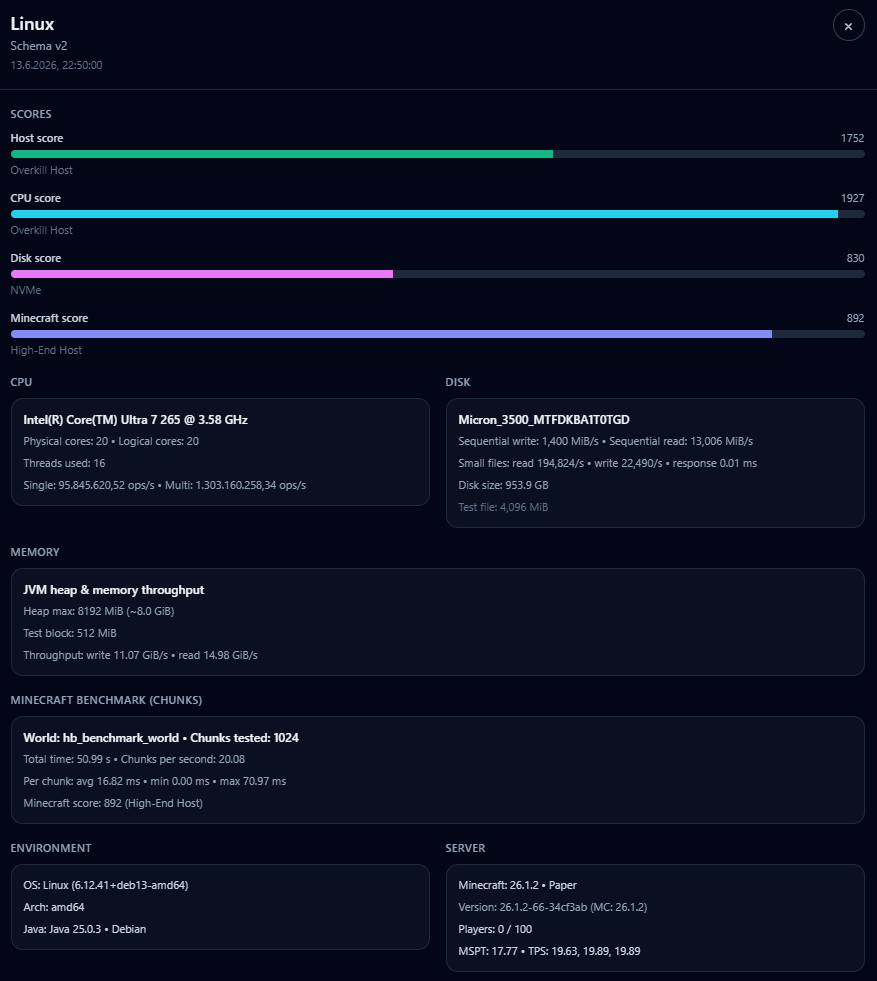
HostBenchmark is a Minecraft server benchmarking plugin that measures CPU, disk, Java heap memory (optional) and a dedicated in‑game Minecraft workload. It generates JSON reports that you can upload to hostbenchmark.net to compare VPS, dedicated and game hosting providers.


What is HostBenchmark?

HostBenchmark focuses on real Minecraft server workloads, not synthetic lab benchmarks.

It measures

  • CPU throughput (single thread + multi thread)
  • Disk throughput (sequential write & read)
  • Optional Java heap memory throughput (EXTREME preset)
  • A dedicated Minecraft world benchmark (chunk generation, entities, block updates)

and turns them into

  • CPU score
  • Disk score
  • Combined Host score
  • Minecraft score

All scores are open‑ended. There is no hard cap like 1000/1000 extremely fast systems can score well above 1000 points. Tier labels (like Midrange Host or Overkill Host) are not fixed score ranges.

You can keep the JSON reports locally or upload them to the public leaderboard on Hostbenchmark.net to compare your host with others worldwide.


How it works (high level)

  1. Install the plugin on a Paper / Spigot‑compatible server.
  2. Run one of the benchmark commands (see Commands below).
  3. The plugin runs:
    • a CPU benchmark (single + multi thread),
    • a disk benchmark (large temporary file),
    • an optional Java heap memory benchmark (EXTREME preset),
    • a dedicated Minecraft benchmark in a temporary world.
  4. A JSON report and a result card image(soon removed) are written to the plugin exports folder.
  5. You can upload the JSON file to Hostbenchmark.net, tag it with provider and plan and view it on the global leaderboard.

Presets

HostBenchmark provides three presets that trade off duration vs. precision:

Quick

  • Short CPU test
  • Small disk file (~256 MiB)
  • No memory test
  • Fast sanity check for new hosts

Standard

  • Longer CPU test
  • Larger disk file (~1 GiB)
  • No memory test
  • Recommended baseline preset

Extreme

  • Long CPU test
  • Large disk file (~4 GiB)
  • Extra Java heap memory benchmark (up to 512 MiB block, but never more than 25% of the configured max heap)
  • Full dedicated Minecraft world benchmark

All presets share the same scoring model – they only differ in runtime and test sizes.


Dedicated Minecraft benchmark

To make results better HostBenchmark runs a separate Minecraft benchmark in a temporary world:

  • Creates or loads a world named hb_benchmark_world.
  • Generates and loads a configurable number of chunks (depending on preset, e.g. 1024 chunks for EXTREME).
  • Spawns entities (ArmorStands) to stress pathfinding and entity ticking.
  • Applies batches of block updates (placing/breaking blocks) to exercise chunk lighting and block update logic.
  • Measures how long it takes to process all these operations on the main thread.
  • Unloads and deletes the benchmark world afterwards.

The Minecraft benchmark produces:

  • total benchmark duration in seconds
  • chunks tested
  • average, min and max ms per chunk
  • chunks per second
  • a separate Minecraft score and tier label

All Minecraft metrics are included in the JSON report and shown on the website when present.


Commands

Basic usage:

/hostbench start quick
/hostbench start standard
/hostbench start extreme

Typical workflow:

  1. Start the server.
  2. Run one of the /hostbench start ... commands.
  3. Wait until the benchmark finishes.
    • CPU, disk, memory and Minecraft benchmark run automatically as part of the chosen preset.
  4. Grab the generated files from plugins/HostBenchmark/exports/:
    • hostbench-YYYYMMDD-HHmmss.json
  5. Upload the JSON report to Hostbenchmark.net and assign:
    • Provider (e.g. Hetzner, Contabo, Netcup, Zap Hosting, Nitrado, …)
    • Plan name (e.g. AX41-NVMe, VPS S, MC Premium 8GB)
      If your Provider or Plan name is missing you can add them with the new button!

You can then compare your host on the public leaderboard.


Website: Hostbenchmark.net

The companion website provides:

  • A public leaderboard, sorted by Host score
  • Filters for preset, provider and plan
  • Detailed per‑report pages, showing:
    • CPU details (model, cores/threads, frequency, measured ops/s)
    • Disk details (model, size, measured read/write MiB/s)
    • Memory throughput (GiB/s, EXTREME only, Does not count in the Score!)
    • Minecraft implementation, version, TPS/MSPT and environment
    • Minecraft benchmark results (chunks, ms per chunk, Minecraft score)

If your provider or plan is missing, you can simply add it during upload.


How scoring works (overview)

HostBenchmark measures three core areas:

  • CPU performance
  • Disk throughput
  • (Optional) Java heap memory throughput
    (informational only; it does not change the Host score)

From this it computes:

  • CPU score
  • Disk score
  • Combined Host score
  • Minecraft score

Scores are not clamped to a fixed maximum. Values above 1000 are possible and simply mean “faster than the internal baseline high‑end system”.

CPU score

  • Measures single‑thread and multi‑thread throughput.
  • Multi‑thread results are normalized per thread to avoid inflating scores just by having many cores.
  • Final CPU score is roughly:
    • ~70% single‑thread performance
    • ~30% normalized multi‑thread performance

Disk score

  • Based on sequential write and read throughput of a large temporary file.
  • Read throughput is weighted slightly higher than write throughput, since:
    • chunk loading,
    • backups,
    • region scanning
      are usually more sensitive to read speed.

Host score

  • Combines CPU and disk performance into a single number:
    • CPU contributes ~70%
    • Disk contributes ~30%
  • Scores are with respect to internal reference systems:
    • ~500–800 → solid midrange to high‑end hosts
    • ~800–1200 → very strong or “overkill” systems
    • Below ~400 → budget or older hardware

Minecraft score

  • Derived from the Minecraft benchmark:
    • average ms per chunk,
    • chunk throughput (chunks/s),
    • stability (min/max times).
  • A lower average ms per chunk yields a higher Minecraft score.
  • Designed to show how well the host deals with actual Minecraft main‑thread load, not just synthetic CPU numbers.

Tier names such as Potato Host, Entry Host, Midrange Host, High-End Host and Overkill Host are based on score thresholds and are meant as intuitive labels, not hard performance guarantees.


Memory benchmark (Extreme only)

The memory benchmark:

  • Allocates an off‑heap buffer and a Java heap block (up to 512 MiB, but never more than 25% of the configured max heap).
  • Measures streaming write and read throughput in GiB/s.
  • Is only run in the EXTREME preset.
  • Is informational – it does not affect CPU, Disk or Host scores.

Because it stresses the JVM heap and GC, EXTREME is not recommended while players are online on a production server.


Safety and usage notes

  • Always run the benchmark on an idle server if you want clean, comparable results.
  • On production servers:
    • warn players before running a benchmark,
    • prefer quick or standard presets,
    • reserve extreme for off‑peak testing windows.
  • The plugin deletes its temporary benchmark world after the Minecraft test, but you should still avoid naming your own worlds hb_benchmark_world.

Summary

HostBenchmark is designed to answer questions like:

  • “Is this VPS strong enough for my survival or modded server?”
  • “Is my new dedicated server actually better than the old one?”
  • “How good is this game host compared to a cheap VPS?”

Instead of marketing numbers, you get repeatable, Minecraft‑relevant scores that you can compare locally or via the public leaderboard on Hostbenchmark.net.

👥 Team & Contributors

Trason
TrasonOwner

⚙️ Compatibility

Environment
🖥️ Server-side
Loaders
bukkitbungeecordfoliapaperpurpurspigot
Minecraft Versions
1.161.16.11.16.21.16.31.16.41.16.51.171.17.1+27 more

🔗 Links

Modrinth Page