
MINECRAFTBIBLE
Loading...
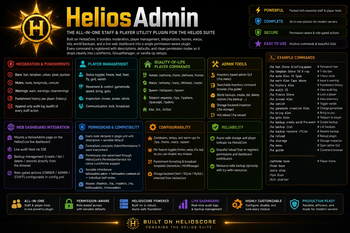

HeliosAdmin is an advanced all-in-one moderation and staff utility plugin for Minecraft servers, featuring punishments, player management, homes, warps, kits, backups, audit logging, and live dashboard integration powered by HeliosCore.
Moderation • Player Management • Homes & Warps • Kits • World Backups • Live Web Dashboard
HeliosAdmin replaces 5–6 separate plugins (essentials, ban systems, homes/warps, kits, backups) with one unified plugin that shares data, permissions, audit logs, and storage with every other Helios plugin via HeliosCore.
| 🛡️ Moderation | 🧰 Player Tools | 🏠 QoL | 💾 Server Ops |
|---|---|---|---|
| Bans, mutes, IP bans | Freeze, heal, feed, fly, god | Homes, warps, spawn | Live web dashboard |
| Tempbans & tempmutes | Gamemode, vanish, speed | TPA / TPAHere | World backups + restore |
| Warnings & history | Invsee, ecsee, bring, goto | Kits | Audit log streaming |
| Punishment audit log | Whois, broadcast, kick | Customisable cooldowns | Hot reload |
✅ Drop-in replacement for EssentialsX • LuckPerms-ready • Adventure / MiniMessage native
| Requirement | Version |
|---|---|
| Minecraft | 1.21.x • 26.1.x (native & tested) |
| Server | Paper / Purpur (Spigot not officially supported) |
| Java | 21+ |
| HeliosCore | Latest (required dependency) |
⚠️ HeliosCore is required. HeliosAdmin will not start without it. After installing HeliosCore for the first time, you must run
/hcore setupbefore HeliosAdmin's dashboard features will work.
1. Drop HeliosCore-x.y.z.jar     →  plugins/
2. Drop HeliosAdmin-x.y.z.jar    →  plugins/
3. Start the server (data folders & configs auto-generate)
4. Run  /hcore setup             (initialise dashboard owner — REQUIRED)
5. Edit plugins/HeliosAdmin/config.yml to taste
6. Run  /hadmin reload
7. (Optional) Configure your permission plugin — see Permissions below
That's it. Every command and permission node is registered automatically.
🛠️ Root CommandAliases:
/hadmin•/ha•/nadmin•/na•/heliosadmin•/ninezadmin
| Command | Description | Permission |
|---|---|---|
/hadmin guide |
Open the inventory command browser | heliosadmin.command.guide |
/hadmin menu |
Open the admin GUI menu | heliosadmin.command.menu |
/hadmin reload |
Reload Helios Admin config & storage | heliosadmin.command.reload |
/hadmin storage |
View / test the storage backend | heliosadmin.command.storage |
/hadmin audit [n] |
View recent audit log entries | heliosadmin.command.audit |
| Command | Description | Permission |
|---|---|---|
/hadmin ban <player> [reason] |
Permanently ban | heliosadmin.command.ban |
/hadmin tempban <player> <duration> [reason] |
Temporarily ban | heliosadmin.command.tempban |
/hadmin unban <player> |
Remove an active ban | heliosadmin.command.unban |
/hadmin ipban <player|ip> [reason] |
Ban a player's IP | heliosadmin.command.ipban |
/hadmin ipunban <ip> |
Remove an IP ban | heliosadmin.command.ipunban |
/hadmin mute <player> [reason] |
Permanently mute | heliosadmin.command.mute |
/hadmin tempmute <player> <duration> [reason] |
Temporarily mute | heliosadmin.command.tempmute |
/hadmin unmute <player> |
Remove an active mute | heliosadmin.command.unmute |
/hadmin warn <player> <reason> |
Issue a warning | heliosadmin.command.warn |
/hadmin warnings <player> |
View warnings | heliosadmin.command.warnings |
/hadmin clearwarnings <player> |
Clear all warnings | heliosadmin.command.clearwarnings |
/hadmin history <player> |
Full punishment history | heliosadmin.command.history |
/hadmin kick <player> [reason] |
Kick a player | heliosadmin.command.kick |
| Command | Description | Permission |
|---|---|---|
/hadmin freeze <player> |
Freeze / unfreeze | heliosadmin.command.freeze |
/hadmin heal [player] |
Restore full health | heliosadmin.command.heal |
/hadmin feed [player] |
Restore hunger | heliosadmin.command.feed |
/hadmin fly [player] |
Toggle flight | heliosadmin.command.fly |
/hadmin god [player] |
Toggle damage immunity | heliosadmin.command.god |
/hadmin gamemode <mode> [player] |
Change gamemode | heliosadmin.command.gamemode |
/hadmin speed <walk|fly> <0–10> [player] |
Adjust speed | heliosadmin.command.speed |
/hadmin invsee <player> |
Open another's inventory | heliosadmin.command.invsee |
/hadmin ecsee <player> |
Open another's ender chest | heliosadmin.command.ecsee |
/hadmin bring <player> |
Teleport player to you | heliosadmin.command.bring |
/hadmin goto <player> |
Teleport to a player | heliosadmin.command.goto |
/hadmin vanish [player] |
Toggle vanish | heliosadmin.command.vanish |
/hadmin whois <player> |
Detailed player info | heliosadmin.command.whois |
/hadmin broadcast <message> |
Server-wide announcement | heliosadmin.command.broadcast |
| Command | Description | Permission |
|---|---|---|
/hadmin backup create <world> [label] |
Create a labelled backup | heliosadmin.command.backup |
/hadmin backup list |
List all backups | heliosadmin.command.backup |
/hadmin backup delete <filename> |
Delete a backup | heliosadmin.command.backup |
/hadmin backup restore <filename> |
Restore a backup (unload world first) | heliosadmin.command.backup |
| Command | Description | Permission |
|---|---|---|
/sethome [name] |
Save current location as a home | heliosadmin.home.set |
/home [name] |
Teleport to a saved home | heliosadmin.home.use |
/delhome <name> |
Delete a home | heliosadmin.home.set |
/homes |
List your saved homes | heliosadmin.home.use |
/setwarp <name> |
Create / update a server warp | heliosadmin.warp.manage |
/warp <name> |
Teleport to a warp | heliosadmin.warp.use |
/delwarp <name> |
Delete a warp | heliosadmin.warp.manage |
/warps |
List server warps | heliosadmin.warp.use |
/setspawn |
Set server spawn | heliosadmin.command.setspawn |
/spawn |
Teleport to server spawn | heliosadmin.spawn.use |
/tpa <player> |
Request to teleport to a player | heliosadmin.tpa |
/tpahere <player> |
Request a player teleport to you | heliosadmin.tpa |
/tpaccept |
Accept a pending request | heliosadmin.tpa |
/tpdeny |
Deny a pending request | heliosadmin.tpa |
/kit [name] |
Claim a kit | heliosadmin.kit.use |
/hadmin kit <create|delete|edit> |
Manage kits | heliosadmin.kit.manage |
/kitlist |
View available kits | heliosadmin.kit.use |
HeliosAdmin uses a clean, hierarchical permission tree that drops straight into LuckPerms, GroupManager, PermissionsEx, or vanilla op.
heliosadmin.admin                 (default: op)  ━ grants EVERYTHING
└── heliosadmin.command.all                       ━ all leaf nodes below
    ├── heliosadmin.command.<each-command>
    ├── heliosadmin.home.use      / heliosadmin.home.set
    ├── heliosadmin.warp.use      / heliosadmin.warp.manage
    ├── heliosadmin.spawn.use     / heliosadmin.command.setspawn
    ├── heliosadmin.tpa
    ├── heliosadmin.kit.use       / heliosadmin.kit.manage
    └── heliosadmin.command.backup
heliosadmin.home.use • heliosadmin.home.setheliosadmin.warp.useheliosadmin.spawn.useheliosadmin.tpaheliosadmin.kit.useEverything else defaults to
false— staff opt-in only.
# ────────────── Helper / Trial Mod ──────────────
/lp group helper permission set heliosadmin.command.kick true
/lp group helper permission set heliosadmin.command.mute true
/lp group helper permission set heliosadmin.command.tempmute true
/lp group helper permission set heliosadmin.command.unmute true
/lp group helper permission set heliosadmin.command.warn true
/lp group helper permission set heliosadmin.command.warnings true
/lp group helper permission set heliosadmin.command.history true
/lp group helper permission set heliosadmin.command.invsee true
/lp group helper permission set heliosadmin.command.ecsee true
/lp group helper permission set heliosadmin.command.vanish true
/lp group helper permission set heliosadmin.command.whois true
/lp group helper permission set heliosadmin.command.freeze true

# ────────────── Moderator ──────────────
/lp group mod parent add helper
/lp group mod permission set heliosadmin.command.ban true
/lp group mod permission set heliosadmin.command.tempban true
/lp group mod permission set heliosadmin.command.unban true
/lp group mod permission set heliosadmin.command.clearwarnings true
/lp group mod permission set heliosadmin.command.broadcast true

# ────────────── Admin (everything) ──────────────
/lp group admin permission set heliosadmin.admin true
HeliosAdmin contributes a page to the HeliosCore live dashboard. From your browser you can:
OWNER / ADMIN / STAFF) configured in config.yml💡 First-time setup: run
/hcore setupto create the dashboard owner account. The dashboard will display a coloured prompt if you haven't done this yet.
Key sections in plugins/HeliosAdmin/config.yml:
# Storage backend (inherits from HeliosCore by default)
storage:
  inherit-core: true

# Per-feature toggles
features:
  homes: true
  warps: true
  kits: true
  tpa: true
  backups: true

# Cooldowns & warm-ups (in seconds)
teleport:
  warmup: 3
  cooldown: 5
  cancel-on-move: true
  cancel-on-damage: true

# Dashboard role gating for actions
dashboard:
  permissions:
    actions:
      createBackup: ADMIN
      deleteBackup: OWNER
      restoreBackup: OWNER
      kickPlayer: STAFF
      banPlayer: ADMIN

# Punishment formatting (MiniMessage)
messages:
  prefix: "<gradient:#F4A623:#FFD580>[Helios]</gradient> <white>"
  ban-screen: "<red>You are banned: <white><reason>"
🔄 Run
/hadmin reloadto apply changes without restarting.
# ━━━━━━━━━━━ First boot ━━━━━━━━━━━
/hcore setup                                  # Initialise dashboard owner

# ━━━━━━━━━━━ Daily moderation ━━━━━━━━━━━
/ha ban Steve Griefing spawn
/ha tempban Steve 7d X-ray
/ha mute Alex 1h Spam in chat
/ha warn Alex Caps abuse
/ha history Alex
/ha freeze Steve
/ha invsee Alex

# ━━━━━━━━━━━ Player utilities ━━━━━━━━━━━
/sethome base
/home base
/warp shop
/tpa Alex
/kit starter

# ━━━━━━━━━━━ Server operations ━━━━━━━━━━━
/ha backup create world Pre-event
/ha backup list
/ha backup restore world_2026-05-08_14-30-00_Pre-event.zip
/ha audit 25
/ha reload
Yes. HeliosCore provides storage, permissions, the dashboard, and the service registry every Helios plugin uses.
Will HeliosAdmin replace EssentialsX?For most servers — yes. Homes, warps, kits, spawn, TPA, fly, gamemode, heal, feed, vanish, broadcast, kick, ban, mute, IP-ban — all built in.
Does it support LuckPerms / GroupManager / PEX?Yes. Every permission node is registered in plugin.yml and advertised via HeliosCore's PermissionService, so they appear automatically in your permission plugin's tab-complete and admin UI.
plugins/HeliosAdmin/backups/<world>_<date>_<time>[_label].zip. Restoring requires the world be unloaded first.
Yes — toggle each module under features: in config.yml.
Yes — token-authenticated, role-gated, and you can rotate the token any time with /hcore dashboard token regenerate.
| Channel | Link |
|---|---|
| 💬 Discord | Helios Support Server |
| 🐛 Issue Tracker | Use the Discussion tab on this resource |
| 📚 Documentation | Bundled README.md and CONFIG_GUIDE.md |
Total server control, in one plugin.
Part of the Helios Ecosystem • Built on HeliosCore



