


HappyGhast - Ride & Upgrade
Give Happy Ghasts real gameplay: permanent speed boost, cargo & upgrades, fireball shooting, freeze/heal, and harness buffs.
📖About HappyGhast - Ride & Upgrade
HappyGhast — Ride & Upgrade the Happy Ghast
HappyGhast turns the new minecraft:happy_ghast into a real vehicle with progression and utility.
Players can boost riding speed, install cargo, fire fireballs, freeze/unfreeze, heal their mount, and gain buffs when a harness is equipped. All data (cargo, upgrades, boosts) is persisted safely across restarts.
Features
- Permanent riding speed boost
- Right-click with an Enchanted Snowball to multiply base riding speeds (configurable).
- Remove the boost with Enchanted Gunpowder; the plugin restores vanilla base values.
- Cargo & upgrades
- Sneak + Chest to install cargo, Sneak + Diamond to upgrade to double chest.
- Inventory is persisted to disk and restored on startup.
- Ghast Freeze
- Sneak + Amethyst Shard toggles AI pause/resume (useful for staging or parking).
- Fireballs while riding
- Use Fire Charges to shoot; includes cooldown, projectile speed, and anti-grief options (destructive by default).
- Ghast Heal
- Sneak + Phantom Membrane to heal to full or by a fixed amount (configurable, optional item consumption).
- Harness buffs
- Equipping any vanilla harness grants +9 hearts (configurable) and Resistance II (optional particles/ambient).
- Buffs are re-applied automatically on server start or reload.
Crafting
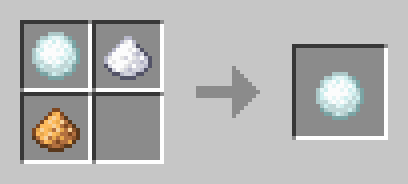
Enchanted Snowball
Type: Shapeless recipe
Ingredients: 1x Snowball + 1x Gunpowder + 1x Glowstone Dusk
Output: 1x Enchanted Snowball
Recipe ID: happyghast:enchanted_snowball
Use: Sneak + Right-click a Happy Ghast with the Enchanted Snowball to apply a permanent riding-speed boost (multiplier is configurable).
The item has the vanilla enchantment glint—no resource pack required.
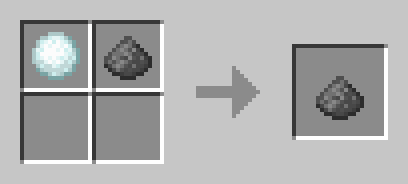
Enchanted Gunpowder
Type: Shapeless recipe
Ingredients: 1x Enchanted Snowball + 1x Gunpowder
Output: 1x Enchanted Gunpowder
Recipe ID: happyghast:enchanted_gunpowder
Use: Sneak + Right-click a Happy Ghast to remove the boost and restore vanilla base speeds immediately.
Both recipes are survival-friendly and show up like normal crafting recipes.
Admins can still use/hg give snowball <player> <amount>for testing or servers with restricted crafting.
Default Controls
- Install cargo: Sneak + Chest
- Open cargo: Sneak + Lightning Rod
- Upgrade cargo: Sneak + Diamond
- Freeze / Unfreeze: Sneak + Amethyst Shard
- Apply boost (permanent): Sneak + Right-click with Enchanted Snowball
- Remove boost: Sneak + Right-click with Enchanted Gunpowder
- Heal: Sneak + Phantom Membrane
- Fireball (while riding): Right-click with a Fire Charge
Commands & Permissions
| Command | What it does | Permission |
|---|---|---|
/hg |
Help | happyghast.admin (OP by default) |
/hg reload |
Reload config (recipes re-registered safely) | happyghast.admin |
/hg give snowball <player> <amount> |
Give Enchanted Snowballs | happyghast.admin |
/hg info |
Show tick interval | happyghast.admin |
/hg audit |
Print Happy Ghast stats | happyghast.admin |
/hg bases |
Read base movement/flying from nearest ghast | happyghast.admin |
/hg migrate |
Force config migration/refresh with comments | happyghast.admin |
/hg version |
Show plugin + config version | happyghast.admin |
To install on server
- Set up a Bukkit server such as Spigot or Paper (Paper is recommended over Spigot).
- Download Happy ghast - Ride & Upgrade from this page.
- Put the Happy ghast - Ride & Upgrade plugin file into your plugins folder.
Config (excerpt)
controls:
  install_with: CHEST          # SNEAK + right-click the Happy Ghast to install cargo
  open_with: LIGHTNING_ROD     # SNEAK + right-click to open the cargo inventory
  upgrade_item: DIAMOND        # SNEAK + right-click to upgrade (single -> double)
  freeze_item: AMETHYST_SHARD  # SNEAK + right-click to toggle freeze / resume AI
  heal_with: PHANTOM_MEMBRANE  # Item used to heal (SNEAK + right-click)

cargo:
  base_slots: 27               # Slots with cargo installed (must be multiple of 9)
  upgraded_slots: 54           # Slots after upgrade (max 54)

ride_boost:
  multiplier: 0.9              # Factor applied to riding speed base
                               # < 1.0 = slower (e.g. 0.7), > 1.0 = faster (e.g. 1.6)

vanilla_base:
  flying_speed: 0.05           # Vanilla flying speed (used on reset via enchanted gunpowder)
  movement_speed: 0.10         # Vanilla ground speed (used on reset via enchanted gunpowder)

fx:
  sounds: true                 # Enable interaction sounds
  particles: true              # Enable visual particles (feedback bursts)

heal:
  consume_item: true           # Consume the item outside Creative
  full: true                   # true = heal to max HP; false = add only 'amount'
  amount: 10.0                 # Used when full=false (HP; 2.0 = 1 heart)

fireball:
  enabled: true
  only_when_riding: true       # Only fire when the player is mounted on a Happy Ghast
  ammo_item: FIRE_CHARGE       # Ammo required in hand
  consume_ammo: true           # Consume one ammo in Survival
  cooldown_ticks: 20           # 20 ticks = 1s (per ghast)
  speed: 2.8                   # Initial projectile speed
  explosion_yield: 1.5         # Explosion "power" of the LargeFireball (vanilla ~1–3)
  incendiary: true             # Set blocks on fire (yes/no)
  block_damage: true           # false = no block damage (anti-grief)
  shooter_is_ghast: true       # true = ghast is the shooter (else the player)

harness:
  bonus_health: 20             # Extra HP while harness is equipped (+10 hearts)
  resistance_level: 2          # Resistance level (1–4)
  resistance_duration: 72000   # Duration in ticks (72000 = 1 hour); auto-refreshed
  reapply_on_enable: true      # Re-apply buffs on server start/reload
  resistance_particles: true   # Show potion swirl on the ghast
  resistance_ambient: false    # Ambient (subtle) particles when true

config-version: 1              # Managed by the plugin; will be migrated as needed