

FunTraps
A fun trap cage plugin for your server
📖About FunTraps
Custom Cages, Traps & Plast Walls for Paper/Purpur 1.21+
FunTraps adds temporary tactical structures to Minecraft servers. Players can deploy custom cages, Traps and directional Plast walls using configurable activation items, structures, skins, potion effects, sounds and visual feedback.
Create your own Trap and Plast designs with .schem or YAML structures, configure their behavior, assign skins, manage limited or unlimited uses, and control exactly where players can use them.
FunTraps is designed for fast-paced combat mechanics without leaving permanent damage in the world.
- Lifesteal
- Survival
- Factions
- Practice
- KitPvP
- Prison
- PvP Events
- Minigames
- Custom Battle Arenas
Compatibility
- Server software: Paper / Purpur 1.21+
- Java: Java 21 recommended
- Storage: YAML, SQLite or MySQL
- Languages: English, Spanish and Russian
Dependencies and optional integrations
FunTraps works without additional plugins for its core Trap, Plast, skin, storage and restoration systems.
- WorldEdit / FAWE: Create, save and manage custom
.schemstructures. - WorldGuard: World and region restrictions, custom flags and protection rules.
- ProtectionStones: Claim-based permissions for owners, members, administrators and visitors.
- PlaceholderAPI: Placeholders inside menus, requirements, messages and custom item text.
Skin shop requirements
The included skin purchase menus are configured to use PlayerPoints.
To use the default shop exactly as included, install:
PlaceholderAPI
PlayerPoints
PlaceholderAPI resolves
%playerpoints_points_formatted%inside the menus.PlayerPoints provides player balances and the
/points take <player> <amount>charge command.The default confirmation menu checks the player's balance before completing a purchase.
FunTraps still works without these plugins, but the included PlayerPoints shop must be reconfigured before use.
Main features
Custom Traps and cages
- Create temporary cages using custom
.schemor YAML structures. - Configure duration, cooldown, activation item, sounds, action bars and boss bars.
- Apply configurable potion effects to the owner and trapped players.
- Configure item cooldowns while players are inside active Traps.
- Save Trap structures with automatic center calculation.
- Configure per-player limits for active structures.
- Use custom placement, removal and ambient sounds.
Plast walls
- Deploy temporary directional walls using a dedicated activation item.
- Create separate Plast structures for every skin and direction.
- Supports horizontal, diagonal and vertical wall variants.
- Configure independent duration and cooldown settings.
- Use separate tools, saving commands, skins and removal commands.
Available Plast directions:
north
northeast
east
southeast
south
southwest
west
northwest
up
down
Example:
/plast save cruel northeast
This saves the variant as:
cruel_northeast.yml
Skins and uses
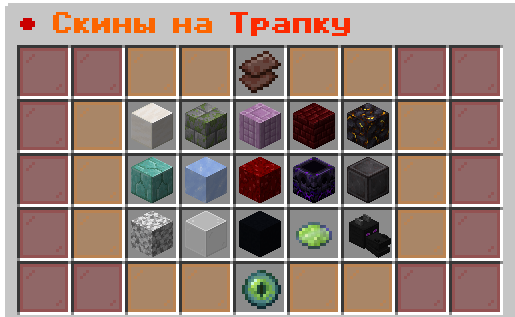
- Custom Trap and Plast skins.
- Unlimited, limited and virtual skin uses.
- Optional physical tokens that convert into virtual uses.
- Built-in skin browser, purchase menus and confirmation menus.
- Purchased skins can be granted directly as virtual uses.
- Selected skin state and remaining uses displayed in menus.
- Shift + right-click shortcut to open the skin menu from the activation item.
- Per-skin permissions using
funtraps.skin.<skinId>.
Safe restoration and recovery
- Temporary blocks restore automatically when structures expire or are removed.
- Traps and Plast walls are removed when their owner dies or disconnects.
- Original block information is stored before temporary blocks are replaced.
- Recovery data can restore pending structures after an unexpected shutdown.
- Containers, spawners and special block states are handled safely.
- Administrators can inspect, verify and restore pending recovery data.
Overlap and intersection system
FunTraps supports intersections between:
Trap ↔ Trap
Trap ↔ Plast
Plast ↔ Plast
self: Rules for structures owned by the same player.
others: Rules for structures owned by different players.
allow: Allows or blocks intersections.
SAFE: Restores only the finished structure layer while preserving intersected structures.
LEGACY: Uses legacy restoration behavior.
FORCE: Restores shared blocks to their original state and may visually break the intersected structure.
preserve-first-structure: Controls which structure remains visible in shared block positions.
Example overlap configuration
trap:
  overlap:
    preserve-first-structure: true
    self:
      allow: true
      restore-mode: FORCE
    others:
      allow: true
      restore-mode: FORCE
- The first placed Trap or Plast remains visible in shared positions.
- Later structures remain active internally.
- When one intersected structure ends, shared blocks are restored forcibly.
- The remaining structure can lose blocks in the shared area.
Material protection rules
FunTraps separates structure placement protection from interior clearing protection.
trap:
  ignore-blocks:
    - BARRIER
    - BEDROCK
    - BEACON
    - DIRT_PATH

  cancel-on-materials:
    - CHEST
    - BARREL
    - ".*shulker_box"

  clear-inside:
    ignore-blocks:
      - BARRIER
      - BEDROCK
      - BEACON
      - ".*shulker_box"
- ignore-blocks: Matching blocks are not replaced by Trap or Plast structures.
- cancel-on-materials: Cancels the complete placement when a matching material exists inside the structure area.
- clear-inside.ignore-blocks: Defines blocks that clear-inside must never remove.
- Supports exact Minecraft material names and regex rules.
Regex examples
cancel-on-materials:
  - SHULKER_BOX
  - ".*shulker_box"
  - ".*_shulker_box"
  - ".*_bed"
  - ".*_chest"
SHULKER_BOXmatches only the normal shulker box..*shulker_boxmatches normal and colored shulker boxes..*_shulker_boxmatches colored shulker boxes only..*_bedmatches every bed color..*_chestmatches chest-related materials.
World, region and claim protection
FunTraps provides flexible restrictions for worlds, WorldGuard regions and ProtectionStones claims.
- Allow or block structures by world.
- Allow or block structures by WorldGuard region.
- Create local allowed-region exceptions inside blocked worlds.
- Restrict placement inside spawn areas, markets or protected zones.
- Use optional WorldGuard custom flags for advanced control.
- Use ProtectionStones role rules for owners, members, administrators and non-members.
- Use
funtraps.worldguard.bypasswhen an administrator requires a custom-flag bypass.
ProtectionStones role configuration
trap:
  protectionstones:
    placement:
      allow-owners: true
      allow-members: true
      allow-administrators: false
      allow-non-members: false
- allow-owners: Allows claim owners to deploy structures.
- allow-members: Allows listed claim members to deploy structures.
- allow-administrators: Allows players with administrator access in the claim.
- allow-non-members: Allows visitors without claim membership.
- Roles are cumulative. A player is allowed when at least one enabled role applies.
Clear-inside system
Clear-inside removes eligible blocks inside a Trap while respecting configured material rules, worlds, WorldGuard regions and ProtectionStones claims.
trap:
  clear-inside:
    enabled: true
    default-behavior: DENY
    allowed-worlds: []
    allowed-regions: []
    allowed-match: ANY
    blocked-worlds: []
    blocked-regions: []

    protectionstones:
      enabled: true
- With
DENY, clear-inside is disabled outside configured allowed worlds or regions. - Authorized ProtectionStones claim members can still use clear-inside when ProtectionStones support is enabled.
- Set
protectionstones.enabled: falseto prevent clear-inside inside all ProtectionStones claims. - Use
allowed-worldsandallowed-regionsto enable clear-inside in selected PvP worlds and arenas. - Use
blocked-worldsandblocked-regionsto protect important locations.
Performance and stability
- Deferred structure preloading to reduce first-use lag.
- Separate caches for Trap and Plast structures.
- Event-driven menu updates without mandatory one-tick refresh tasks.
- Particle viewer cache to reduce repeated player scans.
- Configurable MySQL connection pool.
- Recovery journal written before temporary world changes.
- Automatic cleanup on player death, disconnect and plugin shutdown.
- Crash recovery support for temporary structures and clear-inside changes.
- Modular systems for Traps, Plast walls, skins, menus, particles, storage, protections and recovery.
Commands
Trap administration
/trap give <player|all> <amount>
/trap giveuses <player> <skin> <amount>
/trap takeuses <player> <skin> <amount>
/trap setuses <player> <skin> <amount>
/trap tool
/trap pos1
/trap pos2
/trap save <skin>
/trap delete <skin>
/trap rename <old> <new>
/trap remove <player|all> [resetcooldown]
/trap recovery <status|restore [world]|verify>
/trap reload
Plast administration
/plast give <player> <amount>
/plast tool
/plast pos1
/plast pos2
/plast save <skin> [direction]
/plast delete <skin>
/plast rename <old> <new>
/plast remove <all|here|player|me|id> [resetcooldown]
/plast removehere [resetcooldown]
/plast reload
Player commands
/trap skin <skin>
/trap skins
/trap profile
/trap togglemode
/plast skin <skin>
/plast skins
/plast variants <skin>
Permissions
funtraps.admin— Full administrative access.funtraps.user— Access to player Trap and skin commands.funtraps.skin.<skinId>— Permission to use one specific skin.funtraps.skin.*— Permission to use every available skin.funtraps.worldguard.bypass— Bypass FunTraps custom WorldGuard flags.
Important update notes
Always create a backup before updating FunTraps.
Back up the complete
plugins/FunTrapsfolder, including configuration files, menus, skins, schematics, recovery data and storage files.Review the changelog before updating, especially when changing storage settings, structure formats, custom menus or protection rules.
FunTraps brings tactical combat, custom structures and safe world restoration to your server. /trap rename
/trap remove <player|all> [resetcooldown]
/trap recovery <status|restore [world]|verify>
/trap reload
Plast administration
/plast give <player> <amount>
/plast tool
/plast pos1
/plast pos2
/plast save <skin> [direction]
/plast delete <skin>
/plast rename <old> <new>
/plast remove <all|here|player|me|id> [resetcooldown]
/plast removehere [resetcooldown]
/plast reload
Player commands
/trap skin <skin>
/trap skins
/trap profile
/trap togglemode
/plast skin <skin>
/plast skins
/plast variants <skin>
Permissions
funtraps.admin— Full administrative access.funtraps.user— Access to player Trap and skin commands.funtraps.skin.<skinId>— Permission to use one specific skin.funtraps.skin.*— Permission to use every available skin.funtraps.worldguard.bypass— Bypass FunTraps custom WorldGuard flags.
Important update notes
Always create a backup before updating FunTraps.
Back up the complete
plugins/FunTrapsfolder, including configuration files, menus, skins, schematics, recovery data and storage files.Review the changelog before updating, especially when changing storage settings, structure formats, custom menus or protection rules.
FunTraps brings tactical combat, custom structures and safe world restoration to your server.