Logo
MINECRAFTBIBLE
Items
Items

All game items

Blocks
Blocks

Building blocks

Mobs
Mobs

Creatures & monsters

Biomes
Biomes

World biomes

Structures
Structures

Generated structures

Recipes
Recipes

Crafting guides

Advancements
Advancements

Achievements

Loot Tables
Loot Tables

Drop rates

Tags
Tags

Item groupings

All Versions
View all data →
Capes
Cape ArchiveNEW

Browse rare Minecon capes, OptiFine capes, and custom capes from players worldwide

Browse

Player Database
Player DatabasePopular

Search any player

Skin Browser
Skin Browser

Browse & download skins

Cape Gallery
Cape GalleryNEW

Minecon & OptiFine capes

Seed Vault
Seed Vault

Curated seeds

Learn

Guides
GuidesNew

Tutorials & tips

Blog
Blog

News & updates

Community

Community Hub
Community HubHub

Posts, discussions & more

All Versions
View community →
Seed Analyzer
Seed Analyzer

World seed analysis

Loot Explorer
Loot Explorer

Drop rates

Crafting Calculator
Crafting Calculator

Material planning

Enchant Calculator
Enchant Calculator

Probability math

Redstone Lab
Redstone Lab

Signal timing

Trading Profit
Trading Profit

Villager ROI

All Versions
View all tools →
Mods
Mods

Browse all mods

Plugins
Plugins

Server plugins

Resource Packs
Resource Packs

Textures & sounds

Shaders
Shaders

Visual enhancements

Datapacks
Datapacks

World logic

Scanner
Mod Intelligence

Scan & analyze any mod

All Versions
View all mods →
Loading...
IntroductionIntroductionVersion HistoryVersion HistoryGuidesGuidesBlog & NewsBlog & News
ItemsItemsBlocksBlocksMobsMobsRecipesRecipesBiomesBiomesStructuresStructuresAdvancementsAdvancementsLoot TablesLoot TablesTagsTags
ModsModsPluginsPluginsResource PacksResource PacksShadersShadersDatapacksDatapacks

MinecraftBible

The Ultimate Wiki

Logo
MINECRAFTBIBLE

The ultimate Minecraft reference. Every item, block, mob, and recipe documented with precision.

Community

  • Skin Browser
  • Cape Gallery
  • Seed Vault
  • Blog
  • Guides

Database

  • Items
  • Blocks
  • Mobs
  • Recipes
  • Biomes
  • Structures

Tools

  • Seed Analyzer
  • Mod Intelligence
  • Crafting Calculator
  • Enchant Calculator

Mods & Packs

  • Mods
  • Plugins
  • Resource Packs
  • Shaders
  • Datapacks

Site & Legal

  • About
  • Authors
  • Editorial Policy
  • Corrections
  • Contact
  • Privacy Policy
  • Terms of Service
  • DMCA
  • Sitemap

© 2026 MinecraftBible. Not affiliated with Mojang or Microsoft.

PrivacyTermsContact
FoliaGram
PluginMIT

FoliaGram

Connect your Folia server straight to your pocket.

16
Downloads
0
Followers
3 months ago
Updated
📦
2
Versions
managementutilityfolia
Download Latestv1.0.1View on Modrinth

📖About FoliaGram

FoliaGram

Connect your Folia server straight to your pocket.

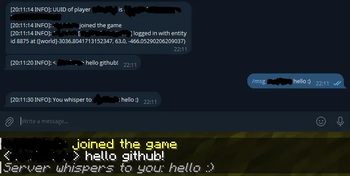
FoliaGram is a lightweight, multithread-safe Telegram bridge built exclusively for Minecraft Folia 1.21+. It transforms your Telegram app into a remote control panel and a 1:1 real-time console mirror.

Features

  • Real-Time Console Mirror: Watch your server logs live from your phone.
  • Remote Commands: Execute console commands securely via Telegram.
  • Chat Bridge: See player chats, joins, and leaves instantly.
  • Custom Log Levels: Use /fg level [1-4] in-game to filter how much information gets sent to your phone (from just chats up to full debug logs).
  • Folia Native: Built natively for Folia's GlobalRegionScheduler and AsyncScheduler to ensure zero TPS impact and strict thread safety.
  • Secure: Locked strictly to your personal Telegram User ID.

Installation

  1. Drop FoliaGram-1.0.1.jar into your plugins folder.
  2. Restart the server.
  3. Open plugins/FoliaGram/config.yml and paste your Bot Token and Telegram ID.
  4. Restart once more and hit /start on your bot in Telegram!

👥 Team & Contributors

H
heavnhvnOwner

⚙️ Compatibility

Environment
🖥️ Server-side
Loaders
folia
Minecraft Versions
1.211.21.11.21.21.21.31.21.41.21.51.21.61.21.7+4 more

🔗 Links

Modrinth Page