Logo
MINECRAFTBIBLE
Items
Items

All game items

Blocks
Blocks

Building blocks

Mobs
Mobs

Creatures & monsters

Biomes
Biomes

World biomes

Structures
Structures

Generated structures

Recipes
Recipes

Crafting guides

Advancements
Advancements

Achievements

Loot Tables
Loot Tables

Drop rates

Tags
Tags

Item groupings

All Versions
View all data →
Capes
Cape ArchiveNEW

Browse rare Minecon capes, OptiFine capes, and custom capes from players worldwide

Browse

Player Database
Player DatabasePopular

Search any player

Skin Browser
Skin Browser

Browse & download skins

Cape Gallery
Cape GalleryNEW

Minecon & OptiFine capes

Seed Vault
Seed Vault

Curated seeds

Learn

Guides
GuidesNew

Tutorials & tips

Blog
Blog

News & updates

Community

Community Hub
Community HubHub

Posts, discussions & more

All Versions
View community →
Seed Analyzer
Seed Analyzer

World seed analysis

Loot Explorer
Loot Explorer

Drop rates

Crafting Calculator
Crafting Calculator

Material planning

Enchant Calculator
Enchant Calculator

Probability math

Redstone Lab
Redstone Lab

Signal timing

Trading Profit
Trading Profit

Villager ROI

All Versions
View all tools →
Mods
Mods

Browse all mods

Plugins
Plugins

Server plugins

Resource Packs
Resource Packs

Textures & sounds

Shaders
Shaders

Visual enhancements

Datapacks
Datapacks

World logic

Scanner
Mod Intelligence

Scan & analyze any mod

All Versions
View all mods →
Loading...
IntroductionIntroductionVersion HistoryVersion HistoryGuidesGuidesBlog & NewsBlog & News
ItemsItemsBlocksBlocksMobsMobsRecipesRecipesBiomesBiomesStructuresStructuresAdvancementsAdvancementsLoot TablesLoot TablesTagsTags
ModsModsPluginsPluginsResource PacksResource PacksShadersShadersDatapacksDatapacks

MinecraftBible

The Ultimate Wiki

Logo
MINECRAFTBIBLE

The ultimate Minecraft reference. Every item, block, mob, and recipe documented with precision.

Community

  • Skin Browser
  • Cape Gallery
  • Seed Vault
  • Blog
  • Guides

Database

  • Items
  • Blocks
  • Mobs
  • Recipes
  • Biomes
  • Structures

Tools

  • Seed Analyzer
  • Mod Intelligence
  • Crafting Calculator
  • Enchant Calculator

Mods & Packs

  • Mods
  • Plugins
  • Resource Packs
  • Shaders
  • Datapacks

Site & Legal

  • About
  • Authors
  • Editorial Policy
  • Corrections
  • Contact
  • Privacy Policy
  • Terms of Service
  • DMCA
  • Sitemap

© 2026 MinecraftBible. Not affiliated with Mojang or Microsoft.

PrivacyTermsContact
Fog
PluginMIT

Fog

A PaperMC plugin adding quiet echoes, liminal thoughts, and absolute abyss darkness.

63
Downloads
3
Followers
1 months ago
Updated
📦
2
Versions
adventurecursedpaperpurpur
Download Latestv2.0.0View on Modrinth

📖About Fog

Fog Banner

A moody PaperMC plugin that turns underground mining into a quiet, introspective, and slightly unsettling journey. It completely strips away flashy particles to focus on isolation, soundscapes, and raw psychological depth.


The Concept

As players descend deeper into the earth, the world slowly changes. FOG tracks player depth in real-time and triggers subtle atmospheric changes depending on their current zone:

  • Shallow (Y: 59 to 30): Warm nostalgic thoughts, gentle cave echoes, and the quiet comfort of a furnace.
  • Deep (Y: 29 to 0): Heavy silence, deep reflections on why we keep digging, and distant machinery.
  • Abyss (Y: -1 and below): Existential dread, raw cavern echoes, and sudden 10-second warden blindness.

Features

1. No Particles

There are no floating bubbles, colorful dusts, or flashy indicators. The atmosphere is built purely on ambient sound cues, raw text, and sensory deprivation.

2. Warden Darkness

When an atmospheric trigger occurs in the Abyss, the player is struck with a pure, black Darkness effect for 10 seconds (200 ticks), simulating a warden passing by in the dark.

Fog Texts

3. No-Repeat Message Pools

To prevent spam, the plugin tracks which thoughts a player has already experienced during their current zone visit. It will never show the same text twice until they leave the zone (which resets their history). If a player has seen everything in a zone, the whispers fade to absolute silence.

4. UI

The help and status interfaces are designed with a retro psychological horror aesthetic:

  • Spaced lowercase styling.

5. Paranoia & Hallucinations

Deep underground, you are never truly alone. The plugin triggers sensory hallucinations:

  • Lanterns & Cobwebs: Randomly appearing lanterns that disappear after a few seconds.
  • Abandoned Signs: Eerie signs in the Abyss that stay in place until you look at them and then look completely away.
  • Auditory Paranoia: Footsteps following you, blocks breaking in nearby walls, and chests creaking in the void.

Recommended Experience

For the best atmospheric experience, it is highly recommended to:
  • Enable game sounds: The soundscapes, heartbeat pacing, and auditory hallucinations are core to the experience.
  • Disable FullBright / Gamma mods: Playing with high gamma or fullbright cheats completely bypasses the darkness mechanics and ruins the intended atmosphere.

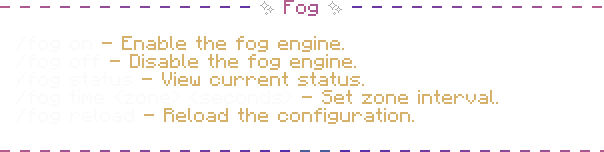
Fog Menu (/fog)

Commands

  • /fog on
    Enables the atmospheric engine. Warns you if it is already active.
  • /fog off
    Disables the atmospheric engine. Returns you to standard vanilla silence.
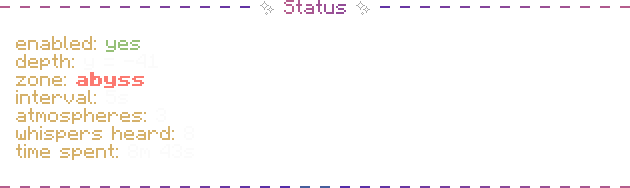
  • /fog status
    Shows your current depth, zone, intervals, and active atmospheres.
  • /fog time <shallow|deep|abyss> <seconds>
    Dynamically changes and persists trigger intervals directly to config.yml in real-time.
  • /fog reload
    Reloads the config file instantly without requiring a server reboot.

Fog Status

Configuration (config.yml)

The configuration is extremely clean. You can add or modify thoughts and sounds for each depth zone:

depth:
  shallow: 59
  deep: 29
  abyss: -1

intervals:
  shallow: 120
  deep: 300
  abyss: 600

atmospheres:
  shallow_thoughts:
    zone: shallow
    messages:
      - "some things just take time, but i don't mind waiting. it's warm near the furnace."
      - "i don't restart worlds because they're bad. i restart them because i miss beginnings."
    sounds:
      - "minecraft:ambient.cave"

  deep_reflections:
    zone: deep
    messages:
      - "i mined for hours and found no diamonds but i didn't really fail i just forgot i was looking for coal"
    sounds:
      - "minecraft:ambient.cave"
      - "minecraft:block.portal.ambient"

  abyss_echoes:
    zone: abyss
    messages:
      - "you feel like seeing village torches in the distance after walking through darkness for too long"
    sounds:
      - "minecraft:entity.warden.ambient"

Requirements & Compatibility

  • Minecraft Version: PaperMC 1.21, 1.21.1, and all 1.21.x sub-releases
  • Java Version: Java 21 or higher

How to install:

  1. Put fog-2.0.0.jar into your server's plugins/ directory.
  2. Restart or reload the server.

Disclaimer

Please keep in mind that there might be compatibility conflicts with other plugins on your server.


License

This project is licensed under the MIT License. Feel free to use, modify, and distribute it.

👥 Team & Contributors

alfredsaveron
alfredsaveronOwner

⚙️ Compatibility

Environment
🖥️ Server-side
Loaders
paperpurpur
Minecraft Versions
1.211.21.11.21.21.21.31.21.41.21.51.21.61.21.7+4 more

🔗 Links

Modrinth Page