Logo
MINECRAFTBIBLE
Items
Items

All game items

Blocks
Blocks

Building blocks

Mobs
Mobs

Creatures & monsters

Biomes
Biomes

World biomes

Structures
Structures

Generated structures

Recipes
Recipes

Crafting guides

Advancements
Advancements

Achievements

Loot Tables
Loot Tables

Drop rates

Tags
Tags

Item groupings

All Versions
View all data →
Capes
Cape ArchiveNEW

Browse rare Minecon capes, OptiFine capes, and custom capes from players worldwide

Browse

Player Database
Player DatabasePopular

Search any player

Skin Browser
Skin Browser

Browse & download skins

Cape Gallery
Cape GalleryNEW

Minecon & OptiFine capes

Seed Vault
Seed Vault

Curated seeds

Learn

Guides
GuidesNew

Tutorials & tips

Blog
Blog

News & updates

Community

Community Hub
Community HubHub

Posts, discussions & more

All Versions
View community →
Seed Analyzer
Seed Analyzer

World seed analysis

Loot Explorer
Loot Explorer

Drop rates

Crafting Calculator
Crafting Calculator

Material planning

Enchant Calculator
Enchant Calculator

Probability math

Redstone Lab
Redstone Lab

Signal timing

Trading Profit
Trading Profit

Villager ROI

All Versions
View all tools →
Mods
Mods

Browse all mods

Plugins
Plugins

Server plugins

Resource Packs
Resource Packs

Textures & sounds

Shaders
Shaders

Visual enhancements

Datapacks
Datapacks

World logic

Scanner
Mod Intelligence

Scan & analyze any mod

All Versions
View all mods →
Loading...
IntroductionIntroductionVersion HistoryVersion HistoryGuidesGuidesBlog & NewsBlog & News
ItemsItemsBlocksBlocksMobsMobsRecipesRecipesBiomesBiomesStructuresStructuresAdvancementsAdvancementsLoot TablesLoot TablesTagsTags
ModsModsPluginsPluginsResource PacksResource PacksShadersShadersDatapacksDatapacks

MinecraftBible

The Ultimate Wiki

Logo
MINECRAFTBIBLE

The ultimate Minecraft reference. Every item, block, mob, and recipe documented with precision.

Community

  • Skin Browser
  • Cape Gallery
  • Seed Vault
  • Blog
  • Guides

Database

  • Items
  • Blocks
  • Mobs
  • Recipes
  • Biomes
  • Structures

Tools

  • Seed Analyzer
  • Mod Intelligence
  • Crafting Calculator
  • Enchant Calculator

Mods & Packs

  • Mods
  • Plugins
  • Resource Packs
  • Shaders
  • Datapacks

Site & Legal

  • About
  • Authors
  • Editorial Policy
  • Corrections
  • Contact
  • Privacy Policy
  • Terms of Service
  • DMCA
  • Sitemap

© 2026 MinecraftBible. Not affiliated with Mojang or Microsoft.

PrivacyTermsContact
FoCoinflip
PluginLicenseRef-All-Rights-Reserved

FoCoinflip

Vault-based player coinflips with GUI listings, animated results, stats, tax, and admin controls.

82
Downloads
1
Followers
1 months ago
Updated
📦
6
Versions
economybukkitpaperpurpurspigot
Download Latestv1.5View on Modrinth

📖About FoCoinflip

Cover Image
Add fast player-vs-player coinflips with a clean GUI, Vault payouts, stats, tax controls, and admin editing.

FoCoinflip lets players create wager listings, join other players' flips, watch a short result animation, and track their won/lost totals. Server owners get simple admin controls for tax, min/max bet limits, announcements, GUI text, and animation behavior.
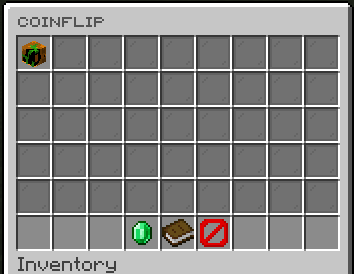
FoCoinflip main GUI with active player coinflips and the player's stats item

Features

  • Let players create one active coinflip listing with /cf create <amount>.
  • Show active coinflips in a paginated GUI with player heads and bet amounts.
  • Withdraw stakes up front, refund deleted or shutdown coinflips, and pay winners through Vault.
  • Configure tax percentage, minimum bet, maximum bet, result announcements, and animation timing.
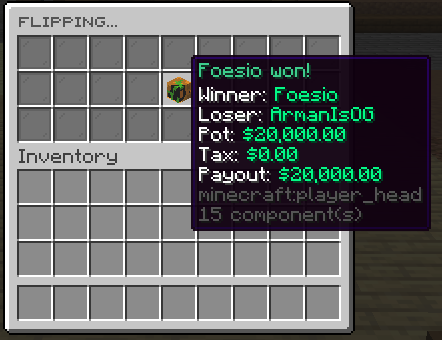
  • Display a rolling coinflip animation and final winner result to both players.
  • Track player totals for money won, money lost, and net sum.
  • Expose PlaceholderAPI placeholders for coinflip stats when PlaceholderAPI is installed.
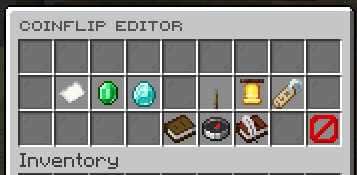
  • Edit key settings from an admin GUI with chat prompts.

Coinflip result animation showing winner, loser, pot, tax, and payout

Coinflip admin editor with tax, bet limits, announcements, and GUI title settings

Dependencies

  • Required: Vault and a Vault-compatible economy provider.
  • Optional: PlaceholderAPI for %focoinflip_total_won%, %focoinflip_total_lost%, and %focoinflip_total_sum%.

Commands

  • /coinflip - Open the coinflip GUI.
  • /coinflip create <amount> - Create a coinflip listing.
  • /coinflip delete - Delete your active coinflip and refund the stake.
  • /coinflipadmin version - Show plugin version and author.
  • /coinflipadmin editor - Open the admin settings editor.
  • /coinflipadmin reload - Reloadds config.yml, messages.yml and guis folder.

Aliases: /focoinflip, /cf, /focoinflipadmin, /cfadmin

Permissions

  • focoinflip.use - Use coinflip commands.
  • focoinflip.admin - Use admin commands and the editor.

Placeholders

  • %focoinflip_total_won% - Player's formatted total money won from coinflips.
  • %focoinflip_total_lost% - Player's formatted total money lost from coinflips.
  • %focoinflip_total_sum% - Player's formatted net coinflip total.

👥 Team & Contributors

Carrotio
CarrotioOwner

⚙️ Compatibility

Environment
🖥️ Server-side
Loaders
bukkitpaperpurpurspigot
Minecraft Versions
1.211.21.11.21.21.21.31.21.41.21.51.21.61.21.7+8 more

🔗 Links

Modrinth Page