Logo
MINECRAFTBIBLE
Items
Items

All game items

Blocks
Blocks

Building blocks

Mobs
Mobs

Creatures & monsters

Biomes
Biomes

World biomes

Structures
Structures

Generated structures

Recipes
Recipes

Crafting guides

Advancements
Advancements

Achievements

Loot Tables
Loot Tables

Drop rates

Tags
Tags

Item groupings

All Versions
View all data →
Capes
Cape ArchiveNEW

Browse rare Minecon capes, OptiFine capes, and custom capes from players worldwide

Browse

Player Database
Player DatabasePopular

Search any player

Skin Browser
Skin Browser

Browse & download skins

Cape Gallery
Cape GalleryNEW

Minecon & OptiFine capes

Seed Vault
Seed Vault

Curated seeds

Learn

Guides
GuidesNew

Tutorials & tips

Blog
Blog

News & updates

Community

Community Hub
Community HubHub

Posts, discussions & more

All Versions
View community →
Seed Analyzer
Seed Analyzer

World seed analysis

Loot Explorer
Loot Explorer

Drop rates

Crafting Calculator
Crafting Calculator

Material planning

Enchant Calculator
Enchant Calculator

Probability math

Redstone Lab
Redstone Lab

Signal timing

Trading Profit
Trading Profit

Villager ROI

All Versions
View all tools →
Mods
Mods

Browse all mods

Plugins
Plugins

Server plugins

Resource Packs
Resource Packs

Textures & sounds

Shaders
Shaders

Visual enhancements

Datapacks
Datapacks

World logic

Scanner
Mod Intelligence

Scan & analyze any mod

All Versions
View all mods →
Loading...
IntroductionIntroductionVersion HistoryVersion HistoryGuidesGuidesBlog & NewsBlog & News
ItemsItemsBlocksBlocksMobsMobsRecipesRecipesBiomesBiomesStructuresStructuresAdvancementsAdvancementsLoot TablesLoot TablesTagsTags
ModsModsPluginsPluginsResource PacksResource PacksShadersShadersDatapacksDatapacks

MinecraftBible

The Ultimate Wiki

Logo
MINECRAFTBIBLE

The ultimate Minecraft reference. Every item, block, mob, and recipe documented with precision.

Community

  • Skin Browser
  • Cape Gallery
  • Seed Vault
  • Blog
  • Guides

Database

  • Items
  • Blocks
  • Mobs
  • Recipes
  • Biomes
  • Structures

Tools

  • Seed Analyzer
  • Mod Intelligence
  • Crafting Calculator
  • Enchant Calculator

Mods & Packs

  • Mods
  • Plugins
  • Resource Packs
  • Shaders
  • Datapacks

Site & Legal

  • About
  • Authors
  • Editorial Policy
  • Corrections
  • Contact
  • Privacy Policy
  • Terms of Service
  • DMCA
  • Sitemap

© 2026 MinecraftBible. Not affiliated with Mojang or Microsoft.

PrivacyTermsContact
Ender Be Gone
PluginLicenseRef-All-Rights-Reserved

Ender Be Gone

Prevents Endermen from moving blocks.

14
Downloads
0
Followers
2 months ago
Updated
📦
1
Versions
decorationgame-mechanicspaper
Download Latestv1.0.1-RC.1View on Modrinth

📖About Ender Be Gone

Ender Be Gone

Problem

Endermen can move blocks. This is usually only a minor inconvenience because of their relatively low spawn rate. However, once you fully light up your world with torches, lanterns, or other light sources, Endermen become much more noticeable. Since most hostile mobs can no longer spawn in lit areas, Endermen make up a larger percentage of the remaining mob spawns.

Even though Endermen cannot spawn directly in torch light, they can still spawn:

  • In nearby caves beneath your base
  • Just outside the lit area
  • In dark patches you may have missed

After spawning, they can teleport into your play space and start rearranging your blocks.
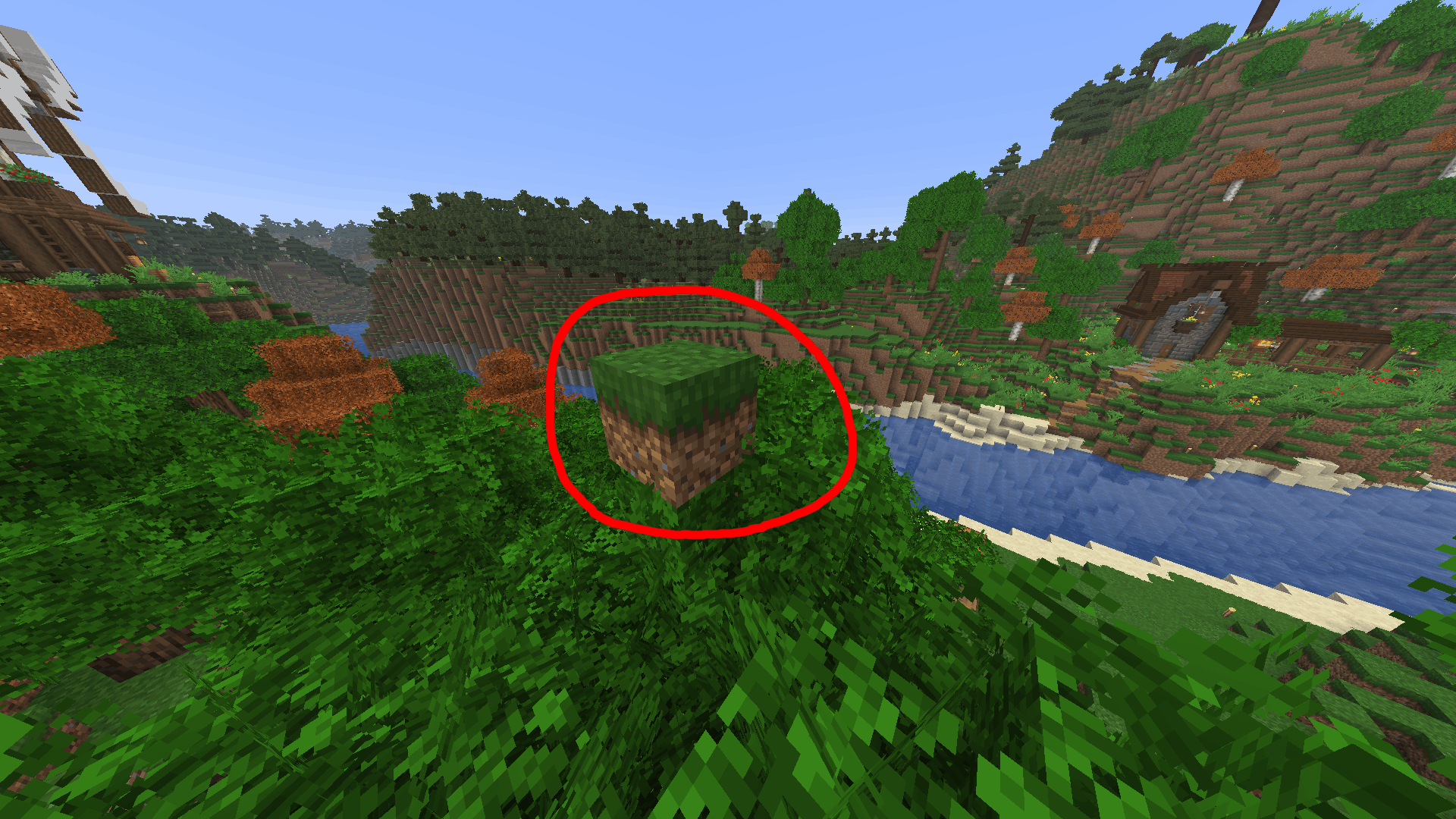
Grass block placed by an enderman in an improper place

Why Not Just Disable Mob Griefing?

You could disable mob griefing with:

/gamerule mobGriefing false

But this also disables behavior for many other mobs, including villagers, animals, and other non-hostile mechanics that players may still want enabled.

Solution

This plugin specifically targets Endermen and prevents them from mutating your world. This way you don't have to worry about disabling other mob functions that might be useful in farms and such.

Features

  • Prevents Endermen from picking up blocks

  • Prevents Endermen from placing blocks

  • Gives Endermen a configurable chance to spawn already holding a block

    • Default: 33%
  • Configurable scan radius for selecting held blocks

    • Default: 4 blocks

How It Works

When an Enderman spawns, the plugin scans nearby blocks within the configured radius around the spawn location. Any block contained in Minecraft's enderman_holdable tag can be selected, and the enderman will be spawned carrying that block. This way we can preserve the appearance and atmosphere of vanilla Endermen while preventing the terrain from being disfigured.

👥 Team & Contributors

WeAreJacket
WeAreJacketOwner

⚙️ Compatibility

Environment
🖥️ Server-side
Loaders
paper
Minecraft Versions
1.211.21.11.21.21.21.31.21.41.21.51.21.61.21.7+4 more

🔗 Links

Modrinth Page