Logo
MINECRAFTBIBLE
Items
Items

All game items

Blocks
Blocks

Building blocks

Mobs
Mobs

Creatures & monsters

Biomes
Biomes

World biomes

Structures
Structures

Generated structures

Recipes
Recipes

Crafting guides

Advancements
Advancements

Achievements

Loot Tables
Loot Tables

Drop rates

Tags
Tags

Item groupings

All Versions
View all data →
Capes
Cape ArchiveNEW

Browse rare Minecon capes, OptiFine capes, and custom capes from players worldwide

Browse

Player Database
Player DatabasePopular

Search any player

Skin Browser
Skin Browser

Browse & download skins

Cape Gallery
Cape GalleryNEW

Minecon & OptiFine capes

Seed Vault
Seed Vault

Curated seeds

Learn

Guides
GuidesNew

Tutorials & tips

Blog
Blog

News & updates

Community

Community Hub
Community HubHub

Posts, discussions & more

All Versions
View community →
Seed Analyzer
Seed Analyzer

World seed analysis

Loot Explorer
Loot Explorer

Drop rates

Crafting Calculator
Crafting Calculator

Material planning

Enchant Calculator
Enchant Calculator

Probability math

Redstone Lab
Redstone Lab

Signal timing

Trading Profit
Trading Profit

Villager ROI

All Versions
View all tools →
Mods
Mods

Browse all mods

Plugins
Plugins

Server plugins

Resource Packs
Resource Packs

Textures & sounds

Shaders
Shaders

Visual enhancements

Datapacks
Datapacks

World logic

Scanner
Mod Intelligence

Scan & analyze any mod

All Versions
View all mods →
Loading...
IntroductionIntroductionVersion HistoryVersion HistoryGuidesGuidesBlog & NewsBlog & News
ItemsItemsBlocksBlocksMobsMobsRecipesRecipesBiomesBiomesStructuresStructuresAdvancementsAdvancementsLoot TablesLoot TablesTagsTags
ModsModsPluginsPluginsResource PacksResource PacksShadersShadersDatapacksDatapacks

MinecraftBible

The Ultimate Wiki

Logo
MINECRAFTBIBLE

The ultimate Minecraft reference. Every item, block, mob, and recipe documented with precision.

Community

  • Skin Browser
  • Cape Gallery
  • Seed Vault
  • Blog
  • Guides

Database

  • Items
  • Blocks
  • Mobs
  • Recipes
  • Biomes
  • Structures

Tools

  • Seed Analyzer
  • Mod Intelligence
  • Crafting Calculator
  • Enchant Calculator

Mods & Packs

  • Mods
  • Plugins
  • Resource Packs
  • Shaders
  • Datapacks

Site & Legal

  • About
  • Authors
  • Editorial Policy
  • Corrections
  • Contact
  • Privacy Policy
  • Terms of Service
  • DMCA
  • Sitemap

© 2026 MinecraftBible. Not affiliated with Mojang or Microsoft.

PrivacyTermsContact
EmojiType
PluginCC-BY-SA-4.0

EmojiType

A plugin to auto-replace emoji codes with unicode symbols server-side.
115
Downloads
2
Followers
1 years ago
Updated
📦
1
Versions
decorationmanagementsocialpaperspigot
Download Latestv1.0-SNAPSHOTView on Modrinth

📖About EmojiType

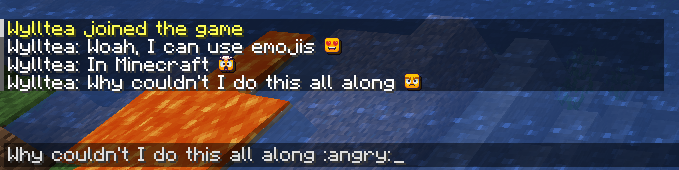
screenshot of the plugin working

Emojis in minecraft 🤯

This is my first plugin and it's honestly pretty simple. You use the config.yml file to define replacement maps for unicode characters in a resource pack. There's some details in the config on how to set up new maps. Please read the description before asking for support.

I made this with three permission levels for access to emojis, so you can build out special emojis as rank perks if you'd like! You can also just leave the fields blank and just build out all your emojis under level one if you don't want to use the level feature.

This plugin does not come with a resource pack!

There's some good tutorials and tools out there on how to make packs for unicode symbols, I personally used Nautical Tools when I was making mine since it gives you the unicode mappings in your pack folder. If you don't want to do it yourself, Cheerful is a good start :)

‼️YOU NEED TO HAVE A PERMISSIONS PLUGIN ON YOUR SERVER‼️

The emojis are not enabled by default, so you have to assign the permissions yourself.

Really this is kind of just a replacement filter, you don't have to use unicode symbols or emoji codes. Your text can really be whatever you want, this is just the intended use case :)

I'll probably have a new version of this up soon, there's a lot of things I want to add to this, but this is just the barebones first version.

Commands:

/emoji reload reloads the config

Permissions:

emojitype.admin

Grants access to /emoji reload

emojitype.levelone

Grants access to Level One emojis

emojitype.leveltwo

Grants access to Level Three emojis

emojitype.levelthree

Grants access to Level Three emojis

Default config.yml
# How to add a new emoji.
#
# ":EMOJI_NAME:": "UNICODE SYMBOL"
#
# EMOJI_NAME is what you want your players to enter, it can be anything. It's just what the plugin searches for to
# replace.
# UNICODE_SYMBOL is the unicode symbol that your emoji is defined as in your resource pack
# There's tutorials and tools out there to make resource packs for unicode symbols, it's pretty easy. I know that
# https://modrinth.com/resourcepack/cheerful?version=1.21.5 can provide a good start!
# I used https://tools.nauticalhosting.org/packgen/ as I was working on this. It gives you the unicode mappings in your
# pack file.
#
# I also included three permission levels in this, just give your players the permission level based on what emojis you
# want your players to have access to.
#
# Do "/emoji reload" if you want to reload this config.

# Permission level: emojitype.levelone
emojis-level-one:
  ":heart_eyes:": ""
  #":EMOJI_NAME:": "UNICODE_SYMBOL"

# Permission level: emojitype.leveltwo
emojis-level-two:
  ":angry:": ""

# Permission level: emojitype.levelthree
emojis-level-three:
  ":mind_blown:": ""

👥 Team & Contributors

Wylltea
WyllteaOwner

⚙️ Compatibility

Environment
🖥️ Server-side
Loaders
paperspigot
Minecraft Versions
1.211.21.11.21.21.21.31.21.41.21.51.21.61.21.7

🔗 Links

Modrinth Page