Logo
MINECRAFTBIBLE
Items
Items

All game items

Blocks
Blocks

Building blocks

Mobs
Mobs

Creatures & monsters

Biomes
Biomes

World biomes

Structures
Structures

Generated structures

Recipes
Recipes

Crafting guides

Advancements
Advancements

Achievements

Loot Tables
Loot Tables

Drop rates

Tags
Tags

Item groupings

All Versions
View all data →
Capes
Cape ArchiveNEW

Browse rare Minecon capes, OptiFine capes, and custom capes from players worldwide

Browse

Player Database
Player DatabasePopular

Search any player

Skin Browser
Skin Browser

Browse & download skins

Cape Gallery
Cape GalleryNEW

Minecon & OptiFine capes

Seed Vault
Seed Vault

Curated seeds

Learn

Guides
GuidesNew

Tutorials & tips

Blog
Blog

News & updates

Community

Community Hub
Community HubHub

Posts, discussions & more

All Versions
View community →
Seed Analyzer
Seed Analyzer

World seed analysis

Loot Explorer
Loot Explorer

Drop rates

Crafting Calculator
Crafting Calculator

Material planning

Enchant Calculator
Enchant Calculator

Probability math

Redstone Lab
Redstone Lab

Signal timing

Trading Profit
Trading Profit

Villager ROI

All Versions
View all tools →
Mods
Mods

Browse all mods

Plugins
Plugins

Server plugins

Resource Packs
Resource Packs

Textures & sounds

Shaders
Shaders

Visual enhancements

Datapacks
Datapacks

World logic

Scanner
Mod Intelligence

Scan & analyze any mod

All Versions
View all mods →
Loading...
IntroductionIntroductionVersion HistoryVersion HistoryGuidesGuidesBlog & NewsBlog & News
ItemsItemsBlocksBlocksMobsMobsRecipesRecipesBiomesBiomesStructuresStructuresAdvancementsAdvancementsLoot TablesLoot TablesTagsTags
ModsModsPluginsPluginsResource PacksResource PacksShadersShadersDatapacksDatapacks

MinecraftBible

The Ultimate Wiki

Logo
MINECRAFTBIBLE

The ultimate Minecraft reference. Every item, block, mob, and recipe documented with precision.

Community

  • Skin Browser
  • Cape Gallery
  • Seed Vault
  • Blog
  • Guides

Database

  • Items
  • Blocks
  • Mobs
  • Recipes
  • Biomes
  • Structures

Tools

  • Seed Analyzer
  • Mod Intelligence
  • Crafting Calculator
  • Enchant Calculator

Mods & Packs

  • Mods
  • Plugins
  • Resource Packs
  • Shaders
  • Datapacks

Site & Legal

  • About
  • Authors
  • Editorial Policy
  • Corrections
  • Contact
  • Privacy Policy
  • Terms of Service
  • DMCA
  • Sitemap

© 2026 MinecraftBible. Not affiliated with Mojang or Microsoft.

PrivacyTermsContact
Dream Displays
PluginLGPL-3.0-only

Dream Displays

Create in-game screens to stream your favorite videos in Minecraft.

30.7K
Downloads
126
Followers
3 weeks ago
Updated
📦
30
Versions
game-mechanicssocialutilitybukkitfabricfolianeoforgepaperpurpurquiltspigot
Download Latestv1.8.5View on Modrinth

📖About Dream Displays

If you enjoy Dream Displays, consider buying me a coffee. Every contribution helps keep the project alive!

Support me on Ko-fi


Latest release
License
Discord

Dream Displays
Download from Modrinth | CurseForge | GitHub | Discord

Available for Fabric, NeoForge, Quilt, and popular server forks

Dream Displays also supports Fabric servers! No Paper or hybrid server software required.

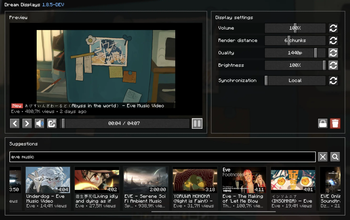
Create interactive in-game displays that stream YouTube videos in real time, with smooth playback, configurable
resolution, and even with synchronization mode for all players on the server.

For this mod to work, players install the client mod, while server admins can install either:

  • Server plugin on Paper / Folia / Purpur or other fork
  • Fabric server mod on Fabric servers

img

Features

Client

  • Ad-free YouTube video playback, so you can enjoy uninterrupted viewing
  • Seamless multiplayer synchronization: local, synced, and broadcast
  • Livestreams and premières support
  • Direct YouTube search and suggestions
  • Vertical display orientation support
  • Picture-in-Picture mode
  • Adjustable resolutions from 144p up to 4K
  • Volume control from 0% to 200%
  • Brightness control from 0% to 100%
  • Multiple video languages support
  • Customizable display sizes in blocks
  • Integrated controls for play, pause, and seek
  • Hardware accelerations
  • And much more!

Server

  • Screens and settings remain after the server restarts or when unloaded
  • Simple and precise server-side configuration
  • Ultra-low network impact and zero lags
  • Fabric server support (1:1 as Paper)
  • Display commands — manage your in-game screens: create, delete, etc.
  • Fine-grained permissions for admin-only control

How to use this mod?

Set up a display using black concrete, select it with a diamond axe, and type /display create. After the display is
created, type /display video <link to YouTube video> [language]

Done! To customize the display, look at it and press Shift + RMB

Read more in our wiki.

img

👥 Team & Contributors

arnodoelinger
arnodoelingerOwner

⚙️ Compatibility

Environment
✅ Client & Server
Loaders
bukkitfabricfolianeoforgepaperpurpurquiltspigot
Minecraft Versions
1.211.21.11.21.21.21.31.21.41.21.51.21.61.21.7+8 more

🔗 Links

Modrinth Page