Logo
MINECRAFTBIBLE
Items
Items

All game items

Blocks
Blocks

Building blocks

Mobs
Mobs

Creatures & monsters

Biomes
Biomes

World biomes

Structures
Structures

Generated structures

Recipes
Recipes

Crafting guides

Advancements
Advancements

Achievements

Loot Tables
Loot Tables

Drop rates

Tags
Tags

Item groupings

All Versions
View all data →
Capes
Cape ArchiveNEW

Browse rare Minecon capes, OptiFine capes, and custom capes from players worldwide

Browse

Player Database
Player DatabasePopular

Search any player

Skin Browser
Skin Browser

Browse & download skins

Cape Gallery
Cape GalleryNEW

Minecon & OptiFine capes

Seed Vault
Seed Vault

Curated seeds

Learn

Guides
GuidesNew

Tutorials & tips

Blog
Blog

News & updates

Community

Community Hub
Community HubHub

Posts, discussions & more

All Versions
View community →
Seed Analyzer
Seed Analyzer

World seed analysis

Loot Explorer
Loot Explorer

Drop rates

Crafting Calculator
Crafting Calculator

Material planning

Enchant Calculator
Enchant Calculator

Probability math

Redstone Lab
Redstone Lab

Signal timing

Trading Profit
Trading Profit

Villager ROI

All Versions
View all tools →
Mods
Mods

Browse all mods

Plugins
Plugins

Server plugins

Resource Packs
Resource Packs

Textures & sounds

Shaders
Shaders

Visual enhancements

Datapacks
Datapacks

World logic

Scanner
Mod Intelligence

Scan & analyze any mod

All Versions
View all mods →
Loading...
IntroductionIntroductionVersion HistoryVersion HistoryGuidesGuidesBlog & NewsBlog & News
ItemsItemsBlocksBlocksMobsMobsRecipesRecipesBiomesBiomesStructuresStructuresAdvancementsAdvancementsLoot TablesLoot TablesTagsTags
ModsModsPluginsPluginsResource PacksResource PacksShadersShadersDatapacksDatapacks

MinecraftBible

The Ultimate Wiki

Logo
MINECRAFTBIBLE

The ultimate Minecraft reference. Every item, block, mob, and recipe documented with precision.

Community

  • Skin Browser
  • Cape Gallery
  • Seed Vault
  • Blog
  • Guides

Database

  • Items
  • Blocks
  • Mobs
  • Recipes
  • Biomes
  • Structures

Tools

  • Seed Analyzer
  • Mod Intelligence
  • Crafting Calculator
  • Enchant Calculator

Mods & Packs

  • Mods
  • Plugins
  • Resource Packs
  • Shaders
  • Datapacks

Site & Legal

  • About
  • Authors
  • Editorial Policy
  • Corrections
  • Contact
  • Privacy Policy
  • Terms of Service
  • DMCA
  • Sitemap

© 2026 MinecraftBible. Not affiliated with Mojang or Microsoft.

PrivacyTermsContact
Donut Pay
PluginMIT

Donut Pay

Instant Economy Upgrade for your Minecraft Server. Turn your standard economy into a modern, customizable payment system instantly.

3.3K
Downloads
5
Followers
2 months ago
Updated
📦
2
Versions
economytechnologybukkitpaperpurpurspigot
Download Latestv2.2View on Modrinth

📖About Donut Pay

Donut Pay

Instant Economy Upgrade for your Minecraft Server. Turn your standard economy into a modern, customizable payment system instantly.

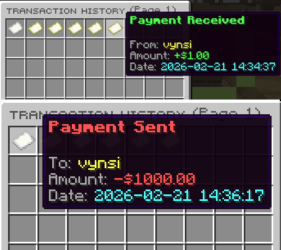
Preview

Preview

📥 Installation

Prerequisites: Ensure you have Vault and EssentialsX or something installed on your server.

  • Download DonutPay.jar.
  • Upload it to your /plugins folder.
  • Restart your server.
  • Done! Start managing transactions with ease.

Example GUI Command: /payhistory

⚙️ Configuration

The config.yml is generated automatically on first run:

# ----------------------------------------
# DonutPay Configuration
# ----------------------------------------

settings:
  # Maximum number of transactions to keep per player
  history-limit: 45
  
  # Should we play a sound when someone receives money?
  play-sound: true

gui:
  # The base title of the inventory
  title: "&8ᴛʀᴀɴsᴀᴄᴛɪᴏɴ ʜɪsᴛᴏʀʏ"
  
  # Inventory size (multiple of 9)
  size: 54

🎮 Commands & Usage

1. Pay a Player

  • Send money using smart shorthands (e.g., 1.5k, 2m).

  • Command: /pay <player> <amount>

  • Permission: donutpay.pay

2. View Transaction History

  • Open an interactive, paginated GUI of your past sent/received payments.

  • Command: /payhistory (Alias: /phistory)

  • Permission: donutpay.history

3. Toggle Incoming Payments

  • Control your privacy by blocking incoming payments from other players.

  • Command: /paytoggle

  • Permission: donutpay.toggle

4. Check Balances

  • Quickly view formatted balances for yourself or others.

  • Command: /bal [player]

  • Permission: donutpay.bal / donutpay.bal.other

  • Pull requests are welcome. For major changes, please open an issue first

  • to discuss what you would like to change.

    Please make sure to update tests as appropriate.

🛠 Features & Technical Info

Core Features:

  • Number Shorthands: Players type 1.5k instead of 1500, or 2m for 2,000,000!
  • Hex Color Engine: Fully supports modern #RRGGBB and &#RRGGBB colors in chat, GUIs, and Action
    Bars.
  • Action Bar Alerts: Non-intrusive action bar popups mirroring customized chat messages.
  • PlaceholderAPI Hook: Use PAPI placeholders seamlessly inside your messages.yml.

Technical:

  • Built for Spigot, Paper, and Purpur (1.13 - 1.21.11).
  • Lightweight asynchronous transaction logging (history.yml).
  • Fast UUID-based player toggle storage (userdata.yml).

Thank for support

Made with ❤️ by Bellanoo and Ly_No

👥 Team & Contributors

NotDelulu
NotDeluluOwner

⚙️ Compatibility

Environment
🖥️ Server-side
Loaders
bukkitpaperpurpurspigot
Minecraft Versions
1.131.13.11.13.21.141.14.11.14.21.14.31.14.4+41 more

🔗 Links

Modrinth Page