Logo
MINECRAFTBIBLE
Items
Items

All game items

Blocks
Blocks

Building blocks

Mobs
Mobs

Creatures & monsters

Biomes
Biomes

World biomes

Structures
Structures

Generated structures

Recipes
Recipes

Crafting guides

Advancements
Advancements

Achievements

Loot Tables
Loot Tables

Drop rates

Tags
Tags

Item groupings

All Versions
View all data →
Capes
Cape ArchiveNEW

Browse rare Minecon capes, OptiFine capes, and custom capes from players worldwide

Browse

Player Database
Player DatabasePopular

Search any player

Skin Browser
Skin Browser

Browse & download skins

Cape Gallery
Cape GalleryNEW

Minecon & OptiFine capes

Seed Vault
Seed Vault

Curated seeds

Learn

Guides
GuidesNew

Tutorials & tips

Blog
Blog

News & updates

Community

Community Hub
Community HubHub

Posts, discussions & more

All Versions
View community →
Seed Analyzer
Seed Analyzer

World seed analysis

Loot Explorer
Loot Explorer

Drop rates

Crafting Calculator
Crafting Calculator

Material planning

Enchant Calculator
Enchant Calculator

Probability math

Redstone Lab
Redstone Lab

Signal timing

Trading Profit
Trading Profit

Villager ROI

All Versions
View all tools →
Mods
Mods

Browse all mods

Plugins
Plugins

Server plugins

Resource Packs
Resource Packs

Textures & sounds

Shaders
Shaders

Visual enhancements

Datapacks
Datapacks

World logic

Scanner
Mod Intelligence

Scan & analyze any mod

All Versions
View all mods →
Loading...
IntroductionIntroductionVersion HistoryVersion HistoryGuidesGuidesBlog & NewsBlog & News
ItemsItemsBlocksBlocksMobsMobsRecipesRecipesBiomesBiomesStructuresStructuresAdvancementsAdvancementsLoot TablesLoot TablesTagsTags
ModsModsPluginsPluginsResource PacksResource PacksShadersShadersDatapacksDatapacks

MinecraftBible

The Ultimate Wiki

Logo
MINECRAFTBIBLE

The ultimate Minecraft reference. Every item, block, mob, and recipe documented with precision.

Community

  • Player Database
  • Skin Browser
  • Cape Gallery
  • Community Hub
  • Seed Vault

Database

  • Items
  • Blocks
  • Mobs
  • Recipes
  • Biomes
  • Structures

Tools

  • Seed Analyzer
  • Mod Intelligence
  • Crafting Calculator
  • Enchant Calculator

Mods & Packs

  • Mods
  • Plugins
  • Resource Packs
  • Shaders
  • Datapacks

© 2026 MinecraftBible. Not affiliated with Mojang or Microsoft.

PrivacyTermsContact
Donut Chat Replica
PluginMIT

Donut Chat Replica

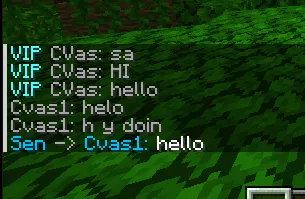
Lightweight and Simple Chat Management Plugin Like Donut With Performant Coding

609
Downloads
0
Followers
7 months ago
Updated
📦
1
Versions
managementsocialutilitypaperpurpur
Download Latestv1.0.0View on Modrinth

📖About Donut Chat Replica

🍩 DonutChat - Advanced Chat Management Plugin

  • It is a very simple DonutSmp replica Chat plugin.

Transform your Minecraft server's chat experience with DonutChat - the ultimate chat formatting and management solution!

✨ Key Features

🎨 Advanced Chat Formatting

  • Customizable chat format with placeholders ({prefix}, {name}, {message})​
  • Full color code support including hex colors (#RRGGBB)​
  • LuckPerms integration for dynamic prefixes​
  • Configurable default prefixes for players without permissions​

🔇 Personal Mute System

  • Individual Player Muting: Players can mute specific users for themselves only
  • Smart Tab Completion: Easy-to-use commands with intelligent auto-completion
  • Mute List Management: View and manage all muted players with /unmute
  • Bulk Unmute: Unmute all players at once with /unmute all

💬 Private Messaging System

  • Direct Messages: Send private messages with /msg command
  • Quick Reply: Reply to the last message with /r command
  • Sound Notifications: Customizable sound alerts for new messages
  • Mute Integration: Respects personal mute settings automatically

🔧 Toggle Controls

  • Chat Toggle: Players can disable/enable public chat visibility with /togglechat
  • Message Toggle: Players can disable/enable private message reception with /togglemsg
  • Personal Control: Each player controls their own chat experience

⚙️ Configuration & Management

  • Live Reload: Reload configuration without server restart
  • Test Commands: Preview chat formatting before applying
  • Flexible Configuration: Easy-to-edit YAML configuration files
  • Performance Optimized: Efficient concurrent data structures for large servers

📋 Commands Overview

Command Description Aliases
/mute Mute a specific player
/unmute [player|all] Unmute player(s) or view muted list
/togglechat Toggle public chat visibility
/togglemsg Toggle private message reception
/msg
r Reply to last message /reply
/donutchat reload Reload plugin configuration

🔐 Permissions

  • donutchat.reload - Allow configuration reloading (default: op)
  • donutchat.colors - Allow color codes in chat (default: true)

📝 Configuration Example

  • chat-format: "{prefix}{name}&r: {message}"

  • default-prefix: "&6 "

  • allow-colors: true

  • Private_Messages:

    • Sender:
  • Format: "&bYou -> {receiver}: &f"

    • Receiver:
  • Format: "&b{player} -> You: &f"

    • sound:
    • toggle: true
    • value: "entity.player.levelup"

Example

👥 Team & Contributors

CVas
CVasOwner

⚙️ Compatibility

Environment
🖥️ Server-side
Loaders
paperpurpur
Minecraft Versions
1.21

🔗 Links

Modrinth Page