Logo
MINECRAFTBIBLE
Items
Items

All game items

Blocks
Blocks

Building blocks

Mobs
Mobs

Creatures & monsters

Biomes
Biomes

World biomes

Structures
Structures

Generated structures

Recipes
Recipes

Crafting guides

Advancements
Advancements

Achievements

Loot Tables
Loot Tables

Drop rates

Tags
Tags

Item groupings

All Versions
View all data →
Capes
Cape ArchiveNEW

Browse rare Minecon capes, OptiFine capes, and custom capes from players worldwide

Browse

Player Database
Player DatabasePopular

Search any player

Skin Browser
Skin Browser

Browse & download skins

Cape Gallery
Cape GalleryNEW

Minecon & OptiFine capes

Seed Vault
Seed Vault

Curated seeds

Learn

Guides
GuidesNew

Tutorials & tips

Blog
Blog

News & updates

Community

Community Hub
Community HubHub

Posts, discussions & more

All Versions
View community →
Seed Analyzer
Seed Analyzer

World seed analysis

Loot Explorer
Loot Explorer

Drop rates

Crafting Calculator
Crafting Calculator

Material planning

Enchant Calculator
Enchant Calculator

Probability math

Redstone Lab
Redstone Lab

Signal timing

Trading Profit
Trading Profit

Villager ROI

All Versions
View all tools →
Mods
Mods

Browse all mods

Plugins
Plugins

Server plugins

Resource Packs
Resource Packs

Textures & sounds

Shaders
Shaders

Visual enhancements

Datapacks
Datapacks

World logic

Scanner
Mod Intelligence

Scan & analyze any mod

All Versions
View all mods →
Loading...
IntroductionIntroductionVersion HistoryVersion HistoryGuidesGuidesBlog & NewsBlog & News
ItemsItemsBlocksBlocksMobsMobsRecipesRecipesBiomesBiomesStructuresStructuresAdvancementsAdvancementsLoot TablesLoot TablesTagsTags
ModsModsPluginsPluginsResource PacksResource PacksShadersShadersDatapacksDatapacks

MinecraftBible

The Ultimate Wiki

Logo
MINECRAFTBIBLE

The ultimate Minecraft reference. Every item, block, mob, and recipe documented with precision.

Community

  • Player Database
  • Skin Browser
  • Cape Gallery
  • Community Hub
  • Seed Vault

Database

  • Items
  • Blocks
  • Mobs
  • Recipes
  • Biomes
  • Structures

Tools

  • Seed Analyzer
  • Mod Intelligence
  • Crafting Calculator
  • Enchant Calculator

Mods & Packs

  • Mods
  • Plugins
  • Resource Packs
  • Shaders
  • Datapacks

© 2026 MinecraftBible. Not affiliated with Mojang or Microsoft.

PrivacyTermsContact
Damage Indicator
PluginGPL-3.0-only

Damage Indicator

An extensive, feature-rich, high-performance packet-based damage indicator

1.9K
Downloads
11
Followers
4 months ago
Updated
📦
4
Versions
adventureequipmentmobsfoliapaperpurpurspigot
Download Latestv1.22.0View on Modrinth

📖About Damage Indicator

Damage Indicator

A high performance packet-based damage indicator

DamageIndicator is an extensive and feature-rich healthbar manager for Minecraft servers.
It provides a system to display damage dealt to enemies solely using packets,
which means no actual armor stand entities will be spawned.

DamageIndicator is also completely server-side so no additional mods are required by your players.
The high-performance packet spawning and flexible configuration makes DamageIndicator extremely suitable for large PvP or Survival servers.

Key Features

  • Highly configurable

    • Modify damage indicator offset, speed and duration
    • Edit all indicator colours to your liking
      • Each damage range can be a different colour group
      • The colour of every character in a colour group can be customised
    • Support for bold, italics and rainbow mode
    • Global toggle for heal indicators in addition to damage indicators
  • No setup required

    • Default offset and colour values have been extensively tested on large servers
    • Comes with 10 unique colour groups for all indicators to provide more variation
    • Simply drag & drop the plugin to get started
  • Cross-version compatibility

    • Supports all Minecraft versions from 1.8.8–1.21.11
    • Incompatible versions will fallback to invisible armor stands instead of breaking the plugin
  • Per-player & per-world toggle support

    • Allow players to disable client-side indicator packets via a command
      • Useful to preserve FPS on low-end setups and for experienced PvP players who do not need indicators
    • Admins can completely disable indicators in specific worlds
      • Useful for non-PvP worlds or in fast-paced gamemodes like NoHitDelay
  • High-performance

    • DamageIndicator was built with performance in mind
    • No performance issues on servers with up to 100+ players
    • Perfect for large PvP or Survival servers
  • 100% packet-based

    • DamageIndicator uses purely packets to send indicators to players
    • Hugely boosts performance as no armor stand entities are actually spawned
    • No floating armor stands will remain in the world if your server crashes

Plugin Showcase


Commands & Permissions

/damageindicator help
[damageindicator.command.help]
Help command to show all possible arguments

/damageindicator toggle <on/off>
[damageindicator.command.toggle]
Toggle client-side damage indicators

/damageindicator reload
[damageindicator.command.reload]
Reload the plugin’s config.yml and messages.yml files

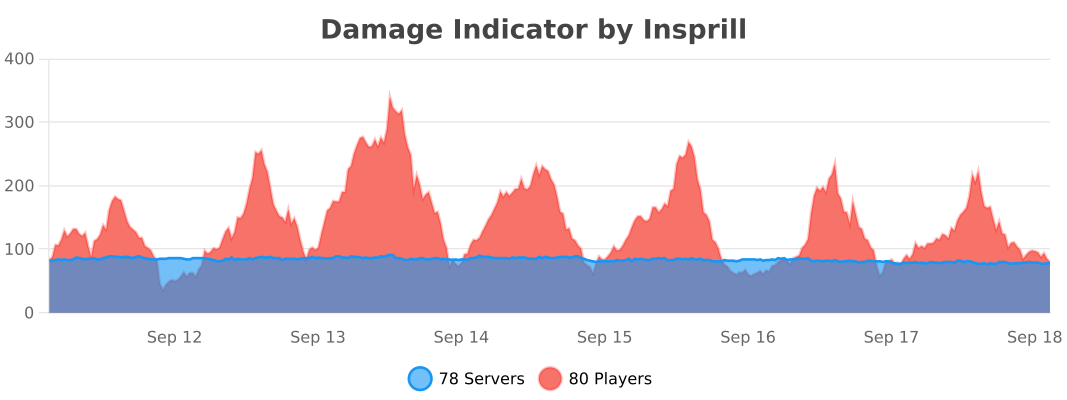
Statistics

bStats Statistics

Contributors

Zenya4
Skaian
Greylatte

  • Developer up to 1.1.2 | Zenya4
  • Configs up to 1.1.2 & Beta Testing | Skaian
  • Videos & Editing | Greylatte

👥 Team & Contributors

Insprill
InsprillOwner

⚙️ Compatibility

Environment
🖥️ Server-side
Loaders
foliapaperpurpurspigot
Minecraft Versions
1.81.8.11.8.21.8.31.8.41.8.51.8.61.8.7+62 more

🔗 Links

Modrinth Page