Logo
MINECRAFTBIBLE
Items
Items

All game items

Blocks
Blocks

Building blocks

Mobs
Mobs

Creatures & monsters

Biomes
Biomes

World biomes

Structures
Structures

Generated structures

Recipes
Recipes

Crafting guides

Advancements
Advancements

Achievements

Loot Tables
Loot Tables

Drop rates

Tags
Tags

Item groupings

All Versions
View all data →
Capes
Cape ArchiveNEW

Browse rare Minecon capes, OptiFine capes, and custom capes from players worldwide

Browse

Player Database
Player DatabasePopular

Search any player

Skin Browser
Skin Browser

Browse & download skins

Cape Gallery
Cape GalleryNEW

Minecon & OptiFine capes

Seed Vault
Seed Vault

Curated seeds

Learn

Guides
GuidesNew

Tutorials & tips

Blog
Blog

News & updates

Community

Community Hub
Community HubHub

Posts, discussions & more

All Versions
View community →
Seed Analyzer
Seed Analyzer

World seed analysis

Loot Explorer
Loot Explorer

Drop rates

Crafting Calculator
Crafting Calculator

Material planning

Enchant Calculator
Enchant Calculator

Probability math

Redstone Lab
Redstone Lab

Signal timing

Trading Profit
Trading Profit

Villager ROI

All Versions
View all tools →
Mods
Mods

Browse all mods

Plugins
Plugins

Server plugins

Resource Packs
Resource Packs

Textures & sounds

Shaders
Shaders

Visual enhancements

Datapacks
Datapacks

World logic

Scanner
Mod Intelligence

Scan & analyze any mod

All Versions
View all mods →
Loading...
IntroductionIntroductionVersion HistoryVersion HistoryGuidesGuidesBlog & NewsBlog & News
ItemsItemsBlocksBlocksMobsMobsRecipesRecipesBiomesBiomesStructuresStructuresAdvancementsAdvancementsLoot TablesLoot TablesTagsTags
ModsModsPluginsPluginsResource PacksResource PacksShadersShadersDatapacksDatapacks

MinecraftBible

The Ultimate Wiki

Logo
MINECRAFTBIBLE

The ultimate Minecraft reference. Every item, block, mob, and recipe documented with precision.

Community

  • Skin Browser
  • Cape Gallery
  • Seed Vault
  • Blog
  • Guides

Database

  • Items
  • Blocks
  • Mobs
  • Recipes
  • Biomes
  • Structures

Tools

  • Seed Analyzer
  • Mod Intelligence
  • Crafting Calculator
  • Enchant Calculator

Mods & Packs

  • Mods
  • Plugins
  • Resource Packs
  • Shaders
  • Datapacks

Site & Legal

  • About
  • Authors
  • Editorial Policy
  • Corrections
  • Contact
  • Privacy Policy
  • Terms of Service
  • DMCA
  • Sitemap

© 2026 MinecraftBible. Not affiliated with Mojang or Microsoft.

PrivacyTermsContact
CreatureCapture
PluginGPL-3.0-only

CreatureCapture

Turn mob hunting into a collection challenge!

28
Downloads
1
Followers
4 months ago
Updated
📦
1
Versions
game-mechanicsmagicmobsbukkitpaperpurpurspigot
Download Latestv2.3.0View on Modrinth

📖About CreatureCapture

CreatureCapture Header

Join Discord GitHub Donate

Catch them all on your server

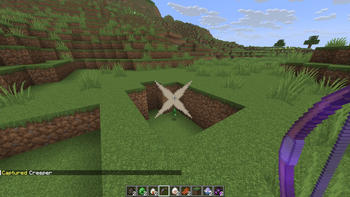
CreatureCapture turns mob hunting into a real progression system. Use the Capture Bow to capture creatures, collect their spawn eggs, complete your personal collection, and compete with other players on the server leaderboard.

Perfect for survival servers, collection-based gameplay, custom progression, and for use alongside SpawnerSilk.

Features

  • Capture creatures with a special bow enchanted with Silk Touch
  • Collection system: every unique creature you capture is permanently recorded
  • Player progression: track your completion with /cc collection and /cc stats
  • Competitive leaderboard: compare players with /cc top
  • Persistent data storage with SQLite
  • Automatic migration from the old captures.yml format
  • Configurable mob list: enable or disable capture per creature in config.yml
  • Configurable bow durability and capture chance
  • Spawner interaction support and special Iron Golem egg handling
  • Tab completion for commands

How it works

  • Get a Capture Bow with /cc get or through the enchantment table
  • Shoot a compatible creature with the bow
  • If the capture succeeds, the creature is turned into its spawn egg
  • The capture is added to the player’s permanent collection

This makes CreatureCapture more than a utility plugin: it adds a real collection and progression loop to your server.

Commands

Command Description
/cc get Get a Capture Bow
/cc reload Reload the plugin configuration
/cc collection Show your captured creatures and progression
/cc stats Show your personal capture stats
/cc top Show the server leaderboard

Permissions

Permission Description
creaturecapture.capture Allows players to capture creatures
creaturecapture.cc Grants access to CreatureCapture commands
creaturecapture.get Allows use of /cc get
creaturecapture.reload Allows use of /cc reload
creaturecapture.collection Allows use of /cc collection
creaturecapture.stats Allows use of /cc stats
creaturecapture.top Allows use of /cc top

Compatibility

Compatible with Bukkit, Spigot and Paper.
Built for modern Minecraft servers with 1.13+ API support and updated against 1.21.1.

Configuration

You can fully customize the plugin in config.yml:

  • Chance to get the Capture Bow in the enchantment table
  • Bow durability
  • Capture success chance
  • Whether spawners can be modified with eggs
  • Which creatures can or cannot be captured

Installation

Drop CreatureCapture.jar into your plugins folder and restart your server.

Issues & Support

Found a bug or have a suggestion? Please report it in the issue tracker or join the Discord server.

👥 Team & Contributors

Crylonz
CrylonzOwner

⚙️ Compatibility

Environment
🖥️ Server-side
Loaders
bukkitpaperpurpurspigot
Minecraft Versions
1.131.13.11.13.21.141.14.11.14.21.14.31.14.4+38 more

🔗 Links

Modrinth Page