Logo
MINECRAFTBIBLE
Items
Items

All game items

Blocks
Blocks

Building blocks

Mobs
Mobs

Creatures & monsters

Biomes
Biomes

World biomes

Structures
Structures

Generated structures

Recipes
Recipes

Crafting guides

Advancements
Advancements

Achievements

Loot Tables
Loot Tables

Drop rates

Tags
Tags

Item groupings

All Versions
View all data →
Capes
Cape ArchiveNEW

Browse rare Minecon capes, OptiFine capes, and custom capes from players worldwide

Browse

Player Database
Player DatabasePopular

Search any player

Skin Browser
Skin Browser

Browse & download skins

Cape Gallery
Cape GalleryNEW

Minecon & OptiFine capes

Seed Vault
Seed Vault

Curated seeds

Learn

Guides
GuidesNew

Tutorials & tips

Blog
Blog

News & updates

Community

Community Hub
Community HubHub

Posts, discussions & more

All Versions
View community →
Seed Analyzer
Seed Analyzer

World seed analysis

Loot Explorer
Loot Explorer

Drop rates

Crafting Calculator
Crafting Calculator

Material planning

Enchant Calculator
Enchant Calculator

Probability math

Redstone Lab
Redstone Lab

Signal timing

Trading Profit
Trading Profit

Villager ROI

All Versions
View all tools →
Mods
Mods

Browse all mods

Plugins
Plugins

Server plugins

Resource Packs
Resource Packs

Textures & sounds

Shaders
Shaders

Visual enhancements

Datapacks
Datapacks

World logic

Scanner
Mod Intelligence

Scan & analyze any mod

All Versions
View all mods →
Loading...
IntroductionIntroductionVersion HistoryVersion HistoryGuidesGuidesBlog & NewsBlog & News
ItemsItemsBlocksBlocksMobsMobsRecipesRecipesBiomesBiomesStructuresStructuresAdvancementsAdvancementsLoot TablesLoot TablesTagsTags
ModsModsPluginsPluginsResource PacksResource PacksShadersShadersDatapacksDatapacks

MinecraftBible

The Ultimate Wiki

Logo
MINECRAFTBIBLE

The ultimate Minecraft reference. Every item, block, mob, and recipe documented with precision.

Community

  • Skin Browser
  • Cape Gallery
  • Seed Vault
  • Blog
  • Guides

Database

  • Items
  • Blocks
  • Mobs
  • Recipes
  • Biomes
  • Structures

Tools

  • Seed Analyzer
  • Mod Intelligence
  • Crafting Calculator
  • Enchant Calculator

Mods & Packs

  • Mods
  • Plugins
  • Resource Packs
  • Shaders
  • Datapacks

Site & Legal

  • About
  • Authors
  • Editorial Policy
  • Corrections
  • Contact
  • Privacy Policy
  • Terms of Service
  • DMCA
  • Sitemap

© 2026 MinecraftBible. Not affiliated with Mojang or Microsoft.

PrivacyTermsContact
CozyHub
PluginMIT

CozyHub

The best Hub Plugin completly customizable

5
Downloads
0
Followers
1 months ago
Updated
📦
1
Versions
managementutilityfoliapaper
Download Latestv1.0.0View on Modrinth

📖About CozyHub

CozyHub

Modrinth
Version
Paper
Folia
License

CozyHub

The all-in-one hub plugin your server deserves. Clean, lightweight, and fully configurable — CozyHub handles everything your lobby needs without the bloat.

Features

  • 🏠 Spawn System — Per-world spawns, teleport warmup, teleport on join
  • 🌍 Multi-World Support — Individual spawn points for every world
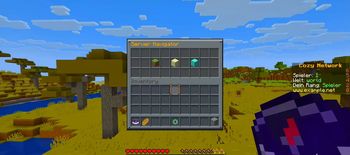
  • 🖥️ Server Selector — Fully configurable GUI navigator with BungeeCord & Velocity support
  • 📢 Join & Quit Messages — Custom messages with MiniMessage support
  • 🎬 Join Title & Actionbar — Welcome players with a custom title screen
  • 🌟 First Join Handling — Special message, starter kit and effects for new players
  • 🛡️ Hub Protection — Disable PvP, damage, block breaking, hunger and item dropping
  • ✈️ Hub Fly — Let players fly freely in your lobby
  • 🎮 Hotbar Manager — Assign actions to hotbar items (open GUI, toggle visibility, connect server)
  • 📋 GUI Navigator — Fully configurable chest GUI for server selection
  • 📊 Sidebar / Scoreboard — Animated sidebar with PlaceholderAPI support
  • 👥 Tab List — Custom header & footer with placeholders
  • 🎆 Join Firework & Sound — Configurable join effects
  • ⬆️ Double Jump — Let players double jump with particles and sounds
  • 👁️ Visibility Toggle — Hide/show other players with one click

Requirements

Dependency Required
Paper / Folia 1.21+ ✅ Yes
PlaceholderAPI ❌ Optional

Commands

Command Description Permission
/hub Teleport to spawn cozyhub.use
/hub setspawn Set the spawn cozyhub.setspawn
/hub reload Reload config cozyhub.admin
/vis Toggle player visibility cozyhub.visibility

Configuration

CozyHub is fully configurable via config.yml and messages.yml. Every feature can be individually toggled.

Support & Links

Discord
GitHub
Wiki


👥 Team & Contributors

No authors recorded.

⚙️ Compatibility

Environment
🖥️ Server-side
Loaders
foliapaper
Minecraft Versions
1.211.21.11.21.21.21.31.21.41.21.51.21.61.21.7+4 more

🔗 Links

Modrinth Page